Clay vs ZoomInfo: The Operational Reality G2 Reviews Ignore
G2 ratings are incomplete for GTM tools. Clay beats ZoomInfo on support, but both hide enrichment failures and sync errors that destroy your pipeline daily.
By Ronan Leonard, Founder, Intelligent Resourcing
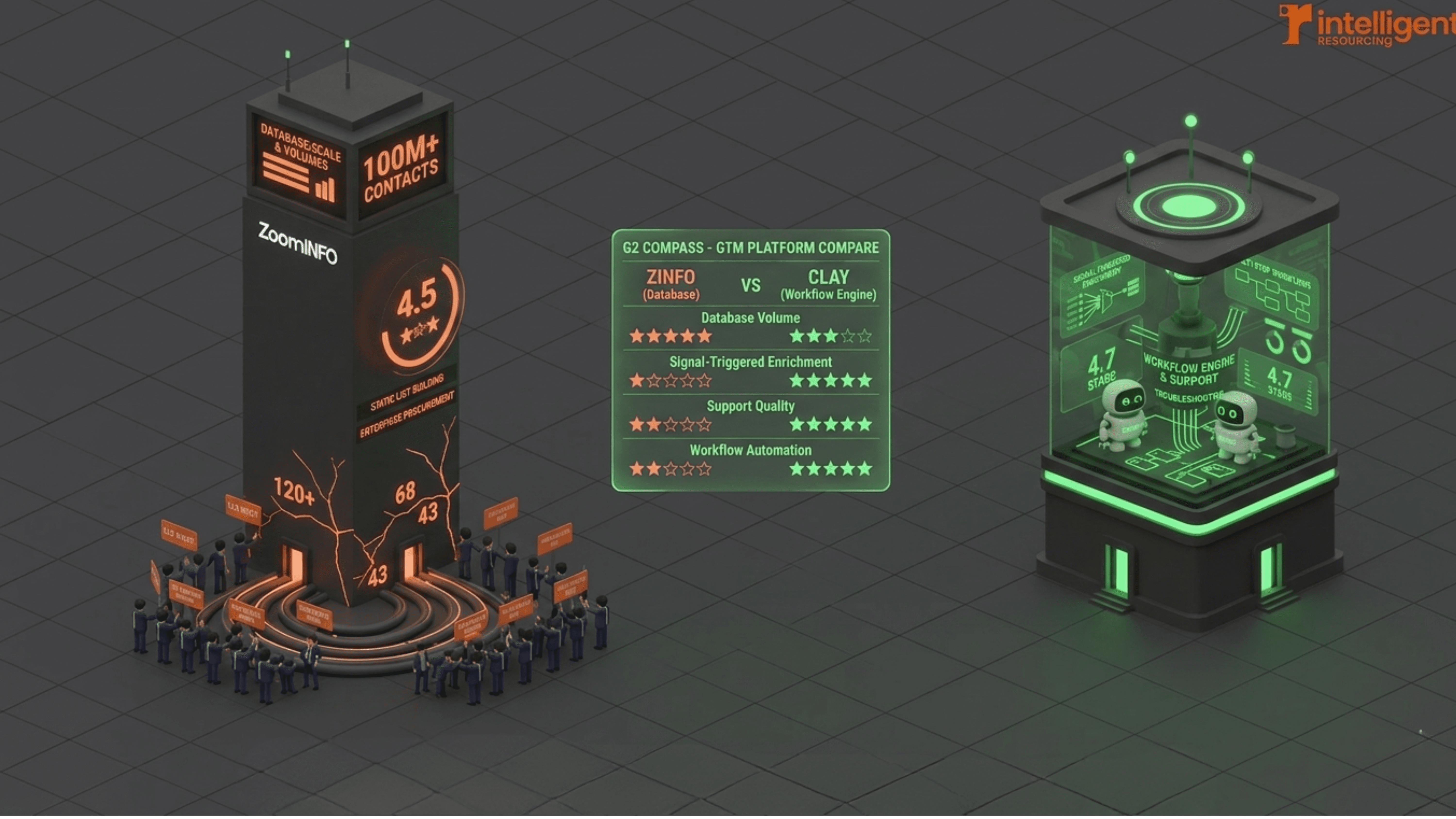
Late-stage GTM buyers use G2 to compare Clay and ZoomInfo for fast third-party proof. Clay is stronger for support, workflow troubleshooting and signal-triggered enrichment. ZoomInfo is stronger for static list-building, contact database scale and enterprise procurement. G2 helps compare sentiment, but the right choice depends on whether you need a database or workflow engine.
Clay leads G2 on support quality: As of April 2026, Clay scores 9.6 for Quality of Support versus ZoomInfo Sales at 8.6, reflecting faster and more hands-on troubleshooting for GTM-specific issues.
ZoomInfo suits static prospecting and enterprise procurement: For one-off list-building, large US contact volumes, and bundled contract structures, ZoomInfo's G2 profile aligns with the use case.
Clay suits signal-driven outbound: For enrichment workflows triggered by live signals, multi-tool integrations, and automated sequences, Clay's architecture and support model match the requirement.
G2 reviews miss execution risk: Silent enrichment failures, CRM sync errors, and duplicate record accumulation rarely surface in G2 ratings. These issues define pipeline health in live GTM systems.
Support speed is a revenue function: When workflow failure means missed pipeline, a 9.6 versus 8.6 support gap translates to faster recovery under real execution conditions.
Scenario | Clay | ZoomInfo Sales |
G2 Quality of Support (April 2026) | 9.6 / 10 | 8.6 / 10 |
Support model | Direct troubleshooting, workflow-specific escalation, fast response | Ticket-based, documentation-first, longer resolution cycle |
Initial ease of use | Technical setup requires RevOps investment upfront | Familiar UI; fast for one-off searches and list exports |
Scalability for automated workflows | Built for conditional logic, signal routing, and verification gates | Becomes rigid as workflow complexity grows; external tools required |
Signal-triggered enrichment | Native capability; multi-source, API-based enrichment | Requires external integration for non-standard enrichment logic |
Steelman: large US database, enterprise procurement, dedicated internal ops team | Credit-based model adds friction for static list use cases | Better fit: bundled contracts, scale contact data, and enterprise procurement process match |
Choosing a GTM tool based on G2 star ratings alone is not the lowest-risk approach for teams where outbound sequences drive pipeline. However, for GTM teams managing signal-triggered enrichment, CRM sync, and multi-step automation, a systems-level evaluation reveals what reviews cannot: enrichment failure rates, sync error frequency, and the support response speed when a workflow breaks mid-campaign. This is the analysis that prevents the costly re-platforming cycles that G2 ratings, by their nature, were never designed to predict.
Why Do Late-Stage GTM Buyers Use G2 to Compare their Support?
Late-stage GTM buyers use G2 to compare these two, because review platforms provide social proof at the moment decision fatigue is highest. 6sense's 2024 B2B Buyer Experience Report found that B2B buyers are nearly 70% through their purchasing decision before engaging with any seller, so G2 becomes the primary reference during the self-directed research phase.
G2 provides star ratings, user comments, and category scores including ease of use, quality of support, and likelihood to recommend. These scores offer directional signals. Clay scores 9.6 for Quality of Support versus ZoomInfo Sales at 8.6 on G2 as of April 2026. That 1-point gap reflects a real structural difference: one provides direct workflow troubleshooting, and the other routes issues through a documentation-first ticket process.
The limitation is scope and not accuracy. G2 reviews are written shortly after initial use or during a specific workflow phase. A reviewer who praises ZoomInfo's list-building interface during onboarding may not have encountered CRM sync failures at month three. A Clay reviewer who notes a steep learning curve may not have used the platform after initial setup, when automation significantly reduces manual effort. G2 captures satisfaction at a moment, but it does not capture operational reliability across a GTM system.
6sense's 2024 Buyer Experience Report found that buyers establish their purchase requirements before engaging sellers 85% of the time. The mental model formed during the G2 research phase tends to persist into the final decision. Accurate interpretation of G2 data, not a higher star rating, is therefore the more valuable skill for late-stage GTM tool selection. For a deeper comparison of how these two tools perform across GTM signal workflows, see Clay vs ZoomInfo for GTM Signals and Workflows.
How Do Clay and ZoomInfo Compare on Ease of Use for GTM Teams?
ZoomInfo is faster to set up for simple list-building tasks, with a familiar interface suited to SDRs running one-off contact searches. Clay requires greater upfront technical investment but scales well for signal-triggered enrichment and automated workflows. G2's comparison data shows ZoomInfo scores higher on initial ease of use, while Clay scores higher on meeting business requirements for teams running workflow-heavy outbound.
ZoomInfo usability
Its G2 reviewers describe an interface optimised for speed at the top of the funnel. SDRs building contact lists for outbound campaigns report fast search results, intuitive filters, and straightforward exports to CRM. The ease-of-use profile holds well for this specific task.
The constraint surfaces when workflows expand. Reviewers note that navigation becomes less intuitive when teams add intent data modules or attempt custom enrichment logic outside core prospecting. Its architecture requires external tooling or internal ops resources to extend. It is best fit for buyers who do not need that extension.
Clay usability
Its G2 reviews show a consistent pattern: steeper initial setup, followed by strong workflow control once the enrichment logic is configured. RevOps leaders and GTM engineers describe the visual logic builder as well-suited to conditional enrichment, signal routing, and multi-source data operations. The payoff for the upfront investment is a platform that scales with workflow complexity rather than against it. Intelligent Resourcing's Clay lead enrichment workflow guide covers the configuration steps that move teams past the setup phase quickly.
Teams without a RevOps owner or GTM engineer describe its setup as demanding. For those teams, ZoomInfo's faster onboarding is an advantage.
Ease at first use does not equal ease at scale. For teams where outbound has moved from one-off prospecting to orchestrated, signal-driven sequences, ease of scale is the relevant measure. It is built for that transition.
Which Tool Has Better Support Responsiveness According to G2?
Clay scores 9.6 for Quality of Support on G2 against ZoomInfo Sales at 8.6, as of April 2026. Clay's support model is direct: product and success teams engage on specific workflow problems. ZoomInfo uses a ticket-based model with documentation-first escalation, better suited to organisations with internal ops headcount to manage resolution cycles.
ZoomInfo support
ZoomInfo's G2 reviewers describe a support model built for enterprise scale. Tickets are logged, escalated through tiers, and resolved through documented channels. For a large B2B organisation with dedicated ops staff managing ZoomInfo integrations, this process works. Resolution cycles are longer than Clay's, but internal headcount absorbs that time cost.
The difficulty surfaces for lean GTM teams. RevOps owners running ZoomInfo without dedicated support staff report that non-standard GTM problems, such as intent data sync errors or custom CRM field mapping, require multiple escalations before reaching someone with the technical knowledge to resolve them. That delay costs pipeline when it occurs mid-campaign.
Clay support
Its support reviewers describe a different model. Product and success teams engage directly on workflow problems, providing context-aware troubleshooting rather than directing teams toward help centre articles. Reviewers report fast resolution for enrichment failures, CRM sync errors, and API issues. This reflects its RevOps-native design: the support team understands signal routing and enrichment logic because the platform was built for those use cases.
Why support speed matters in signal-driven GTM
In workflows where a contact enrichment failure stops a sequence, or a CRM sync error creates duplicate records, every hour without resolution is a pipeline that does not progress. Their Quality of Support score reflects a model where GTM-specific problems receive GTM-competent responses.
What Do G2 Reviews Miss About Workflow Reliability in Live GTM Systems?
G2 reviews capture satisfaction at the point of writing, not workflow performance under months of daily use. The execution failures that define GTM pipeline health, including silent enrichment misses, CRM duplicate accumulation, and sequence misfires from trigger errors, rarely appear in star ratings because reviewers do not connect these failures to the platform when writing shortly after onboarding.
G2's own review documentation shows that reviews are weighted across four decay periods: 0 to 90 days, 90 days to 12 months, 12 to 24 months, and 24 to 48 months. Older reviews carry progressively less weight in scoring calculations. This means the G2 scores buyers see reflect recent onboarding experiences most heavily, not the operational picture that emerges after months of daily use.
By month four or five of daily enrichment workflows, these issues become measurable. A contact enrichment that returns no result without flagging the failure means a lead enters a sequence with missing data. A CRM sync error that creates duplicate records means sales teams work the same contact twice. These problems do not affect a G2 review written at onboarding. They affect pipeline.
IR experience
When Intelligent Resourcing implements Clay for signal-driven outbound programmes, the first audit focus is verification gate architecture. In the first month of its new implementation, we consistently observe between 8 and 14 per cent of enrichment attempts returning incomplete data. Without explicit verification gates before CRM sync, those incomplete records enter the pipeline undetected. Clay's support team is fast to help configure these gates. That responsiveness is what the 9.6 Quality of Support score reflects in practice, not just first-impression satisfaction. For the full architecture behind reliable Clay GTM workflows.
How to extract execution-relevant signal from G2
RevOps-authored reviews are more reliable than SDR-authored reviews for evaluating workflow stability. RevOps reviewers manage the full stack: enrichment logic, CRM routing, and error handling. Their reviews are more likely to reference sync issues, manual workarounds, and workflow failure rates. G2 filters allow buyers to sort by reviewer role. This is the most effective method for extracting execution-relevant signal from a platform built for general user sentiment.
When Does ZoomInfo Outperform Clay Based on G2 Evidence?
ZoomInfo is the stronger choice for GTM teams focused on static list-building, large US contact volume, and enterprise procurement processes. G2 reviewers from enterprise sales organisations consistently rate ZoomInfo's database scale, intent data overlays, and familiar interface as advantages when the core workflow is one-off prospecting rather than automated signal routing.
Static list-building at scale
For SDR teams running high-volume outbound from pre-built contact lists, ZoomInfo's database scale and search speed are clear advantages. It holds a larger US contact database than Clay and returns results faster for simple filters. For this task, its credit-based enrichment model adds unnecessary friction and cost.
Enterprise procurement structures
Large organisations with centralised procurement require bundled SaaS contracts, established vendor relationships, and predictable annual costs. ZoomInfo's contract structure is built for this environment. Clay's consumption-based credit model is less predictable at enterprise budget-cycle scale. For a detailed cost comparison across both platforms, see Clay vs ZoomInfo Pricing in 2026.
Dedicated ops teams managing integrations
For organisations with internal RevOps staff whose role includes managing CRM integrations, data hygiene, and sync monitoring, ZoomInfo's ticket-based support is workable. The team absorbs the resolution delay internally. The support model becomes a genuine risk only when that internal resource does not exist.
Choosing it in these three scenarios is not a compromise. It is the correct decision. G2 reviewers in these contexts rate ZoomInfo well because it delivers well for their specific use case. The distinction matters because those use cases are bounded: static lists, enterprise procurement, dedicated ops. When those conditions change, the tool fit changes with them.
When Does Clay Outperform ZoomInfo Based on G2 Evidence?
It outperforms ZoomInfo for GTM teams running signal-triggered enrichment, multi-tool outbound orchestration, or automated sequences where workflow logic determines which contacts enter which sequences. G2 reviewers from RevOps and GTM engineering backgrounds consistently cite Clay's support responsiveness and workflow adaptability as the deciding factors when these capabilities are the requirement.
Signal-triggered enrichment workflows
For outbound programmes triggered by live signals, including job changes, funding events, or technology stack updates, Clay's enrichment architecture is built for conditional routing. When a contact signal fires, it enriches the record, validates the data, and routes it to the correct sequence without manual intervention. ZoomInfo does not support this natively. External tooling is required, which increases operational complexity and creates additional points of failure. For teams building signal-based selling into their outbound motion, Clay is the infrastructure layer that makes it executable.
Multi-tool GTM orchestration
Clay connects to a wide range of data providers, CRM platforms, and outbound tools through API-based integrations. For revenue teams running this tool alongside n8n, HubSpot, or Salesforce, the ability to build custom enrichment logic across multiple sources is the core value. G2 reviewers who manage complex multi-tool stacks consistently cite its flexibility as the reason they chose it over ZoomInfo. The breadth of integrations reduces the need for manual data movement between tools.
Verified Buying Window identification
For GTM teams using Intelligent Resourcing's signal-led approach, Clay provides the enrichment infrastructure to identify contacts who have entered a Verified Buying Window, the period when a prospect's role, budget, and technology signals indicate active evaluation. ZoomInfo's static database approach does not capture these dynamic signals in real time. Its API-based enrichment model pulls live data at the point of signal, not from a database snapshot.
Why support score matters most in this profile
When live signals trigger automated enrichment and sequence routing, a workflow failure affects the pipeline immediately. The 9.6 Quality of Support score Clay holds on G2 reflects support that resolves those failures fast. For GTM teams where enrichment underlies every stage of the outbound sequence, support speed is not a secondary consideration. It is the risk mitigation factor that determines whether signal-driven GTM delivers a consistent pipeline.
FAQs:
Are G2 reviews reliable for comparing these two tools ?
G2 reviews are reliable for user sentiment and first-impression usability. They are not reliable for assessing workflow stability, enrichment failure rates, or long-term CRM sync performance. These execution risks emerge after 90 or more days of daily use and rarely appear in G2 ratings. Buyers should read RevOps-authored reviews and look specifically for mentions of sync errors or manual workarounds.
Is ZoomInfo easier to use than Clay?
It is faster to set up for simple list-building tasks. The other one requires greater upfront technical investment. For GTM teams that need signal-triggered enrichment, multi-tool integration, and automated workflow logic, Clay is easier to operate at scale because it was built for those use cases. Ease at initial setup and ease of operating at scale are different measures.
When should a GTM team choose ZoomInfo over Clay?
ZoomInfo is the better choice for GTM teams focused on static list-building at enterprise scale, organisations with centralised procurement requiring bundled annual contracts, and teams with dedicated internal RevOps staff who manage CRM integrations and data hygiene. In these scenarios, ZoomInfo's database scale and procurement structure are advantages, not limitations.
How should a GTM team evaluate Clay and ZoomInfo beyond G2 ratings?
Evaluate workflow stability by asking vendors how enrichment failures are flagged and how CRM sync errors are caught before they reach the pipeline. Request examples of support resolution time for workflow-specific problems. Assess the support model against your team structure: without dedicated ops headcount, a ticket-based support model adds risk. G2 ratings are the starting point. Workflow resilience is the evaluation that follows.