Traditional email marketing has often relied on date-based drip campaigns, where emails are sent at fixed intervals, regardless of a lead's actual interest or readiness to purchase. While this approach works to an extent, it doesn't account for the unique behaviours and interactions of individual leads. Today, signal-based email automation is the smarter approach, leveraging customer behaviour such as website visits, email opens, and past purchases to trigger highly personalised, timely email workflows.
In this article, we'll explore how to move beyond generic, date-based email strategies and implement buyer signal-driven automation using tools like Clay, HubSpot, and CRM systems. We'll provide actionable strategies to help create more relevant, engaging, and effective email campaigns that improve conversions and build stronger customer relationships.
Why Signal-Based Automation is Better
Unlike traditional drip campaigns that treat all leads the same, signal-based email marketing focuses on individual behaviours and triggers. By responding to intent signals (such as interactions with specific content, form submissions, or abandoned carts), you can automate emails that feel more personalised, relevant, and timely. This approach not only boosts engagement but also nurtures leads through the buyer's journey with precision.
According to recent industry data, automated campaigns demonstrate 2,361% higher conversion rates than traditional campaigns. Furthermore, automated emails generate 320% more revenue than non-automated emails, despite accounting for only 2% of email volume. These statistics clearly demonstrate why businesses are shifting towards signal-based automation.
Signal-based automation also allows you to leverage platforms like Clay, HubSpot, and CRM systems to personalise email content based on customer data. By syncing buyer signals with your email workflows, you can ensure that your communications align with each lead's interests and actions, resulting in better outcomes.
1. Intent-Triggered Sequences
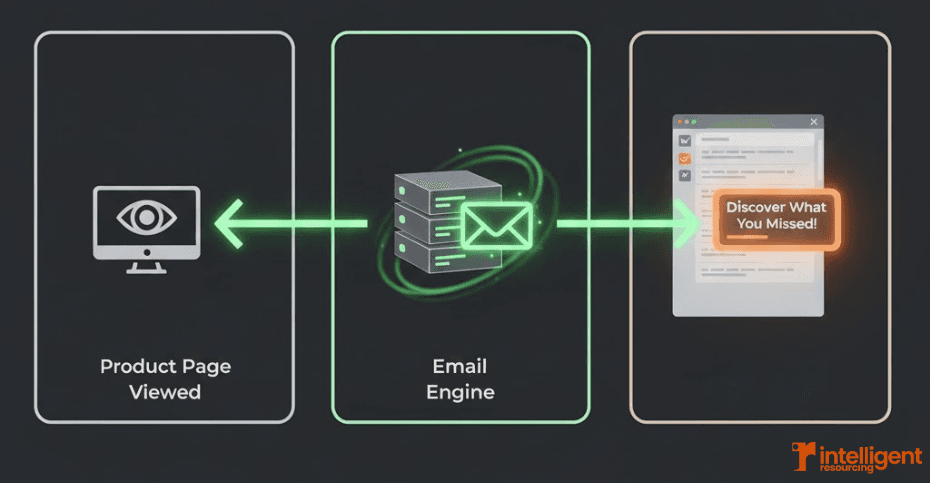
Intent signals are specific actions that indicate a lead’s interest or readiness to make a purchase. These include product page views, demo requests, content downloads, or even abandoned shopping carts. Intent-triggered email sequences ensure that emails are sent at the right time, based on what the lead is actively engaging with.
Key Points
What Are Intent Signals?
Intent signals are behavioural cues that suggest a lead is actively considering your product or service. These signals can be:
Product page views (e.g., someone looking at a specific product for an extended period).
Abandoned cart (when a lead adds items to their cart but doesn’t complete the purchase).
Demo requests (a lead asks to schedule a demo or consultation).
Content downloads (when a lead downloads a whitepaper or eBook).
Research shows that abandoned cart emails have an open rate of 50.5%, which is 15% higher than other marketing emails. This demonstrates the power of responding to specific intent signals.
Creating Intent-Triggered Workflows
Once a lead triggers a specific intent signal, an email workflow can be activated. For example, when a lead visits a product pricing page, a personalised email could be sent offering a free consultation or discount.
Using platforms like HubSpot and Clay, you can design workflows where emails are automatically sent based on these behaviours. GTM engineers can help build sophisticated signal-based marketing workflows that capture these critical moments.
Example Workflow:
Lead Action: A lead visits the pricing page on your website.
Trigger: This signal is captured by HubSpot or Clay, and a workflow is initiated.
Action: A personalised email offering a product demo or case study is sent to the lead, encouraging them to take the next step.
2. Clay-Based Email Flows
Clay allows you to build sophisticated email workflows triggered by user behaviour. Its integration with CRM systems like HubSpot and other marketing tools enables highly personalised email campaigns based on detailed customer data and interactions.
Key Points
Overview of Clay’s Automation Features
Clay’s automation capabilities enable marketers to create dynamic email flows based on real-time signals from customer behaviour and CRM data. By integrating Clay with your CRM, you can send personalised follow-up emails that are contextually relevant to each lead’s activity on your website, interactions with previous content, or stage in the sales funnel.
Email Flow Customisation
Clay allows you to segment your email list automatically based on buyer behaviour, creating targeted groups for follow-up. The tool also enriches customer profiles with real-time data, ensuring that every email is hyper-personalised.
Example Workflow:
Lead Action: A lead engages with a blog post about a specific product category.
Trigger: The behaviour is captured by Clay, and the lead is automatically added to a segmented email list.
Action: A series of personalised emails is sent, each highlighting different aspects of the product category the lead is interested in.
Studies indicate that 39% of email marketing professionals believe AI-driven hyperpersonalisation will have the biggest effect on email automation campaigns in the coming years.
3. Personalisation Based on CRM Signals
CRM systems like HubSpot capture valuable customer data, including past purchases, interactions, and lifecycle stages. Using this data for personalisation in email workflows takes email marketing beyond basic segmentation, allowing you to tailor content to specific customer profiles.
Key Points
Leveraging CRM Data
By integrating CRM data into your email automation, you can create dynamic email content based on customer history. For example, if a lead has purchased from you in the past, an email offering complementary products or a loyalty discount can be triggered automatically.
Dynamic Personalisation
Dynamic personalisation uses CRM data to customise not only the content of the email but also the timing and offer. You can personalise emails based on factors such as:
Past purchases (e.g., offering an upgrade or complementary product)
Lead status (e.g., new customer vs. long-time lead).
Job title (e.g., a VP of Marketing might receive different content than a marketing assistant).
Research shows that 71% of consumers expect personalised interactions from brands, and 76% get frustrated when their brand interactions aren't personalised to their interests.
Example Workflow:
Lead Action: A customer purchases a product from your website.
Trigger: Data from HubSpot indicates this purchase.
Action: A follow-up email is sent offering a discount on related products based on their purchase history.
Research shows that 71% of consumers expect personalised interactions from brands, and 76% get frustrated when their brand interactions aren't personalised to their interests.
Why Signal-Based Email Marketing Outperforms Traditional Drip Campaigns
Signal-based email marketing represents a strategic shift away from traditional, date-based drip campaigns. By leveraging buyer signals, such as website visits, email opens, and past purchases, you can create personalised, timely, and relevant email workflows that resonate with your audience and drive conversions. Tools like Clay, HubSpot, and CRM systems allow you to automate this process efficiently, saving time while improving engagement.
According to Forrester's 2023 B2B Revenue Marketing Wave, 78% of high-performing marketing teams prioritise real-time personalisation based on live signals. Tools like Clay, HubSpot, and CRM systems allow you to automate this process efficiently, saving time while improving engagement.
Stop Sending Emails Based on Calendar Dates. Start Responding to Buyer Behavior.
Schedule your free workflow audit to discover which buyer signals you're currently missing and how automated email flows can lift engagement and conversions. View our pricing plans or explore signal-based marketing tools to see how the right stack turns behavioral data into timely, relevant email automation.
Frequently Asked Questions
What are signal-based email marketing workflows?
Signal-based email marketing workflows are triggered by customer behaviours (such as interactions with content, emails, or website pages) that indicate buyer interest or intent. These workflows ensure emails are sent at the right time, based on the lead's actions. Learn more about signal-based marketing.How do I use buyer signals to personalise email marketing?
You can use tools like Clay and HubSpot to capture buyer signals and automate email sequences based on these signals. For instance, if a lead visits a product page or abandons a cart, an automated email can be sent offering a special promotion.What is the role of CRM data in email personalisation?
CRM data provides deeper insights into a lead's behaviour, purchase history, and lifecycle stage. By integrating CRM data into email workflows, you can send personalised emails that are highly relevant to each lead, improving engagement and conversion rates. GTM engineering services can help set up these integrations.How can I implement these email workflows in my marketing system?
Start by integrating Clay and HubSpot with your CRM to capture real-time data and create automated workflows. Build intent-triggered email sequences and use CRM data to dynamically personalise email content based on customer actions. Consider working with specialists in offshore resourcing to scale your team's capacity to manage these systems.
Related Resources & Further Reading
Which Signal-Based Marketing Tools Do We Actually Need and Why? – Essential platform guide for detection, enrichment, and orchestration in email automation systems.
What Tools Do I Need For Signal Based Marketing – Comprehensive breakdown of automation platforms, analytics engines, and CRM systems for intent-triggered emails.
Which GTM Engineering Tools Should You Actually Invest In – Tool stack recommendations for building scalable email automation workflows.