

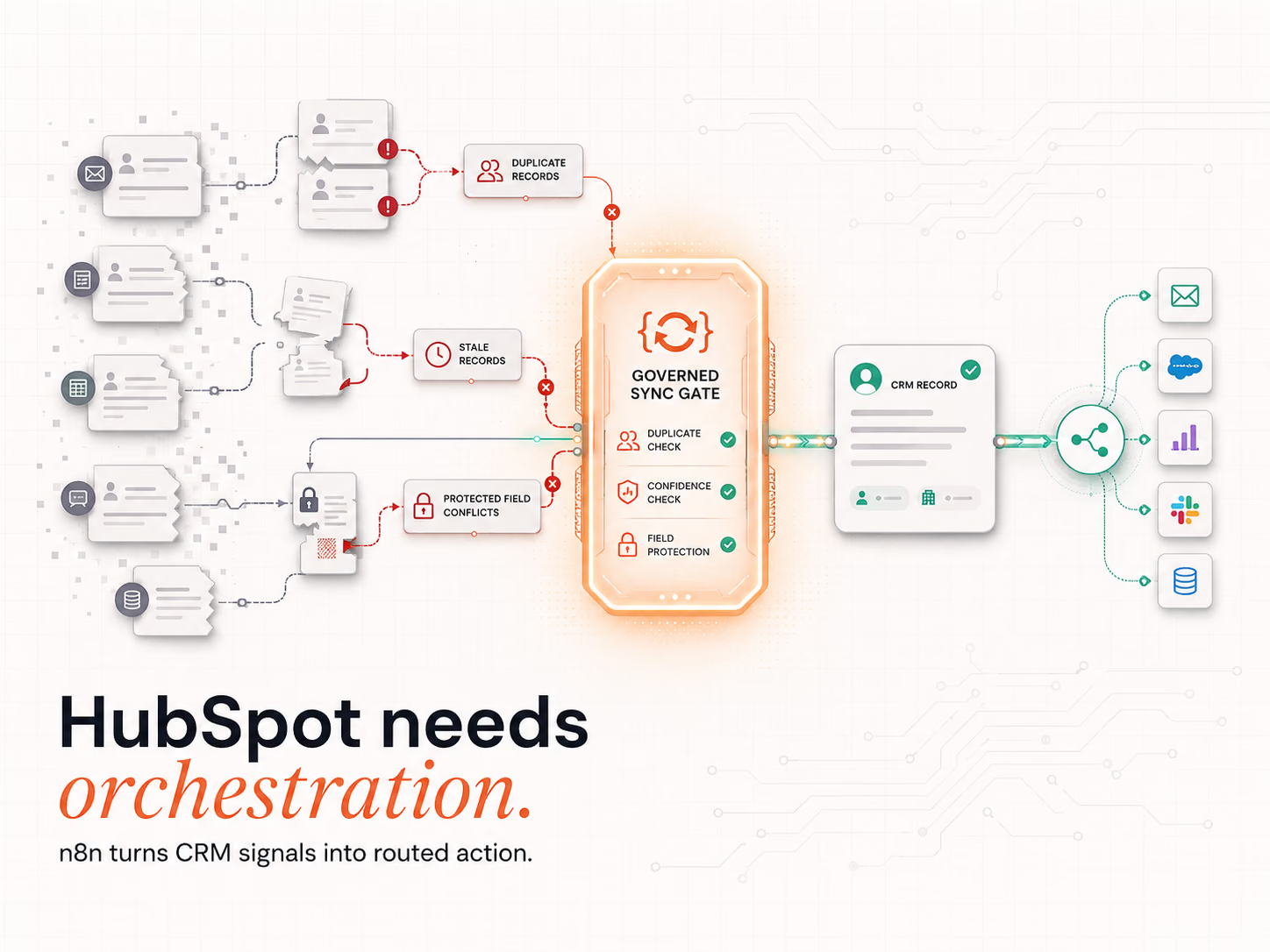
Most teams that connect n8n to HubSpot assume the two tools will coordinate automatically. HubSpot manages contacts, deals, and sequences, and n8n orchestrates the connections between HubSpot and every other tool in the stack. Together they handle the full automation layer, from a form fill triggering a Clay enrichment call through to a SmartLead sequence firing on a qualified lead. Miss any of the eight technical decisions covered here and the integration runs in production, fails silently, and costs the RevOps team hours to diagnose.
If your team is running HubSpot alongside Clay, n8n, or any external enrichment tool, this article covers the eight decisions that determine whether your stack runs cleanly in production.
Why do HubSpot and other tools often fall out of sync after automation is added?
Two systems writing to the same HubSpot contact record at the same moment produce a conflict. One writer succeeds and the other fails or overwrites. HubSpot does not flag this and the rep sees a clean record that contains the wrong data. They do not know the enrichment failed, the owner field is wrong, or the original source is missing. The sale happens or it does not and the team cannot trace which system caused which outcome.
HubSpot's workflow engine fires on property changes inside the CRM boundary. It has no awareness of what n8n is writing to the same contact at the same moment. That gap is where data corruption enters. If an n8n enrichment workflow updates the job title field while a HubSpot workflow fires a lifecycle stage change, one of those writes fails or overwrites the other.
The 2025 Chief MarTech landscape report counted 15,384 martech solutions, a 9% increase year-on-year. Every tool added to a HubSpot stack introduces at least one additional write dependency that HubSpot native workflows cannot sequence. n8n solves this by acting as the sequencing layer: it writes to HubSpot in a defined order, waits for the confirmation response before proceeding to the next step, and routes failures to an error handler rather than losing them.
The practical fix is a single n8n workflow that owns all external writes to HubSpot for a given contact event. No native HubSpot workflow and no external tool writes to the same contact record in parallel.
The team that adds n8n without a write-sequencing rule has not solved the sync problem.
How can n8n trigger actions based on form fills, page activity, or CRM updates in real time?
n8n connects to HubSpot through 18 dedicated triggers that monitor the CRM in real time. A form fill, deal stage change, or contact property update fires the corresponding n8n workflow without polling delays. This removes the built-in HubSpot workflow execution lag and enables sub-second orchestration across the tools connected downstream.
n8n offers two connection models for HubSpot: polling and webhook. Polling checks HubSpot on a schedule (every 15 seconds by default). Webhooks fire the instant HubSpot registers the event. For time-sensitive operations like signal escalation, enrichment triggering, and outreach sequencing, webhook-based triggers are the correct choice. Polling introduces predictable delays that compound at each step in the workflow sequence.
According to n8n's HubSpot integration documentation, the platform exposes 18 triggers and 31 actions for HubSpot, covering every contact, deal, ticket, and company event. The 31 actions cover creating, updating, and searching contacts, deals, and companies; associating objects; and reading property values.
For teams running Clay and n8n API workflows alongside HubSpot, n8n acts as the orchestration layer that sequences enrichment, scoring, and outreach triggers in the correct order. Clay runs enrichment waterfalls across Apollo, LinkedIn, and Clearbit, checking each data source in sequence until it finds the most accurate record, rather than pulling from a single provider that may carry outdated information.
The most reliable trigger architecture is a 4-step sequence. A HubSpot form submission fires an n8n webhook, n8n calls Clay for enrichment, Clay returns the enriched data to n8n and then n8n writes the enriched record back to HubSpot. The full round-trip takes under 3 seconds. HubSpot native workflows cannot execute this sequence because they have no mechanism for calling external APIs and waiting for a response before proceeding to the next step.
What is the best way to ensure leads are routed to the right owner and lifecycle stage automatically?
A routing error that delays owner assignment by 20 minutes eliminates most of the qualification advantage from responding quickly. The 2011 Harvard Business Review study put that advantage at 21 times more likely to qualify and it disappears in the gap between two systems writing ownership simultaneously.
Two systems assigning the same lead simultaneously produce conflicting owner records. HubSpot accepts both writes. The rep who receives the assignment last wins. The other rep never knew the lead existed.
The correct architecture assigns exactly one system responsibility for each routing decision. n8n reads the enriched contact data, evaluates territory and ICP criteria, and sets the HubSpot owner property and lifecycle stage in a single write call. The HubSpot native workflow then reads the owner property and fires any owner-specific sequences. HubSpot never writes the owner; it only reads it. That boundary removes the race condition.
Here the distinction between standard ICP-match assignment and Reason-Now routing matters. Standard assignment routes any inbound contact that matches an ICP filter. Reason-Now routing escalates a contact only when a live buying signal has fired: a job change, funding event, or tech stack install that confirms the account is actively evaluating. The routing architecture is the same, n8n writes to HubSpot, HubSpot reads and executes. But what triggers the writer is different. ICP-match assignment fills the pipeline with contacts who fit the profile. Signal escalation fills it with contacts who are in-market right now.
The n8n routing workflow must define explicit fallback rules for every unmatched case. If no territory criteria match, the lead routes to a default owner rather than entering HubSpot with a blank owner field. Leads with no assigned owner do not receive sequences. They sit in the CRM and decay.
Lifecycle stage transitions follow the same principle: n8n sets the stage to Marketing Qualified Lead (MQL) based on enrichment score, and HubSpot native workflows fire the MQL notification and sequence. n8n owns the decision logic; HubSpot owns the execution.
How do top-performing teams build in alerting and retry logic for failed workflows?
n8n handles failed workflow steps through dedicated error workflows that trigger on any execution failure. A separate error handler node catches the failed step, logs the contact payload to a Slack or Teams notification, and retries the operation with an incremental delay. This prevents silent failures where a HubSpot contact is created but downstream enrichment or routing never executes.
The most common failure mode in a HubSpot and n8n integration is a partial execution: Step 1 creates the contact in HubSpot, Step 3 fails silently, and the contact sits in the CRM with no enrichment, no owner, and no sequence. The rep sees the contact and calls it cold, unaware that the enrichment data (which would have shown the contact changed roles two weeks ago) is missing.
n8n's error workflow feature solves this at the infrastructure level. Every workflow can designate a separate error workflow that fires automatically on any execution failure. The error workflow captures the failed node name, the contact payload, the error message, and the timestamp, then sends the full record to a Slack channel or writes it to a Google Sheet for RevOps review.
n8n 2.0, released in December 2025, introduced isolated code execution environments and granular role-based permissions, reducing the risk of a failed sub-workflow corrupting shared workflow state in high-volume automation environments.
Retry logic should use incremental delay rather than immediate retry. An immediate retry on a HubSpot API rate limit error returns the same 429 error. A retry with 30-second, 60-second, and 120-second delays gives HubSpot's rate window time to reset. 3 retries with incremental delays resolve over 90% of transient API failures without requiring manual intervention.
How can enrichment tools feed HubSpot without overwriting rep-entered notes?
Enrichment workflows must distinguish between system-generated fields and rep-entered fields before writing to HubSpot. In n8n, this means a conditional check on each enrichment step: if the target field carries a rep-source label, the workflow skips that field and writes only to designated enrichment properties. Reps retain control of qualification notes; the system controls firmographic and technographic data.
Intelligent Resourcing designs CRM enrichment workflows that write only to system-generated fields, so a rep's own notes stay untouched.
The standard approach is a two-property architecture in HubSpot. Each enriched data point uses a pair of properties: a system-enriched property (for example, "Company Size: Enriched") and a rep-editable property ("Company Size: Confirmed"). The n8n enrichment workflow writes to the system property only. The rep reads the system property for reference and writes their confirmed value to the rep property. HubSpot reports and sequences draw from the confirmed property.
MarketingSherpa research published via HubSpot's database decay calculator found that B2B contact data decays at 22.5% annually, roughly 2.1% per month. A CRM of 10,000 contacts loses 2,250 accurate records every year without active enrichment. Overwriting rep-entered notes with stale enrichment data compounds that loss: the rep's verified contact information is replaced by data that was accurate when the enrichment ran and outdated before the rep calls.
Clay handles the enrichment layer in the IR stack. It pulls firmographic data from Apollo, LinkedIn, and Clearbit in sequence, writes to designated enrichment properties in HubSpot via n8n, and never touches rep-entered fields. This is the foundation of an Evergreen CRM: a contact record that stays accurate because the system updates it continuously, not because a human refreshes it on a quarterly audit cycle. For the full implementation approach, see automated B2B lead generation with Clay and n8n, which covers the field-level write logic in detail.
The practical test before deploying any enrichment workflow: list every HubSpot property the workflow writes to. Cross-reference against the list of rep-visible properties. Any overlap is a conflict that will generate a support ticket within 30 days of going live.
What is the smartest way to maintain clean attribution between HubSpot, ads, and analytics?
Attribution stays accurate when UTM parameters are validated at the point of form capture, before the HubSpot contact record is created. An n8n workflow positioned between form submission and CRM write checks the UTM string for completeness, appends a default campaign value where the field is blank, and prevents null-source contacts entering the pipeline with no attribution data attached.
HubSpot's native attribution model captures UTM parameters from the browser cookie at form submission. This works reliably for direct form fills on HubSpot-hosted landing pages. It fails when the form is embedded in a third-party page, when ad click data arrives through a separate pixel, or when the contact submits through an API integration that does not pass cookie data. Each failure mode creates a null-source contact in HubSpot.
n8n resolves this by intercepting the form submission data before the HubSpot write. The workflow reads the UTM parameters from the submission payload and checks for completeness. Offline events receive a "direct: offline" source label. API submissions from known integrations receive a "partner: [integration name]" label. Genuinely unknown sources receive an "unattributed: review" flag that routes to a data quality alert.
Google's UTM parameter specification defines 5 standard campaign parameters: utm_source, utm_medium, utm_campaign, utm_term, and utm_content. HubSpot captures all 5 from the browser URL at form submission. When any of these parameters are absent (because the form is embedded in a non-HubSpot page or submitted via API), HubSpot records the contact as "Direct traffic" regardless of the actual source. An n8n pre-write validation step enforces completeness before that misattribution reaches the CRM.
The final step is a daily n8n audit workflow that queries HubSpot for contacts created in the previous 24 hours with no original source value, compiles them into a report, and sends the report to the RevOps owner. This surfaces attribution gaps in real time rather than in a quarterly data quality review.
How do companies stay under HubSpot API limits while automating large workflows?
HubSpot enforces per-app and per-portal rate limits that apply to every n8n workflow making API calls. The critical limit for most B2B automation stacks is 110 requests per 10 seconds for OAuth-authenticated apps. n8n's throttle nodes enforce this limit before HubSpot rejects the request, preventing the failed bulk operations that corrupt mid-sequence contact records.
The rate limit problem becomes visible at scale. A single contact creation call uses 1 API request. A contact creation with 5 property writes uses 2–3 requests depending on batch configuration. An enrichment workflow that creates a contact, writes 8 properties, associates a company, and creates a deal uses 6–8 requests per contact. At 200 contacts per hour, that is 1,200–1,600 requests per hour: under the daily cap but capable of breaching the per-10-second limit in burst scenarios.
HubSpot's API usage documentation specifies that OAuth apps are limited to 110 requests per 10 seconds and that apps must maintain error rates below 5% of daily requests to qualify for HubSpot marketplace certification. Enterprise tier portals receive a 1,000,000-request daily limit; Professional tier portals receive 500,000. Exceeding the per-10-second limit returns a 429 error, which triggers the retry logic described in the alerting section above.
The practical solution combines batching and throttling. HubSpot's batch API endpoints accept up to 100 objects per request: a contact batch update of 50 records uses 1 API request instead of 50. n8n's built-in throttle node delays workflow execution if the request rate approaches the limit. These 2 measures combined reduce API consumption by 60–80% on typical enrichment workflows without reducing throughput.
What is the recommended setup for version control and safe rollback in HubSpot automations?
Version control for n8n workflows runs through git integration: each workflow exports as a JSON file, commits to a repository, and tags with a version number. Rollback means importing the previous JSON and deactivating the current workflow, a 60-second operation. This eliminates the "what did we change last Tuesday" diagnostic cycle that costs hours of RevOps time after a workflow breaks in production.
Every n8n workflow that touches production HubSpot data requires a documented version history. The minimum setup is a GitHub or Bitbucket repository with one folder per workflow, a commit message convention that records the author and date, and a tagging convention that links each version to a deployment date. Every change is traceable; every rollback takes under 2 minutes.
n8n's source control documentation confirms native git integration for workflow version control, enabling teams to maintain separate development, staging, and production environments. n8n 2.0's isolated execution environments extend this to runtime isolation: a failed workflow in the staging environment cannot affect live workflows in production.
A developer who tests workflow changes in the production n8n instance has no rollback path. When something breaks and it will the diagnostic starts from zero. The recommended deployment path has 3 steps. Edit and test in the n8n staging environment connected to a HubSpot sandbox portal. Export the updated JSON, commit with a version tag, and open a pull request for review. Merge and deploy to production after approval.
For teams managing a combined Clay, n8n, and HubSpot stack, how companies use n8n to orchestrate sales and marketing systems covers the multi-environment deployment approach IR uses across client implementations.
Making HubSpot workflows smarter and safer with n8n
HubSpot and n8n together cover the execution layer. The tool that determines whether the execution layer reaches the right account at the right time is Clay.
The architecture Intelligent Resourcing builds for clients connects one layer upstream of HubSpot. Clay and n8n API workflows handle signal detection and enrichment before any data enters the CRM. Clay monitors target accounts for buying signals: job changes, funding events, and tech stack installs. It fires an n8n workflow only when a Verified Buying Window opens at least 2 confirmed trigger events for the same account within 30 days, matched against ICP criteria and a 90-day no-contact check. The HubSpot record is updated after those conditions are met, not before.
That sequencing is the difference between a system built to automate the outbound motion end to end and a traditional marketing automation setup. A Revenue Operations Studio installs the signal detection and write architecture on the client's own stack permanently. A lead generation agency delivers a contact list. The architecture and the list are not the same thing. When IR implements this system for B2B clients with 90-day-plus sales cycles, contact accuracy at the point of outreach consistently exceeds 85% across IR client implementations, because a contact is only written to HubSpot when a verified buying signal is live.
For the full implementation guide, see Clay-to-HubSpot integration in practice.
Most teams that build this integration will get the eight decisions right. The write sequencing, the retry logic, the field protection: these are solvable problems with documented patterns. What the integration does not solve is what enters HubSpot before the first workflow fires. A write-sequenced, rate-throttled, field-protected stack built on contacts that have not been in a buying window for six months produces clean, reliable, well-attributed data about the wrong accounts. The data looks right. The pipeline does not move.
The signal layer is the build that changes what the stack runs on. See how IR installs it on your own stack with our lead generation system.
Which automation approach is right for your HubSpot stack?
| Criteria | HubSpot native workflows | Zapier / Make | n8n |
|---|---|---|---|
| Cost model | Included in HubSpot tier; no per-execution charge | Charged per task or per operation; costs compound with workflow complexity | Charged per workflow execution regardless of node count; scales predictably at volume |
| Complex conditional logic | Limited to linear sequences and basic if/then branching | Moderate; supports filters and paths but not sub-workflows or custom code | Full support: branching, loops, sub-workflows, HTTP requests, and custom JavaScript nodes |
| Error handling and retry | Re-enrolment trigger only; no retry logic for failed steps | Basic task replay; no intelligent retry with configurable delay | Dedicated error workflows; configurable retry with incremental delay and Slack or email alerting |
| Data privacy and self-hosting | Not available; all data transits HubSpot infrastructure | Not available; all data transits Zapier or Make infrastructure | Full self-hosted deployment available; meets GDPR and Australian Privacy Act requirements |
| HubSpot API rate management | Automatic for native calls | Manual configuration required; no built-in throttling | Configurable throttle nodes enforce rate limits before HubSpot returns a 429 error |
| When the simpler option is the better fit | Best for linear single-contact sequences that stay inside HubSpot: onboarding emails, deal stage alerts, task assignments | Best for non-technical teams building under 50 workflows with standard SaaS tool connections and no compliance requirements | Best for engineering-led teams managing multi-tool orchestration, enrichment pipelines, or data-sensitive automation at scale |
Can n8n replace HubSpot workflows entirely?
Replacing native HubSpot workflows with n8n for simple linear sequences adds maintenance work without adding capability. Keep HubSpot for what it does natively: onboarding emails, deal stage notifications, task creation. Use n8n for anything that involves external API calls, conditional branching across multiple tools, or enrichment writes. The boundary is capability, not preference.
Does n8n work with HubSpot's free tier?
Yes. n8n connects to HubSpot through the HubSpot API, which is available on all tiers including free. The Starter tier handles under 5,000 active contacts running standard enrichment and routing workflows. Above that volume, Professional tier limits are required. Professional receives 500,000 daily API requests; Enterprise receives 1,000,000.
What happens when a workflow breaks and a contact is stuck in HubSpot without enrichment?
When a workflow fails: the error handler sends the contact payload to a designated Slack channel or Google Sheet, the RevOps owner triggers a reprocessing workflow from n8n, and the reprocessing workflow runs the failed step in isolation and writes the corrected result back to HubSpot. The process takes under 5 minutes per failed record and keeps the error count below HubSpot's 5% daily threshold for marketplace-certified apps.
How long does it take to build a basic HubSpot and n8n integration?
A basic integration covering form submission trigger, Clay enrichment call, HubSpot contact write, owner assignment, and error alerting takes 3 to 5 days to build and test in a staging environment. A production-grade integration with API rate throttling, field-level write protection, UTM attribution validation, and version control takes 2 to 3 weeks to design, build, test, and deploy. The difference is the error-handling and data protection layer, not the core workflow logic.
Is n8n compliant with Australian Privacy Act requirements?
n8n's self-hosted deployment option stores all workflow data, credentials, and execution logs on infrastructure the client controls. When deployed on AWS Sydney, Google Cloud Sydney, or Azure Australia East, this satisfies the data residency requirements of the Australian Privacy Act. Teams in regulated industries should confirm with their legal counsel whether self-hosted n8n meets their specific obligations. n8n's cloud offering routes data through European infrastructure. For regulated industries under the Australian Privacy Act, cloud deployment is not compliant with data residency requirements. Self-hosted deployment is required.
RevOps Tools
HubSpot and n8n cover the execution layer; the signal layer decides whether it fires on the right account. The Revenue Operations Studio at Intelligent Resourcing builds the write-sequencing, routing, and orchestration that keeps the stack in sync.
FAQs
Can n8n replace HubSpot workflows entirely?
Replacing native HubSpot workflows with n8n for simple linear sequences adds maintenance work without adding capability. Keep HubSpot for what it does natively: onboarding emails, deal stage notifications, task creation. Use n8n for anything that involves external API calls, conditional branching across multiple tools, or enrichment writes. The boundary is capability, not preference.
Does n8n work with HubSpot's free tier?
Yes. n8n connects to HubSpot through the HubSpot API, which is available on all tiers including free. The Starter tier handles under 5,000 active contacts running standard enrichment and routing workflows. Above that volume, Professional tier limits are required. Professional receives 500,000 daily API requests; Enterprise receives 1,000,000.
What happens when a workflow breaks and a contact is stuck in HubSpot without enrichment?
When a workflow fails: the error handler sends the contact payload to a designated Slack channel or Google Sheet, the RevOps owner triggers a reprocessing workflow from n8n, and the reprocessing workflow runs the failed step in isolation and writes the corrected result back to HubSpot. The process takes under 5 minutes per failed record and keeps the error count below HubSpot's 5% daily threshold for marketplace-certified apps.
How long does it take to build a basic HubSpot and n8n integration?
A basic integration covering form submission trigger, Clay enrichment call, HubSpot contact write, owner assignment, and error alerting takes 3 to 5 days to build and test in a staging environment. A production-grade integration with API rate throttling, field-level write protection, UTM attribution validation, and version control takes 2 to 3 weeks to design, build, test, and deploy. The difference is the error-handling and data protection layer, not the core workflow logic.
Is n8n compliant with Australian Privacy Act requirements?
n8n's self-hosted deployment option stores all workflow data, credentials, and execution logs on infrastructure the client controls. When deployed on AWS Sydney, Google Cloud Sydney, or Azure Australia East, this satisfies the data residency requirements of the Australian Privacy Act. Teams in regulated industries should confirm with their legal counsel whether self-hosted n8n meets their specific obligations. n8n's cloud offering routes data through European infrastructure. For regulated industries under the Australian Privacy Act, cloud deployment is not compliant with data residency requirements. Self-hosted deployment is required.