Messy CRM integrations don't just slow your team down, they compromise your entire revenue system. From SDRs chasing duplicate leads to marketing teams misreading attribution, bad data undermines both productivity and trust in your pipeline.
If you're scaling outbound with tools like Apollo, Clay, or SmartLead, integrating them with Salesforce or HubSpot requires more than just API keys. This guide explains how to maintain clean workflows, avoid pipeline contamination, and build a signal-driven prospecting system that holds up under scale.

Why Proper Prospecting Tool Integration Matters
The promise of sales automation often falls apart when prospecting tools are loosely integrated into CRMs. You've probably seen the warning signs:
Duplicate records across leads and contacts
Inconsistent "last activity" fields
Attribution that credits the wrong source or sequence
SDRs working stale or unqualified records
Poor integration doesn't just cause reporting headaches, it breaks trust between GTM teams. Research shows that 44% of CRM users estimate their company loses over 10% of annual revenue due to poor data quality, while Gartner estimates organisations lose an average of $15 million annually from data quality issues alone.
Clean automation depends on a clear data hierarchy, strict ownership, and smart sync rules. When building a GTM engineering framework, proper integration becomes the foundation for scalable growth.
Within your intelligent sales automation framework, Salesforce and HubSpot should be treated as the single source of truth. All enrichment, messaging, scoring, and assignment flows must align to this central record to support signal-driven prospecting workflows and reliable forecasting.
Automation Sync Best Practices
Define the "Source of Truth" Before Syncing Anything
A common mistake is allowing prospecting tools to write freely into Salesforce or HubSpot. This creates a tug-of-war where enrichment, ownership, and lifecycle stages constantly conflict.
Best practice:
Set your CRM (Salesforce or HubSpot) as the governing system.
Configure tools like Clay, Apollo, and Outreach in send-only or read-only mode unless explicit logic dictates otherwise.
Avoid two-way syncs unless you have advanced conflict resolution rules in place.
This protects your CRM architecture and ensures field changes are deliberate, not accidental. According to research, 82% of employees with access to mobile CRM solutions report improved data quality when proper governance is in place.
Field Mapping Rules That Prevent Data Corruption
Before connecting any tool, map key fields across systems and document them clearly. The most important ones include:
Intent Score
Lifecycle Stage
Lead Owner / SDR Assignment
Enrichment Status
Lead Source / Original Source Detail
Avoid custom fields that overlap with default CRM values unless they are gated behind conditional logic. Tools like HubSpot allow you to restrict which users or integrations can edit specific fields; use this to prevent writebacks that overwrite SDR decisions or lifecycle stages.
With 88% of sales professionals citing accurate customer data as their top priority, proper field mapping becomes non-negotiable for maintaining data integrity.
Timestamp and Activity Sync Best Practices
Activity sync is one of the most common sources of data duplication. If both your CRM and a sales engagement tool log calls, emails, or tasks, you risk double-posting which inflates activity metrics and breaks reporting.
Best practice:
Let only one system write activity logs (e.g. Outreach posts to HubSpot, not both).
Use standard fields like "Last Contacted" or "Last Engagement Date" and lock them from being updated by enrichment tools.
Set clear rules for what qualifies as "recent activity" to avoid false positives in dashboards.
Workflow Triggers in Salesforce/HubSpot
Trigger Logic for Lead Creation vs Lead Assignment
Every prospecting tool handles new leads differently. Without care, a Clay import or Apollo scrape can create unwanted records even for people who already exist in your CRM.
Solution:
Create logic that checks for existing email addresses or domain matches before creating new records.
If the record exists, enrich it or update relevant fields.
Only trigger SDR assignment when a score or engagement threshold is met.
In HubSpot, this can be handled through conditional workflows. In Salesforce, use process builders or flow automation with de-duplication logic. Learn more about setting up these workflows in our guide on Clay and n8n API workflows.
Using Buyer Signals to Trigger Workflows
Signals should be the fuel of your workflow engine not just form submissions. Studies show that 75% of companies using sales automation say it directly contributes to revenue growth.
Examples of useful triggers:
A pricing page visit
A return to the website within 7 days
A reply to a SmartLead outbound message
A high intent score from Clay or Bombora
These signals should fire workflows that assign an SDR, send a follow-up asset, or even book a demo through a tool like Chili Piper.
As part of your signal-driven prospecting workflow, make sure each signal maps to a structured response not just a logged activity. Companies implementing signal-based marketing see measurable improvements in pipeline quality and conversion rates.
Managing Multi-Tool Workflows (Outbound, Sequences, CRM)
When using 3+ tools, it's easy to trigger conflicting workflows. For instance:
Clay enriches →
SmartLead starts a sequence →
HubSpot logs activity →
Salesforce triggers assignment →
Outreach sends a duplicate email
Solution:
Use a central orchestration tool like n8n to manage sequencing logic.
Assign priority to each tool's role (e.g. enrichment, sequence, reporting).
Set guardrails so only one tool can trigger outbound messaging at any given time.
This prevents workflow looping and keeps the CRM clean for forecasting and attribution. Companies that automate sales workflows outperform peers by over 20% in revenue growth, according to McKinsey research.
How Integrations Affect Resourcing and Efficiency
Reducing SDR Manual Work Through Correct Setup
With smart integrations, your SDRs shouldn't have to:
Reassign leads manually
Switch tools to check for activity history
Copy-paste contact data between systems
A well-integrated stack improves SDR focus by pre-qualifying leads, auto-assigning tasks, and logging actions correctly in the CRM. That frees up rep time to focus on high-intent conversations not admin.
Research shows that sales reps spend only 30% of their time actually selling, with the remaining 70% consumed by administrative tasks. Proper automation can reclaim this time, with sales professionals saving around 2 hours and 15 minutes daily using automation tools.
Improving Forecast Accuracy and Reporting Cleanliness
When integrations are sloppy, stage conversion rates become unreliable. Leads appear in the wrong lifecycle, attribution is off, and revenue forecasting breaks down.
According to Salesforce's State of Sales report, 42% of sales leaders cite inaccurate pipeline data as their top reporting challenge. Correctly configured integrations solve this by:
Tracking signal-based stage movement
Aligning sequences to lifecycle stages
Enforcing ownership logic from SDR to AE
This creates consistent reporting from first touch through to closed won. Companies using AI-powered forecasting report 33% more accurate revenue projections.
Example: Intelligent Resourcing System Architecture Blueprint
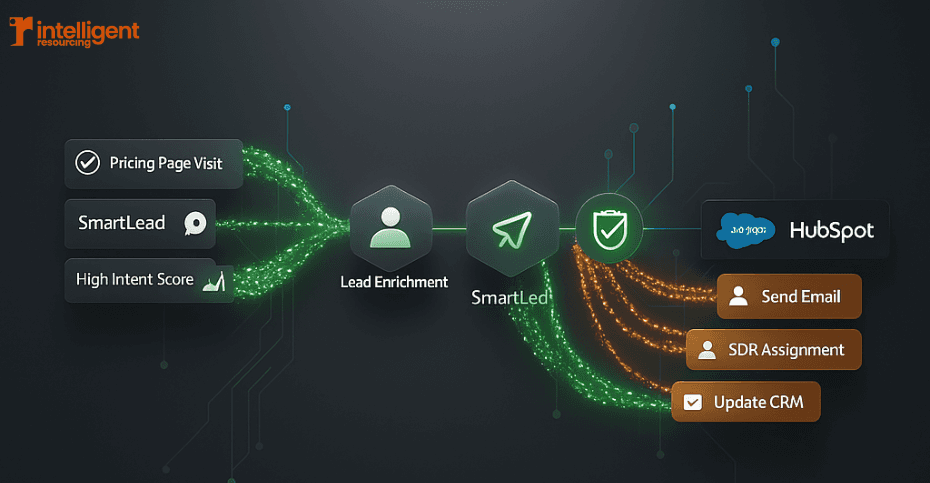
This diagram shows how our clients integrate Clay, HubSpot, SmartLead, and Salesforce in a clean, controlled stack:
Flow:
Clay: Enriches based on buyer signals
HubSpot: Scores lead, checks for duplicate, tags lifecycle
SmartLead: Sends outbound messaging once scored
Salesforce: Updates opportunity stages and tracks attribution
The system includes guardrails to prevent data overwrite, control SDR assignment, and throttle outbound when capacity is hit.
When building an AI-enabled outbound engine, the architecture must be designed to support scale, not just automation. Learn more about our approach in our GTM engineering services.
Common Integration Mistakes (and How to Avoid Them)
1. Allowing prospecting tools to overwrite CRM records
Fix: Restrict write access and enforce CRM priority fields.
2. Two-way syncs with no governance rules
Fix: Use one-directional sync unless logic requires bidirectional updates with reconciliation workflows.
3. Duplicate records from multiple entry points
Fix: Use email/domain matching and lifecycle checks before record creation.
4. Raw or unqualified data flooding the CRM
Fix: Gate enrichment and sequence triggers behind scoring thresholds.
5. Reporting distortion from bad field mappings
Fix: Audit key reporting fields regularly and lock fields from update by enrichment tools.
Each of these mistakes is solvable through good system design, not extra admin work. Organisations that address these issues see significant improvements, with CRM systems increasing sales by up to 29% and productivity by up to 34%.
Build a Future-Proof, Signal-Driven Prospecting Stack
Prospecting tools are only as effective as the systems they integrate with. A broken sync means missed handoffs, confused SDRs, and reporting that misleads your GTM team.
To build a future-proof stack:
Define a single source of truth (Salesforce or HubSpot)
Use clear sync rules to protect data quality
Align outbound tools to signals, not just sequences
Map automation to team capacity and lifecycle logic
When building an intelligent prospecting system, integration is the lever that makes AI and automation scale or fail. Companies that invest in proper sales automation see a 30% improvement in customer lifetime value.
Build a CRM That Works for Your Sales Team, Not Against Them
Stop letting technical debt and duplicate data stall your pipeline growth. At Intelligent Resourcing, we don't just "connect" tools; we engineer high-integrity revenue systems that turn your CRM into a high-octane engine for growth. Whether you need to clean up a messy HubSpot instance or architect a complex Clay-to-Salesforce workflow, our team provides the GTM expertise to ensure your data stays clean and your SDRs stay focused on closing.
Schedule your GTM Systems Audit today
Frequently asked questions
1. What is the best way to integrate Apollo or Clay with Salesforce or HubSpot?
The safest method is to make Salesforce or HubSpot the source of truth and configure Apollo or Clay as send-only tools. Enrichment should flow into the CRM, but not overwrite ownership or lifecycle fields. Learn more about Clay integration best practices.
2. How do I stop duplicate leads when using multiple tools?
Use email and domain de-duplication logic within HubSpot or Salesforce. Tools like Clay can check CRM records before adding new contacts.
3. Should I allow my prospecting tool to update CRM fields directly?
Only with strict field-level permissions. Prospecting tools should enrich and trigger workflows but not overwrite ownership, lead source, or lifecycle stages unless controlled.
4. What signals should trigger SDR follow-up in my CRM?
Useful signals include repeat visits to pricing pages, content downloads, reply to outreach, or high lead scores. These can be used to trigger SDR alerts or sequences. Read more about signal-based automation strategies.
5. Can using multiple outbound tools break my workflows?
Yes, without orchestration you risk creating loops or conflicting sequences. Use a central automation layer (like n8n or Zapier) to control logic and assign ownership clearly.
Related Resources: