

What is Clay workflow automation?
Clay workflow automation is a set of steps you build in Clay that run on their own. A table pulls in companies or people. Each column then adds a fact, checks it or sends it on. The result lands in your CRM or email tool, so reps stop doing the research by hand.
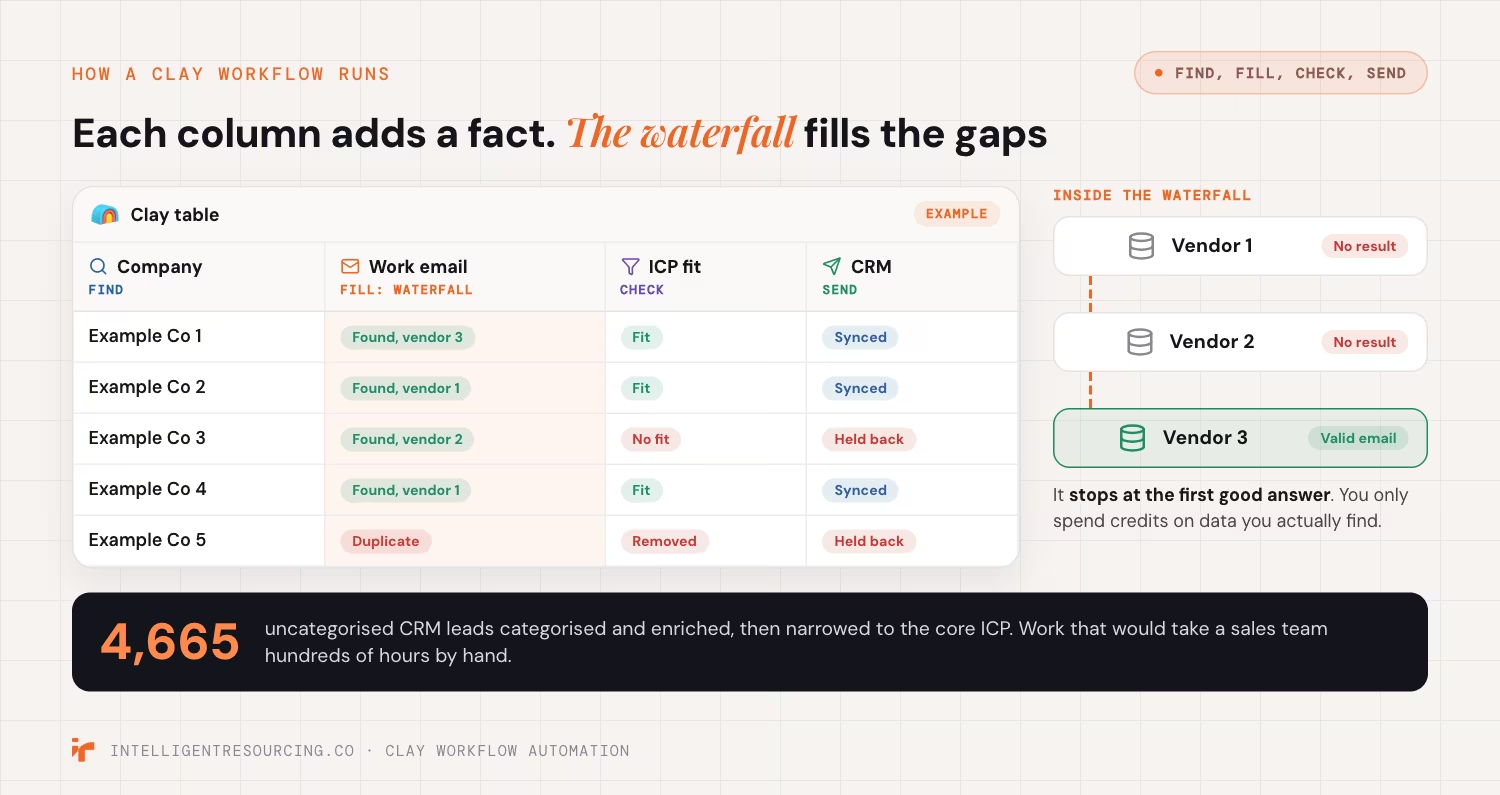
Clay's own course explains the core idea. Its June 2026 Clay University lesson describes the waterfall, Clay's main data step: "A waterfall runs a request through many providers in sequence, until one returns a validated result." The same 2026 lesson says "You only spend credits on data you actually find."
In plain words, Clay asks data vendor 1 for an email. If vendor 1 has none, it asks vendor 2, then vendor 3. It stops at the first good answer.
The common jobs a Clay workflow does:
- Find: pull a list of firms that match your ideal customer profile (ICP), the type of buyer you sell to best.
- Fill: add missing emails, phone numbers, job titles and firm size.
- Check: remove repeats and flag records that do not fit.
- Send: push clean records to your CRM or an email tool.
Here is the scale this work can reach. We took 4,665 uncategorised CRM leads, categorised and enriched every one, and narrowed them to the core ICP, work that would take a sales team hundreds of hours by hand.
This article stays high level. For the build itself, follow our step-by-step guide to Clay workflows.
What does Clay cost to run in 2026?
Clay bills with 2 kinds of credit. Actions pay for the work Clay does, such as running a table, and Data Credits pay for data bought from vendors. As of October 2026, the free plan gives 500 Actions and 100 Data Credits a month. The paid plan prices on Clay's page do not agree with each other.

Clay's pricing page, read in October 2026, says "Actions measure platform usage" and "Data credits buy data & AI from vendors in Clay's marketplace." It lists unlimited seats on the Free, Launch and Growth plans. So you pay for use, not for each user.
The paid prices clash on that page in October 2026:
| Plan | Price in the plan table | Price in the page's FAQ |
|---|---|---|
| Launch | $167 a month | "starting at $185/mo" |
| Growth | $446 a month | "starting at $495/mo" |
| Enterprise | Custom | Custom |
The page does not name a currency. Treat these figures as a guide only. Ask Clay to confirm your price in writing before you set a budget.
Other points from the same October 2026 page:
- Data Credits "start at $0.05 each".
- Actions "reset each billing cycle and don't roll over".
- CRM auto-sync is listed on Growth, not on Launch.
That last point matters for the expert question. If you need Clay to write to your CRM, plan for Growth or above.
Should you build Clay workflows yourself or hire an expert?
Build it yourself when the job is small and one person has time to learn. Hire an expert when the workflow must link Clay to your CRM, your email tool and several data vendors. Each extra tool adds a new way for the workflow to fail. That is why a fix costs more as the build grows.

The hidden cost of doing it yourself is time spent fixing data. A 2026 Validity survey of 500 marketers found "Nearly a third of teams spend six or more hours a week just fixing and reconciling data instead of driving growth." The same August 2026 release says 62% of organisations report losing revenue directly due to poor CRM data quality.
We see the same pattern in our work. Across multiple B2B clients, business development reps reported losing 40 to 60% of their working week to manual prospecting and data verification before our engine was in place.
Use these tests:
- Do it yourself when you have 1 list, 1 data source and someone who likes tables and formulas.
- Do it yourself when you are testing Clay before you pay for a plan.
- Hire an expert when Clay must sync with your CRM without overwriting what reps own.
- Hire an expert when you mix several data vendors, AI research steps and email sends.
For what that expert does each day, see what a Clay workflow specialist does.
What does a Clay workflow expert do?
A Clay workflow expert plans, builds and looks after the tables that feed your sales team. They map your ideal buyer, pick the data vendors, set the checks and link Clay to your CRM and email tools. Then they watch each workflow and fix it when a data source or tool changes.
Clay runs its own partner programme for this work. Its August 2025 partner announcement says the programme is "built for go-to-market engineers, consultancies, and agencies." The same 2025 post names the work: "helping clients streamline prospecting, orchestrate data enrichment, or plug Clay into a GTM system of record."
Clay ranks its partners in tiers. The 2025 post names 4 of them: Artisan, Advanced Artisan, Studio and Elite Studio.
The work usually covers 4 parts:
- Design: map the buyer, the signals and the data sources.
- Build: set up tables, waterfalls and AI research steps.
- Sync: write clean records to the CRM and email tool.
- Upkeep: fix breaks when a vendor or tool changes.
Ready to compare firms? Our guide on how to hire a Clay expert walks through the steps.
How much does a Clay workflow expert cost?
Clay experts charge by the month, by the project or by the hour, and few publish set rates. Clay's own partner directory sorts partners into budget bands of "$5k+ a month" and "$10k+ a month". Its minimum terms run from 1 to 12 months. Your Clay plan sits on top of that fee.
As of October 2026, Clay's partner directory lists 189 partner firms. Buyers can filter them by "Pricing" and "Minimum Engagement". The price options are "any budget", "$5k+ a month" and "$10k+ a month". The minimum terms are 1, 3, 6 or 12 months.
We found no open, dated source for Australian Clay expert rates as of October 2026. So compare quotes on the same 3 points:
- Scope: which tools, lists and data vendors the build covers.
- Term: a one-off build, or a monthly fee with a minimum term.
- Handover: whether your team owns and can edit every table at the end.
Clay credits are separate from the expert's fee. A partner who builds long waterfalls uses more Data Credits, so ask for a credit estimate with each quote. To see how we scope this work, visit our Clay workflow expert service.
What goes wrong with Clay workflows?
Most Clay workflows break in 3 places: bad input data spreads to every record, a CRM sync overwrites fields your reps own, and email sent to enriched lists trips spam rules. Each of these faults is quiet. Nobody sees it until replies drop, deals slip or an email domain gets blocked.

Email rules are the hardest limit. Google's sender guidelines, read in October 2026, tell bulk senders to "Keep spam rates reported in Postmaster Tools below 0.3%."
Google has applied its sender rules to Gmail since February 1, 2024. Senders of more than 5,000 messages a day to Gmail need SPF, DKIM and DMARC. These are 3 email checks that prove a message comes from you.
The usual faults, and the fix for each:
- Bad input: a wrong company web address gives wrong emails all the way down. Add a check column before any paid step.
- CRM overwrites: a sync replaces a field a rep updated by hand. Set rules on which fields Clay may write.
- Silent failures: a vendor changes and a column returns blanks. Add alerts and a weekly spot check.
- Spam risk: enriched emails go out with no checks. Check each email address before you send.
We build every CRM sync to the same rule. Every record we write to your CRM is read back and confirmed. We never trust a success message, and we never overwrite a lead your team already owns.
Want a second pair of eyes on your build? Book a Clay workflow audit.
Clay Workflows
Book a 30-minute Clay workflow audit. We find the gaps in your tables, syncs and sends, and show you what to fix first.
FAQs
Is Clay software free?
Yes, Clay has a free plan. As of October 2026 it includes 500 Actions and 100 Data Credits a month, unlimited seats and up to 200 rows per table. Paid plans add more rows, more credits and CRM sync.
Is Clay AI legit?
Yes, Clay is real software from Clay Labs Inc., with a free plan, public prices and its own training course. Its partner directory listed 189 partner firms in October 2026. As with any tool, test it on a small list first.
What is a Clay agency?
A Clay agency is an outside firm that builds and runs Clay workflows for clients. Clay calls these firms solutions partners and ranks them in tiers, from Artisan to Elite Studio. Its directory sorts them by monthly budget and minimum term.
What is Claygent used for?
Claygent is Clay's AI agent. Clay says it has "access to web research" and can take on tasks "like company research, lead qualification, signal detection." Clay also says you can use it to "generate any custom data points".
How hard is Clay to learn for a non-technical team?
Basic tables need no code, and Clay runs its own course, Clay University, with a first lesson for new users. Waterfalls, API links and CRM sync take more skill. That is the point where an expert saves the most time.
Is hiring a Clay expert worth it?
It is worth it when bad data costs you deals. In Validity's 2026 survey, 62% of organisations said they lose revenue due to poor CRM data. If your list is small and simple, start on your own and hire later.