

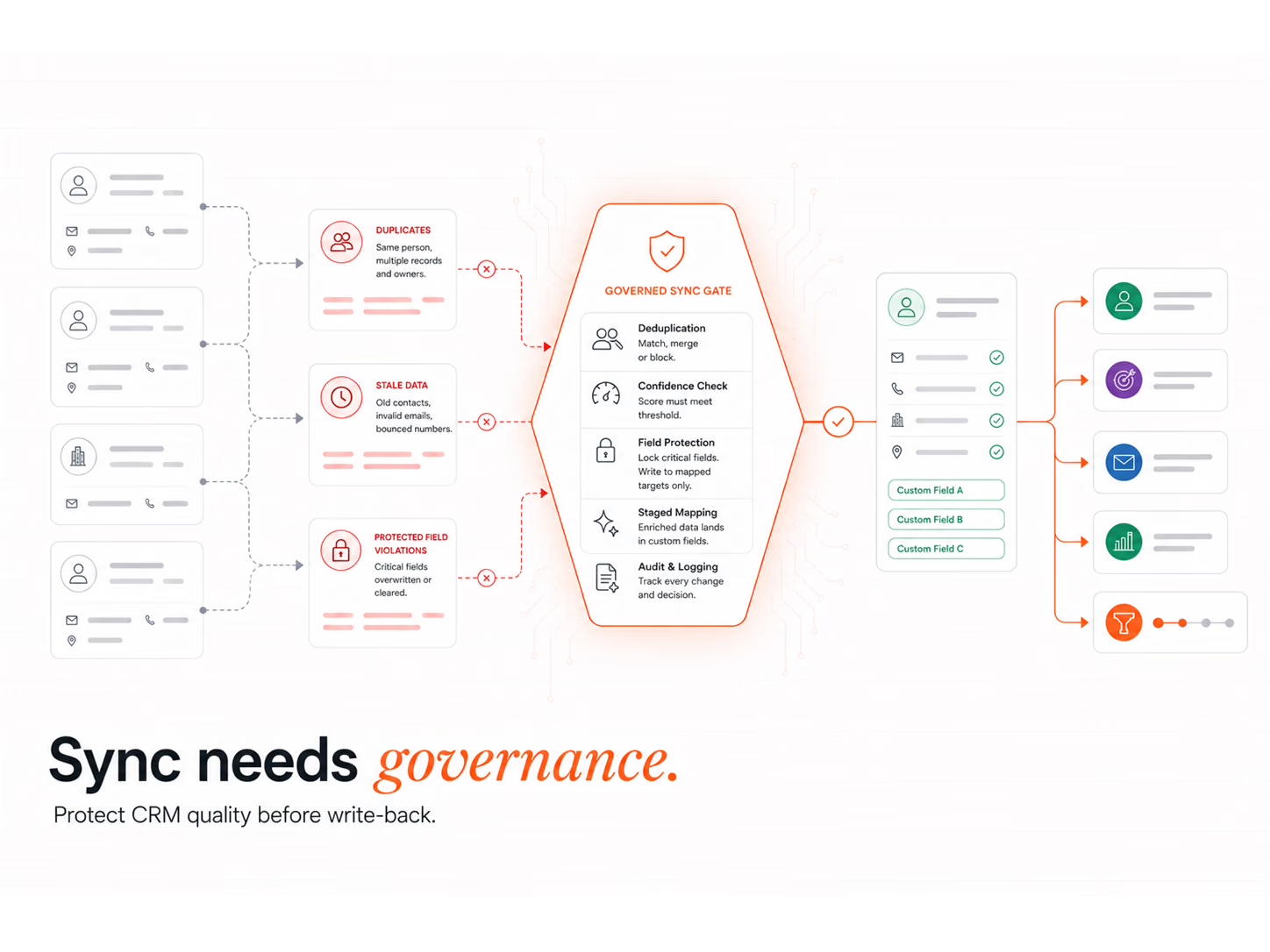
Why does CRM sync cause GTM systems to break?
Uncontrolled write-back reaches your CRM before records are verified, and that is where duplicates pile up, core fields get overwritten, and attribution starts failing. Most teams configure the sync layer last, but they spend more time fixing its failures than any other part of the GTM system.
If you connected Clay to HubSpot or Salesforce without configuring confidence thresholds, field-protection rules, or deduplication logic first, your enrichment is not improving your CRM. It is overwriting fields your reps rely on, creating duplicates attribution cannot track, and building a record of decisions nobody made deliberately. The problem did not start in the CRM. It started in the sync configuration.
Validity's 2025 State of CRM Data Management report found that 76% of organisations report less than half of their CRM data is accurate and complete. 37% of CRM users have directly lost revenue due to poor data quality, and workers waste an average of 13 hours per week hunting for basic information in their CRM. That is the cost of ungoverned sync, not of enrichment tools themselves.
Clay should always sit between signals and the CRM, the core of any CRM enrichment service. It acts as a controlled orchestration layer that manages sync decisions rather than simply sending updates.
How does Clay integrate with HubSpot and Salesforce?
Clay is not a direct connector between a data source and your CRM. It is a decision layer that processes signals, scores records and gates what reaches HubSpot or Salesforce. Understanding how that layer operates is what separates governed sync from uncontrolled automation.
Clay's customer documentation demonstrates how organisations source 4,000+ accounts and enrich 21,000 contacts in a single month when enrichment workflows are designed correctly. The scale of what Clay can process makes configuration discipline more critical, not less.
Clay's Role in the GTM Stack
In a healthy GTM system:
- Signals arrive from third-party sources, lists or CRM activity
- Clay processes them with logic, scoring and gating
- Only validated, enriched and deduplicated records reach the CRM
The CRM should never be the first stop for raw data. That is where systems break.
One-Way, Two-Way and Conditional Sync Models
There are 3 common sync configurations.
One-way sync: Clay updates the CRM but not the reverse. This is the safest model when Clay controls data integrity.
Two-way sync: CRM and Clay update each other. This is risky at scale; manual edits in the CRM can override qualified data.
Conditional sync: Clay writes to the CRM only when specific confidence thresholds or logic rules are met. This model offers the most governance.
At scale, conditional sync is the only model that prevents silent data corruption.
How should Clay field mapping be structured for HubSpot and Salesforce?
Field mapping is where most Clay + CRM implementations break down. Writing enrichment directly to core CRM fields without confidence logic overwrites data that sales teams rely on. The correct approach maps enrichment to custom fields first and updates core fields only when specific conditions are met.
Precisely's data integrity research found that 64% of organisations rank data quality as their top data integrity challenge, up from 50% the prior year. Field-level mapping rules are where that challenge is either solved or made worse by automation.
Designing Fields for Signal Context
One of the most overlooked steps is storing signal data in the CRM itself. Clay lets you map:
- Signal source (e.g. "Clearbit hiring signal")
- Signal type (funding, intent, job post)
- Confidence level (percentage match, enrichment source trust)
Avoid writing over core CRM fields unless confidence is high. Use secondary fields or custom properties to store enriched values alongside existing data.
Mapping Clay Fields to HubSpot Objects
In HubSpot, Clay maps to:
- Contacts: verified emails, job titles, signal context
- Companies: domain, funding information, tech stack
- Custom properties: for match scores, lead origin and enrichment status
Be cautious when updating HubSpot default fields. Store enrichment in custom fields, then surface high-confidence values with logic.
Mapping Clay Fields to Salesforce Objects
In Salesforce, Clay maps to:
- Leads and Contacts: signal type, enrichment source, email confidence
- Accounts: domain match, company confidence, hiring or funding information
- Custom objects: for multi-source enrichment history, scoring or ICP match
For prospecting workflows, start with Leads and convert only when verified. For existing pipeline records, route through Contact or Account enrichment.
To see how this logic ties into lead sourcing, see Clay prospecting for SaaS.
What confidence thresholds and deduplication logic should govern Clay sync?
Every record that enters a CRM without deduplication checks adds operational complexity over time. Duplicates do not just confuse SDRs. They destroy attribution accuracy, inflate pipeline metrics, and make revenue forecasting unreliable. Governing the data at the sync layer is cheaper than cleaning it after the damage is done.
Salesforce research shows that only 35% of sales professionals completely trust the accuracy of their organisation's data, while 39% say accurate forecasting is hindered by poor data quality.
Why Deduplication Must Happen Before CRM Entry
Duplicates do not just confuse SDRs, they destroy attribution and pipeline accuracy. Every duplicate increases cost and reduces CRM trust.
Clay deduplicates at the workflow level, comparing incoming records to CRM entries, spreadsheets and other enrichment sources. This prevents duplication before it becomes a CRM problem.
Confidence Thresholds for Write-Back
Sync logic should include gating rules such as:
- Email confidence above 90%
- Job title match confirmed
- Company match across 3 sources
If data does not meet these thresholds, Clay holds the record or flags it for manual review.
Identity Matching Across Systems
Clay supports multiple matching methods:
- Domain-based: primary for company records
- Email-based: safest for individual records
- Account-level reconciliation: for complex enterprise structures
These rules help Clay decide whether to update an existing record, create a new one or suppress it entirely. For the signal infrastructure that feeds these workflows, see the signal-based automation guide.
What QA cadence prevents CRM data from decaying over time?
CRM data does not stay accurate by default. Contacts change roles, companies shift and enrichment sources update at different rates. A refresh cadence governs which records Clay re-enriches, when it triggers and which fields it is never allowed to overwrite, regardless of what new data is available.
B2B data decay statistics confirm that contact records degrade at approximately 22.5% per year, meaning a CRM with no scheduled enrichment loses a quarter of its accuracy within 12 months.
When CRM Data Should Refresh
Some records need ongoing refreshes:
- New job titles or role changes
- Company-level changes (e.g. funding rounds, hiring activity)
- Signal expiration or revalidation triggers
Clay workflows can re-enrich on a schedule or based on new signal ingestion.
When CRM Data Should Not Refresh
Overwriting CRM fields without logic causes silent errors. Never refresh:
- Sales-owned fields (e.g. lead status, opportunity stage)
- Lifecycle stages (e.g. MQL to SQL)
- Manually edited records (unless verified stale)
Clay allows conditional blocks to protect these fields during sync.
Using Clay to Control Refresh Frequency
Set refresh logic such as:
- "Only re-enrich if record is more than 30 days old and still in MQL"
- "Skip enrichment if field is owned by user"
Schedule QA checkpoints where Clay rechecks logic and flags records for update or suppression.
Example: A Safe Clay to CRM Sync Workflow
A governed sync workflow follows 6 steps:
1. Signal ingestion: Funding event, hiring spike or intent trigger received.
2. Conditional enrichment: Clay pulls data from multiple sources, scores it and stores it in custom fields.
3. Deduplication checks: Record is compared against CRM entries, spreadsheets and enrichment history.
4. Confidence gating: Only high-confidence records progress (verified email and confirmed title).
5. Field-level write-back: Mapped to CRM objects with field-level logic. Core fields updated only when safe.
6. Audit logging: Clay records the signal source, timestamp and decision path for future QA.
This is not just an integration. It is a data governance workflow.
What are the most common Clay CRM integration mistakes?
Most CRM data quality failures trace back to 4 design errors: enrichment runs without verification gates, sync happens before deduplication, there is no audit trail and SDRs spend time fixing records manually. Each of these failures is preventable at the workflow design stage.
Downstream cleanup costs compound significantly as record volumes grow. The organisations that avoid this are those that configure write-back governance before they connect Clay to the CRM.
Letting enrichment overwrite CRM data: Clay uses confidence scores and mapping rules to control which fields update and when.
Syncing before verification: Clay workflows delay sync until verification gates are passed.
No audit trail: Clay logs the signal source, processing steps and sync timestamp so RevOps teams can always track what happened.
Letting SDRs manually fix bad records: With Clay workflows, SDRs receive clean verified leads, removing the need for manual QA downstream.
How does this fit into a scalable Clay GTM system?
A clean CRM is not the output of good data hygiene rules. It is the output of good system architecture. Clay earns its place in the GTM stack by acting as the decision layer between raw signals and the CRM, not as a connector that moves data from point to point without governance.
The CRM should be your system of record, not your decision engine. By acting as a decision layer upstream, Clay ensures the CRM stores only verified, enriched, signal-backed records.
Clean CRM sync supports:
- More reliable outbound targeting
- Better lead scoring and routing
- Accurate campaign and pipeline attribution
For the signal-detection layer that feeds these workflows, see the AI lead generation guide. For teams evaluating whether Clay integration is the right next step, see GTM engineering and lead generation.
Clean CRM sync is a design choice
CRM hygiene is not maintained with rules. It is engineered into the sync architecture from the start. The teams with the cleanest CRM data are not running more audits or more manual cleanup cycles. They configured their write-back logic to prevent bad records from entering the system in the first place.
When Clay governs your sync workflows, data stays accurate, processes remain stable and teams spend less time cleaning up after automation failures. If your CRM is struggling under inconsistent data, ungoverned updates or duplicate records, Clay is the missing control layer.
RevOps Tools
A clean CRM is the output of system architecture, not hygiene rules. The Revenue Operations Studio at Intelligent Resourcing engineers Clay as the governed decision layer between signals and your CRM, with conditional sync, confidence gates, and audit logging.
FAQs
Can Clay sync with both HubSpot and Salesforce?
Yes. Clay integrates natively with both HubSpot and Salesforce. The same conditional sync logic, confidence thresholds and field-mapping rules apply to both platforms.
What is conditional sync in Clay?
Conditional sync means Clay only writes a record to the CRM when predefined logic conditions are met. This includes email confidence scores, company match thresholds and deduplication checks. Records that do not pass the gates are held for manual review or suppressed.
How does Clay handle duplicate records?
Clay deduplicates at the workflow level before records reach the CRM. It compares incoming records against existing CRM entries using domain-based and email-based matching, then decides whether to update an existing record, create a new one or suppress it.
What fields should Clay never overwrite in HubSpot or Salesforce?
Sales-owned fields (lead status, opportunity stage), lifecycle stages (MQL to SQL) and manually edited records should be protected from automated enrichment. Clay's conditional blocks allow you to exclude these fields from any refresh logic.
How often should Clay re-enrich CRM records?
Refresh frequency depends on record age and pipeline stage. A common rule is to re-enrich records more than 30 days old that are still in an active stage. Closed, won and manually edited records should not be re-enriched without explicit logic.