

Can Clay automate LinkedIn prospecting without breaking LinkedIn's rules?
Yes, if Clay does the research and a person does the sending. Clay can pull company and contact data from licensed providers, score fit and draft notes. It must not scrape LinkedIn pages or send invites for you. LinkedIn's rules ban both. LinkedIn acts on them, on accounts and in court.
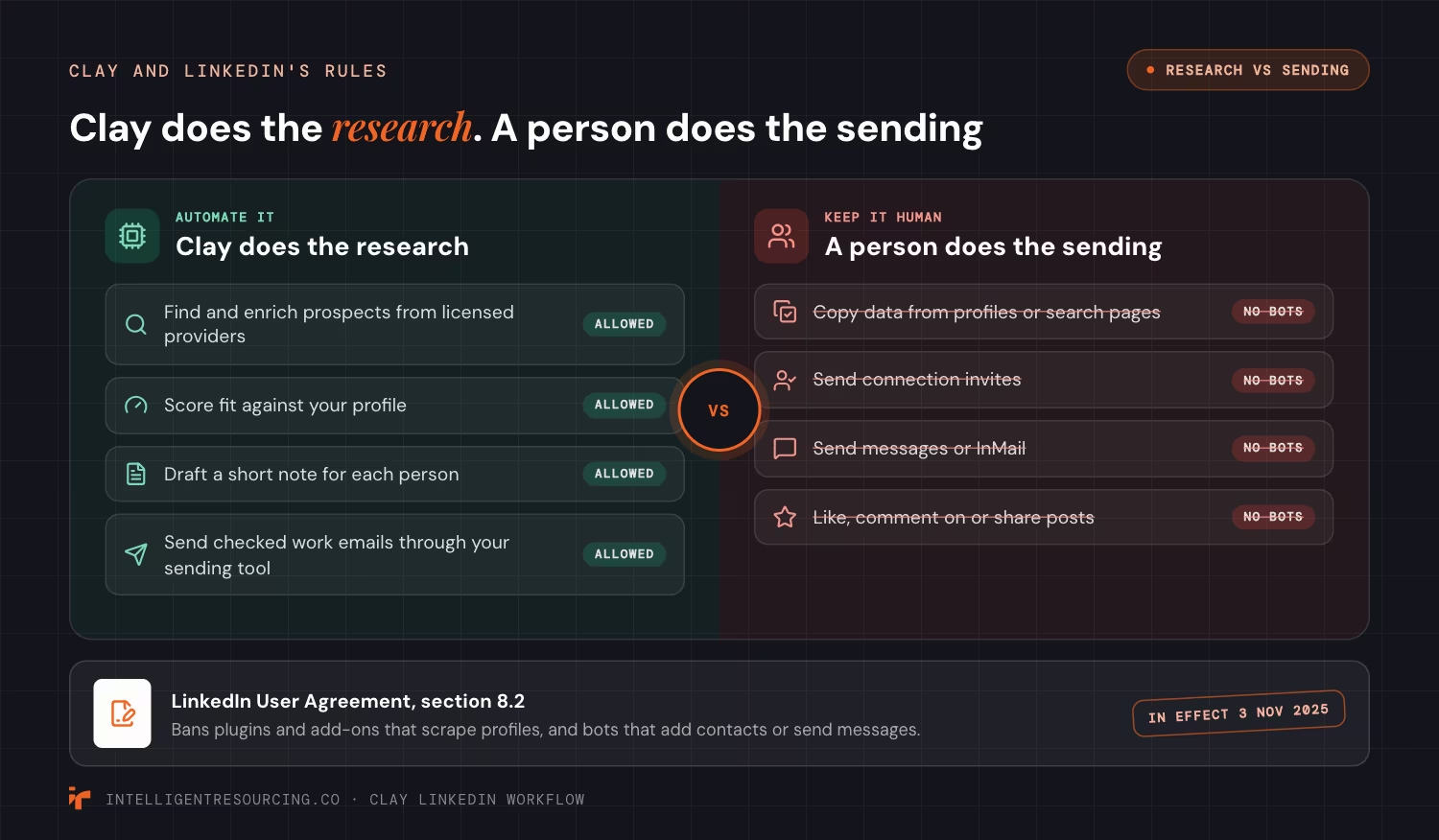
The LinkedIn User Agreement, in effect from 3 November 2025, lists what members must not do. Section 8.2 bans software, including "browser plugins and add-ons", used "to scrape or copy the Services, including profiles". It also bans "bots or other unauthorized automated methods" that "add or download contacts, send or redirect messages".
That rules out a lot of LinkedIn tools. A browser add-on that copies profiles into a sheet is scraping. A tool that sends invites from your account on a timer is a bot. Both put the account at risk.
LinkedIn also takes scrapers to court. In September 2026, The Record reported that a US judge signed off a deal that makes 2 data firms stop mass scraping and delete the data. LinkedIn's complaint put their fake accounts in the millions.
Keep these jobs out of every automated step:
- Copying data from LinkedIn profiles or search pages
- Sending connection invites
- Sending messages or InMail
- Liking, commenting on or sharing posts
How do you build a LinkedIn prospect list for Clay without scraping?
Build the list in LinkedIn's own tools, then let Clay fill in the rest from licensed data providers. Use Sales Navigator to find and save the right people. Bring the names into Clay through your CRM or by hand, never with a scraper. Then Clay adds the work email, company size and other fields.
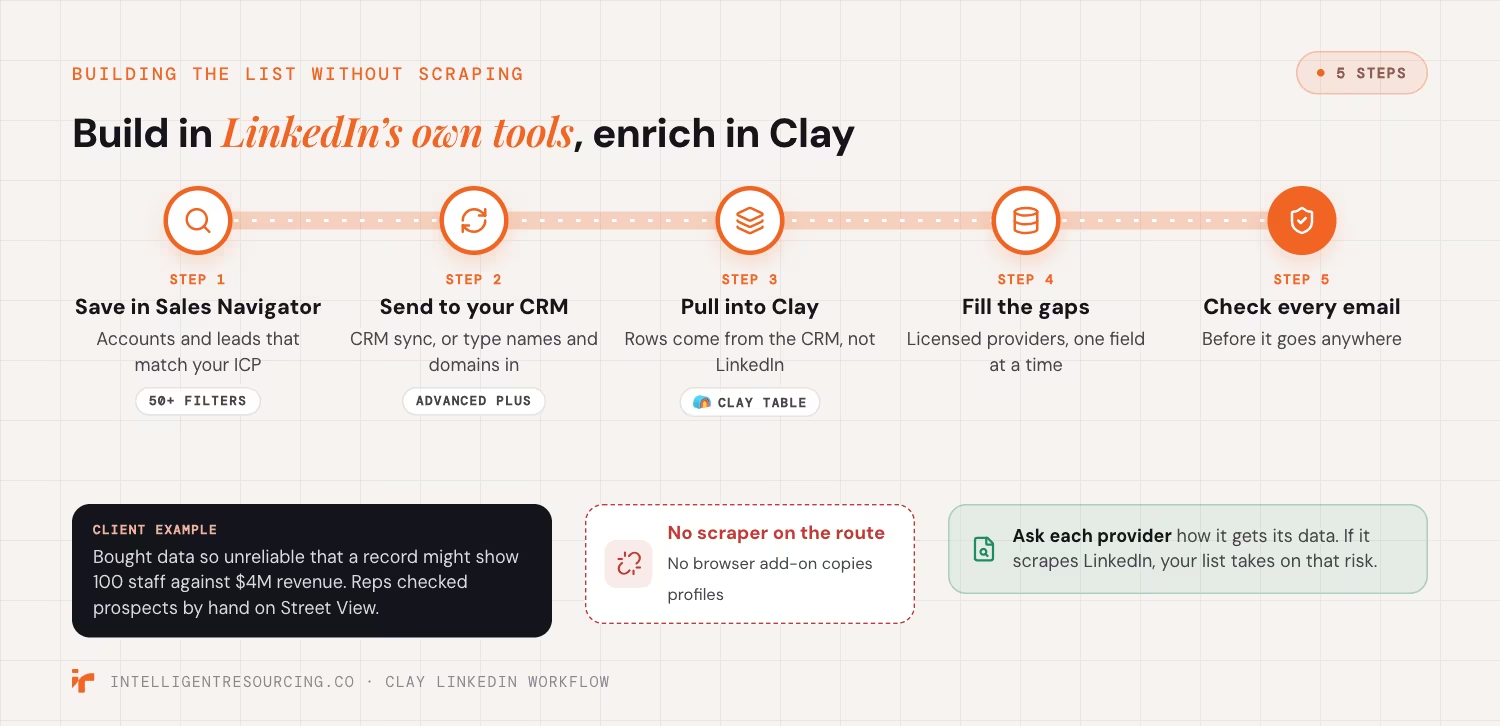
As of September 2026, LinkedIn's Sales Navigator page lists "50+ filters" for search. It also offers alerts when saved leads have "a job or role change". Its CRM sync adds leads straight into your CRM. It needs the Advanced Plus plan. From there, Clay reads the record without touching LinkedIn.
- Save accounts and leads in Sales Navigator that match your ideal customer profile (ICP).
- Send them to your CRM with CRM sync, or type the company names and domains in by hand.
- Pull those rows from the CRM into a Clay table.
- Fill the gaps from licensed providers, one field at a time.
- Check every email before it goes anywhere.
Our Clay enrichment workflow guide covers provider order and email checks. Ask each provider how it gets its data. If the answer is "we scrape LinkedIn", your list takes on that risk.
Weak data costs time too. In our work, one client's bought data was so unreliable, a record might show 100 staff against $4M revenue, that their reps were confirming prospects by hand on Street View.
Which LinkedIn signals should start outreach?
Start outreach when something changes at the account. A new role, new funding, a hiring spike or a new tool gives the rep a reason to write now. Clay records the signal, adds the account data and scores the fit. Then it passes the account to your CRM, so a rep acts while the change is fresh.

Job changes are rarer than many teams think. The Australian Bureau of Statistics (ABS) job mobility release shows that in the year to February 2026, 7.2% of employed Australians changed jobs. That is about 1.0 million people. So a saved lead who changes jobs is worth a note that week.
| Signal | Where you see it | What Clay does next |
|---|---|---|
| Job or role change | Sales Navigator lead alerts | Adds the new company, checks fit and queues a note for a rep |
| New funding | The news and press releases | Enriches the account and scores fit |
| Hiring spike | The company's careers page and job ads | Flags the team that is growing |
| New tool in use | Tech data from providers | Matches the account to your use case |
When the signal and the fit line up, the rep has a Verified Buying Window™: a clear reason to reach out now. Sync the scored account to your CRM. Our Clay and HubSpot sync guide shows how to keep that record clean.
How many LinkedIn invites can you send, and how do you pace them?
LinkedIn caps how many invites you can send, but it does not publish the number. If you hit the cap, you cannot send invites for about a week. The safe pattern is a small batch each day, sent by hand, to people who fit your profile. Clay builds the queue, and the rep works through it.
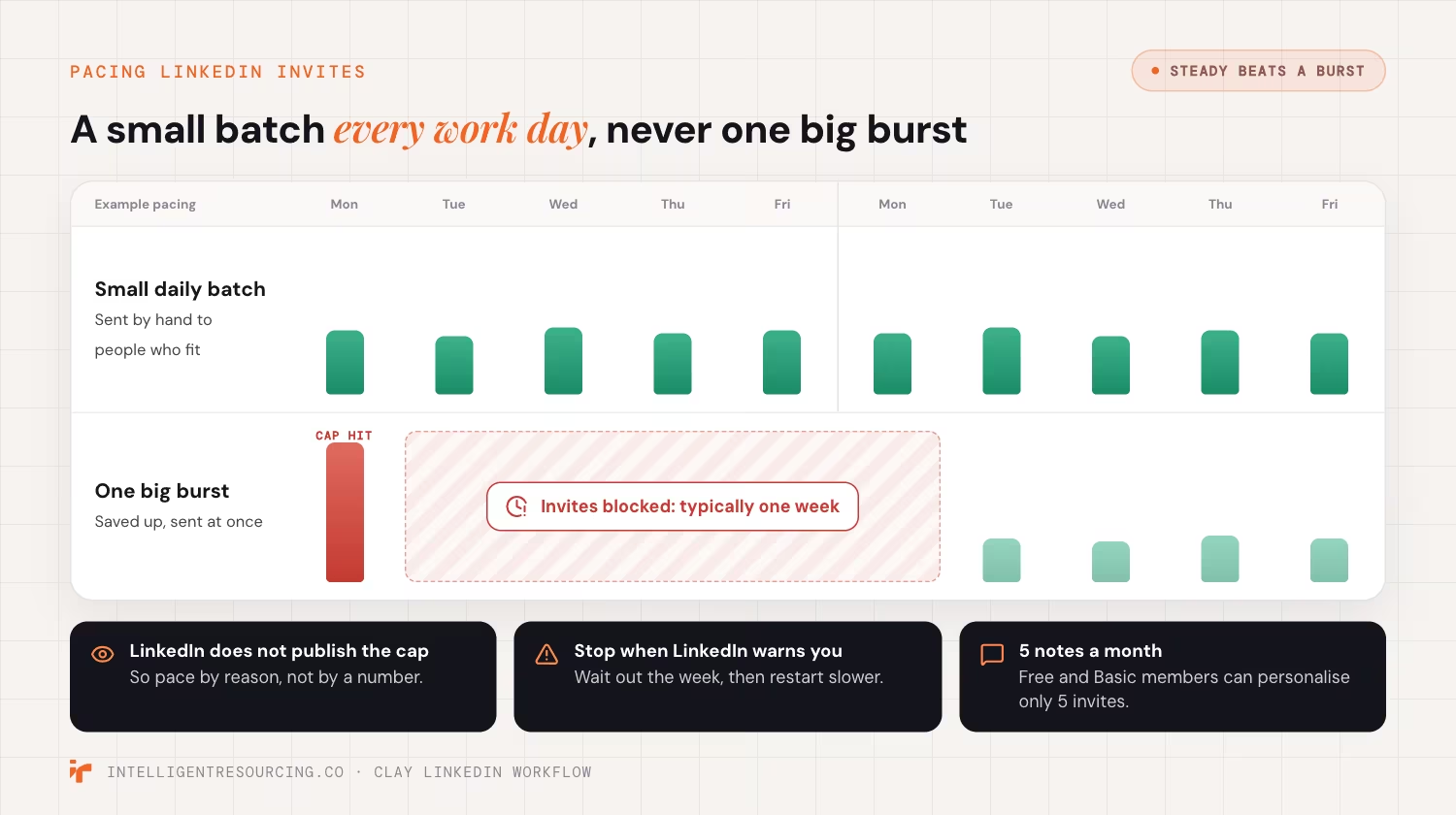
As of October 2026, LinkedIn's invitation limit help page says: "Invitation limits are in place to prevent misuse and promote thoughtful networking." It adds: "This restriction typically lasts one week." LinkedIn will not shorten the wait. Free and Basic members can add a personal note to only 5 invites a month.
Pace your sends with these rules:
- Send a small batch each work day. Do not save them up for one big burst.
- Invite only people who fit. Each invite needs a clear reason.
- Clear out old invites. A pile of unanswered invites counts against you.
- Stop when LinkedIn warns you. Wait out the week, then start again more slowly.
- Never use a tool to get around the cap. That is the automation the User Agreement bans.
A Clay workflow expert can set up the daily queue so each rep sees only the people worth an invite that day.
How do you write and send LinkedIn messages from a Clay workflow?
Let Clay draft, and let a person send. Clay turns the signal and the account data into a short note for each person. The rep reads it, edits it and sends it in LinkedIn. Email goes to your sending tool. That is where the volume belongs, because email puts no LinkedIn account at risk.
Note quality matters to LinkedIn as well. As of October 2026, LinkedIn's help page on invite restrictions lists 3 triggers. They are sending "many invitations within a short amount of time", invites that are "ignored, left pending, or marked as spam", and "the use of an automation tool".
Each row in the rep's queue should hold:
- The signal and the date it happened
- 1 line on why this account fits
- A short draft note the rep can edit
- The checked work email, for the email step
Research is the part that scales. In our work, for one client brand, the engine produced 100 sales-ready account briefs in a single overnight run, each with verified site-level mapping. We produce a full account brief for every target overnight. The facts are inserted by code, not written by the model, and an adversarial check tries to break every brief before a rep sees it.
For the email step, our Clay to Smartlead guide covers how to send without hurting your domain.
What does Australian privacy law expect when you prospect on LinkedIn?
A LinkedIn profile is public, but the data on it is still personal information. Under the Australian Privacy Principles (APPs), you need a fair way to collect it. You also need a clear way for people to opt out of direct marketing. Keep the source and date of every field, and act on every opt out.
Privacy regulators have said so in public. On 29 October 2024, the Office of the Australian Information Commissioner (OAIC) and 16 other privacy regulators put out a joint statement on data scraping. It asks firms to "ensure that permissible data scraping for commercial or socially beneficial purposes is done lawfully." It also warns that people "can lose control over the information they make public online."
APP 7 sets the rules for direct marketing, including the right to opt out. Build these habits into the workflow:
- Record the source. Log where each field came from and when.
- Honour opt outs everywhere. Add an opt out line to every email, and mark it in Clay and your CRM.
- Keep only what you use. Delete fields and rows you no longer need.
- Check your providers. Ask each one, in writing, how it collects its data.
If you want a second view on your setup, talk to our team.
Clay Workflows
Book a workflow audit. We check how your LinkedIn data gets into Clay, how your reps send, and where the risk sits.
FAQs
What is the best automation tool for LinkedIn?
For prospecting, LinkedIn's own Sales Navigator is the safe choice for search, saved leads and alerts. Any tool that sends invites or messages from your account for you breaks LinkedIn's User Agreement. Pair Sales Navigator with Clay for research and a sending tool for email.
How many LinkedIn connection requests can I send per day?
LinkedIn does not publish a daily or weekly number. It restricts accounts that send many invites in a short time, or whose invites are ignored or marked as spam. Send a small batch each work day to people who fit your profile.
Can Clay send LinkedIn connection requests for me?
Do not set up Clay, or any tool linked to it, to send them. LinkedIn bans bots that add contacts or send messages. Use Clay to build the queue and draft the note, then send each request by hand.
How do I get Sales Navigator leads into Clay?
Not with a scraper or a browser add-on, because LinkedIn bans both. Use Sales Navigator's CRM sync on the Advanced Plus plan, then pull the leads from your CRM into Clay. On a smaller plan, type the company names and domains in by hand.
How do I avoid a LinkedIn account restriction?
Keep every send human and keep the pace steady. Invite only people who fit, and remove any browser add-on that copies data or acts for you. If LinkedIn restricts you, wait it out, because most restrictions lift within a week.
Can I run this without a sending tool?
Yes, but it limits reach. You can export checked contacts and email them by hand. A sending tool adds timed sends, bounce handling and opt out tracking. Those matter once you email more than a few people a day.