

How to Go from Enrichment to Outbound Without Buying Lists
You go from enrichment to outbound without buying lists by building your own contact base. Clay finds the firms and people who fit your buyer profile, then fills in their emails and checks each one. Smartlead sends only to the checked records, and its bounce and opt-out data keeps the list clean.

Bought lists fail on fit, not just on age. When we checked one client's bought list, very little of it was usable. A bought lead list of 700 contacts came down to 274 after dedup, 59 actually based in Australia, and 9 that fit the ideal customer profile. Fit is only one of the reasons bought data goes stale so fast.
That is why we never start from one seller's data. We build the target universe from four independent sources and reconcile them, rather than trusting one vendor's list.
A bought list can also carry legal risk in Australia. The Australian Communications and Media Authority (ACMA) sets out the rules for avoiding spam. A marketing email needs consent, it must name the sender, and it must carry a working unsubscribe link.
How does the Clay to Smartlead workflow actually work?
Clay is the data layer and Smartlead is the sending layer. Clay builds a table of contacts, fills in emails from a chain of data vendors, checks each email and removes repeats. Only clean rows go to a Smartlead campaign. Smartlead sends the emails and posts bounces, replies and opt-outs back.
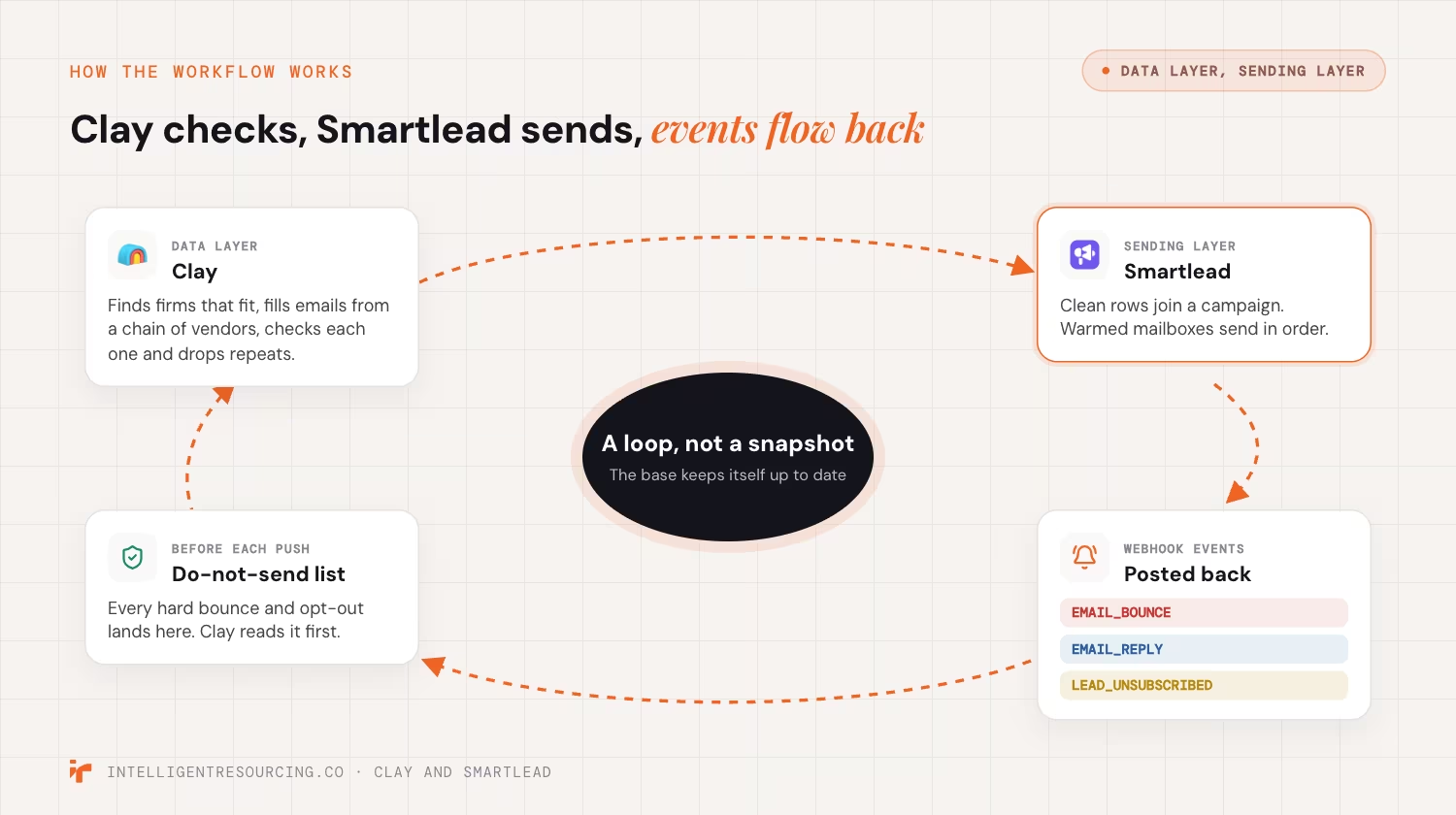
- Clay asks data vendor 1 for an email, then vendor 2, and stops at the first good answer.
- Clay checks each email and drops repeats.
- A Clay action adds each clean row to a Smartlead campaign.
- Smartlead warms the mailboxes and sends the emails in order.
- Smartlead posts bounce, reply and opt-out events to a web address you choose.
That last step uses webhooks, which are messages one app sends to another the moment something happens.
As of October 2026, Smartlead's list of webhook events includes EMAIL_BOUNCE, EMAIL_REPLY and LEAD_UNSUBSCRIBED. Smartlead says the opt-out event fires "Immediately when unsubscribe link is clicked."
This loop is what makes bought lists unneeded. A bought list is a snapshot. This system keeps itself up to date.
What do you need before connecting Clay and Smartlead?
You need 4 things: a Clay workspace, a Smartlead account with warmed mailboxes, your Smartlead API key and a clear ideal customer profile (ICP). Your ICP is the type of buyer you sell to best. Set up the Smartlead campaign first, because Clay cannot create one for you.
- Clay, to find, fill and check contacts
- Smartlead, to send emails and warm up mailboxes
- A customer relationship management (CRM) system to hold the checked records. It is optional, but it helps.
- A tool such as n8n to catch Smartlead's webhook events, if you want them to update other systems
An API key is a password that lets one app act inside another.
As of October 2026, Clay's Smartlead guide shows the steps. In a Clay table, you add a Smartlead action and paste in your key. The guide says, "All Smartlead actions require an existing campaign in Smartlead."
Set filters for job role, industry, location and company size. Then Smartlead only gets full rows it can use.
How do you set up the integration step by step?
Work through 9 steps: fields, enrichment, email checks, tags, the push to Smartlead, warm-up, feedback, quality checks and the refresh. Each step gates the next. No record joins a sequence until it passes the email check in Step 3. That gate is what keeps your domain safe.
Step 1: How do you define fields and segments?
Build a Clay table with the same columns every time, using company name, website, email, LinkedIn URL, check status and a Smartlead campaign tag. Fill these before you write any copy. An empty merge tag, such as a blank first name, tells the reader a machine sent the email.
Step 2: How do you build the enrichment waterfall?
Sort your data vendors by cost and accuracy, so company data comes first, then email finding, then email checks. As of October 2026, Clay's work email waterfall guide says, "You only pay credits for the provider that finds a match." Keep LinkedIn URLs, since they give reps context for a personal first line.
Step 3: How do you verify emails and deduplicate?
Check every email before it can sync. Clay's guide offers a Conservative setting for catch-all emails, and it suggests this setting for cold outreach where bounce rates matter.
Drop bad emails and hold catch-all emails for a person to approve. Then remove repeats on company plus email. This is the same habit behind cutting bounce rates with Clay.
Step 4: How do you tag and route leads?
Tag each lead with the campaign name, ICP group and the sales development rep (SDR) who owns it. Do this before the push. Tags make Smartlead's reports easy to read, so you can tie each reply to the right group and rep.
Step 5: How do you push clean leads to Smartlead?
Use Clay's "Add lead to campaign" action, and send only rows that passed Step 3. By default, Clay will not add a lead that already sits in another Smartlead campaign, and it never adds the same lead to one campaign twice. Stamp each batch with a date and a batch number, so you can trace any fault. Never upload a raw file that skipped the check.
Step 6: How do you warm domains and throttle sends?
Warm every new mailbox with Smartlead's built-in warm-up before real sends. Warm-up trades test emails between real inboxes, which builds a good sending record. Cap daily sends for each mailbox. Spread the volume across several domains, so no single domain carries the full load.
Step 7: How do you capture bounce and reply feedback?
Set up a Smartlead webhook for bounces, replies and opt-outs. Point it at a tool you own, such as an n8n workflow or your CRM. Add every hard bounce and opt-out to a do-not-send list. Clay can also pull a lead's status back with its "Lookup lead status in campaign" action.
Step 8: How do you run quality checks and monitoring?
Check 4 things each week: the email check pass rate, send volume, bounce trend and webhook logs. Set alerts, so a broken data vendor or a jump in bounces shows up fast. Treat a rise in bounces as a reason to pause sending, not a note for the monthly review.
Step 9: How do you set the refresh cadence?
Re-check the whole base every 30 to 60 days. People change jobs and email addresses stop working, so a static base goes stale. A timed refresh keeps emails valid and opt-outs current.
How do you protect deliverability and domain reputation?
Deliverability means your email lands in the inbox, not in spam. You win it before the first send. Check every address, set up your domain records, warm each mailbox and keep volume low enough that spam reports stay rare. Google, Yahoo and Microsoft now set firm rules for bulk senders.

As of October 2026, Google's sender guidelines tell bulk senders to keep spam rates "below 0.10%."
The 2026 page also says to "avoid ever reaching a spam rate of 0.30% or higher."
Google calls anyone who sends more than 5,000 messages a day to Gmail a bulk sender, and these rules have applied since February 1, 2024.
Bulk senders also need SPF, DKIM and DMARC. These are short text records on your domain. Inbox providers read them to confirm that the mail really came from you.
Microsoft has now joined in with its own rules. Its April 2025 Outlook notice says domains that send more than 5,000 emails a day must pass SPF, DKIM and DMARC.
The 2025 notice says mail that fails will be rejected with the code "550; 5.7.515 Access denied."
Bought lists fail these tests all at once. Old emails bounce. People who never asked to hear from you click the spam button.
How do you keep the outbound base evergreen?
An evergreen base is one you refresh on a schedule, not one you clean once. Re-check emails every 30 to 60 days. Sync every Smartlead opt-out into a do-not-send list that Clay reads before each push. Then a person who opted out never hears from you again.
Most teams call this list cleaning. We call it an Evergreen CRM, because the data stays current without a yearly clean-up.
Speed matters when someone opts out. Yahoo's sender rules, in force since February 2024, tell bulk senders to "Honor unsubscribes within 2 days."
As of October 2026, the same Yahoo page asks senders to keep their spam rate "below 0.3%."
In Australia, honouring opt-outs is also a legal duty, so keep a record of each one. A synced do-not-send list keeps that record for you. Send the same clean records to your CRM through the Clay and HubSpot integration, so sales and marketing work from one list.
Which metrics prove the workflow is working?
Track 5 numbers each week: bounce rate, repeat rate, profile fill rate, time to first touch and reply rate by group. Also watch your spam rate in Google Postmaster Tools, a free Google dashboard for senders. A weekly check catches a slip before it harms your domain.
- Bounce rate: aim for under 3%
- Repeat rate: aim for under 1.5%
- Profile fill rate: 90% or more within 7 days
- Time to first touch: under 48 hours
- Reply rate: by group, not just by campaign
Google's sender FAQ, read in October 2026, says, "Spam rate is calculated daily."
Since June 2024, bulk senders above a 0.3% spam rate are "ineligible for mitigation," so Google will not help fix their delivery.
Under that 2024 rule, they become eligible again once their rate stays "below 0.3% for 7 consecutive days."
From November 2025, failing mail faces "temporary and permanent rejections."
Want a second view on your numbers? Book a deliverability review.
What breaks a Clay to Smartlead workflow?
The same 4 faults break most builds. Teams skip the email check, import bought contacts, leave merge tags empty, or never sync Smartlead's feedback back. Each fault quietly pushes up bounces or spam reports. In time, even good emails start landing in spam.
- Skipping the check, or sending to catch-all emails
- Importing unchecked or bought contacts
- Empty merge tags that give away the automation
- A broken feedback sync, so bounced and opted-out contacts get emailed again
The last fault is the easiest one to miss.
As of October 2026, Smartlead's webhook guide says it retries an event after a server error. Read in October 2026, the guide says it tries again after 1 minute, then 5 minutes, then 30 minutes, and after 3 failed tries the event is marked as failed. So if your tool is down for an hour, those opt-outs never reach your list unless you resend them.
Most of these faults come from design, not from the tools. Our Clay workflow expert service builds these checks before a team scales up.
Where do the costs come from?
Costs come from 2 places: Smartlead's monthly plan and the Clay credits you spend to find and check data. Clay credits grow with the number of fields you fill, the emails you check, retries on failed contacts and how often you refresh. Your Smartlead plan sets your monthly send cap.

As of October 2026, Smartlead's pricing page lists 4 plans: "Base at $39/month, Pro at $94/month, Unlimited Smart at $174/month (most popular), and Unlimited Prime at $379/month." The October 2026 page also says, "All Smartlead plans include unlimited email accounts at no extra cost."
| Smartlead plan (October 2026) | Price a month | Email sends a month | Contacts |
|---|---|---|---|
| Base | $39 | 6,000 | 2,000 |
| Pro | $94 | 90,000 | 30,000 |
| Unlimited Smart | $174 | 150,000 | Unlimited |
| Unlimited Prime | $379 | 500,000 | Unlimited |
Smartlead sells email checks as an add-on, but if Clay already checks every email, you may not need it. Clay's waterfall guide also notes, "The validation step does cost Clay credits."
Clay bills on its own, in credits, and we cover Clay's plans and credits in our guide to Clay workflow automation costs. Plan your fields and refresh pace with care. Checking every field on the whole base every week burns credits for little gain.
Clay Workflows
Book a 30-minute workflow audit. We focus on deliverability, lead velocity and an Evergreen CRM.
FAQs
Can you connect Clay to Smartlead without n8n or Zapier?
Yes, Clay has built-in Smartlead actions. You paste your Smartlead API key into Clay and use "Add lead to campaign" to push checked contacts. Add n8n only when you want Smartlead's webhook events to update other systems.
How do you make sure Smartlead only sends to verified emails?
Check every email in Clay before the push, and only sync rows that pass. Drop bad emails and hold catch-all emails for a person to approve. Since the check runs before the sync, no unchecked email can join a sequence.
Is it legal to buy an email list in Australia?
It is risky, because Australia's spam rules need consent before you send a marketing email. A bought list rarely shows who agreed to hear from you, so ask the seller for proof of consent for each contact. If they cannot show it, do not send.
What is Smartlead used for?
Smartlead is cold email software. Teams use it to send email sequences from many mailboxes, warm up those mailboxes and track replies in one inbox. In a Clay build, it is the sending layer.
How much does it cost to send 10,000 emails a month with Smartlead?
As of October 2026, the Base plan covers 6,000 sends a month, so 10,000 sends needs the Pro plan. In October 2026, Pro cost $94 a month and covered 90,000 sends. Add your Clay credits and mailbox costs on top.
How often should you refresh the enrichment?
Re-check the base every 30 to 60 days. People change roles and firms, so their emails stop working. A timed refresh keeps emails valid, opt-outs current and your campaigns within the rules.