

When should a step run in Clay, and when in n8n?
Run a step in Clay when it adds facts about a person or company. Run it in n8n when it moves data, waits, branches across apps or recovers from an error. Clay holds the enrichment data and the table view, while n8n holds the triggers, retries and logs. That split keeps each tool doing the job it is built for.

Clay has moved closer to n8n's ground. On 11 August 2026, Clay launched Workflows in open beta. Clay calls it its "new orchestration layer".
A workflow runs on a live audience and can start from "audience membership, a schedule over a segment, a webhook, a cron schedule, or a manual run". The post also says "The Table isn't going anywhere". Some table features, like search to find new records, were not yet in Workflows at launch.
So the question is no longer "Clay or n8n". It is which tool owns each step:
| Step | Owner | Why |
|---|---|---|
| Find a work email, size a company, score fit | Clay | Clay holds the data providers and the table you check by eye |
| Pick the order of data providers | Clay | Our Clay enrichment workflow guide covers that |
| Start a run when a form, CRM or app event fires | n8n | n8n has triggers for many apps |
| Send one result to a CRM, a sending tool and Slack | n8n | One branch per app, each with its own retry |
| Catch a failed call and try again | n8n | Retry On Fail and error workflows live here |
Keep the scoring rules in one place. If Clay scores a lead and n8n scores it again, the 2 rules drift apart. Then no one knows which score is real.
How do you send data from n8n into Clay?
Send each row to a Clay webhook with an n8n HTTP Request node. A webhook is a web address that takes in data when another app posts to it. In Clay, you add a webhook as a table source, copy its address and post JSON to it. Each post becomes a new row, and the table's columns enrich it.
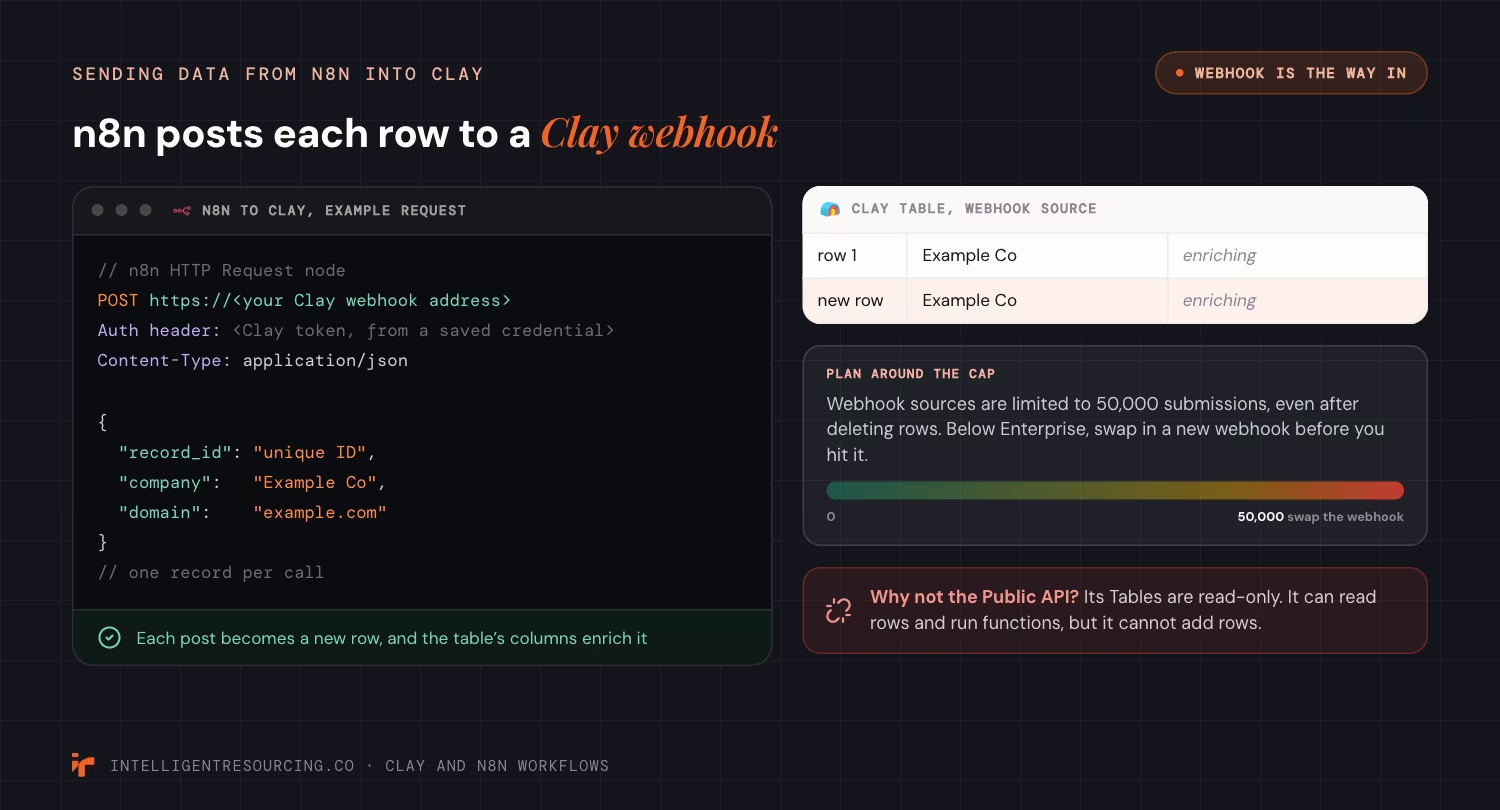
As of October 2026, Clay's webhook guide sets 2 rules to plan around. First, "Webhook sources are limited to 50,000 submissions, and this limit persists even after deleting rows." On plans below Enterprise, you need a new webhook once you hit that number. Enterprise plans can turn on auto-delete, so one webhook takes rows without a cap.
Second, you can add an auth token to the request header. You can only see that token once, so copy it straight away.
Why not use the API? An API (application programming interface) lets one app call another in code. In July 2026 Clay opened a Public API and a command line tool.
But Clay's API and CLI page says "Tables in the Public API is read-only." It can read rows and run functions, but it cannot add rows, so the webhook is still the way in.
Set up the n8n side like this:
- Add an HTTP Request node with the method set to POST.
- Paste the Clay webhook address as the URL.
- Add the Clay token as a header, stored in a saved credential.
- Send one record per call, with a unique ID field.
- Count posts per webhook, so you swap it before 50,000.
How do you send rows from Clay to n8n and get results back?
Add an HTTP API column in Clay and point it at an n8n webhook. Clay posts the row to n8n, and n8n replies through a Respond to Webhook node. Clay writes that reply into the column, so the result lands back on the same row. This is the cleanest way to run a step Clay cannot do itself.

Clay's HTTP API page lists 2 modes as of October 2026. Enrichment mode adds "API data to existing rows". Source mode imports data "to create a new table". Use enrichment mode to call n8n, because the answer belongs on the row that asked.
On the n8n side, set the Webhook node's Respond option to "Using 'Respond to Webhook' Node" and end the branch with that node. As of October 2026, n8n's Respond to Webhook docs set out 3 rules:
- If the workflow ends without reaching the node, n8n sends a standard message with a 200 status.
- If the workflow fails before the node runs, n8n returns a 500 error.
- If a second Respond to Webhook node runs, n8n ignores it.
The second rule helps you. A 500 shows up as an error in the Clay cell, so you can filter for failed rows and run them again. Reply with JSON, and keep the field names the same on every run. Clay maps those fields into columns, and a renamed field breaks the map.
Sometimes the n8n job is slow, like a call to a tool that queues work. Then reply at once with a job ID. Later, post the result back to a Clay webhook with that same ID.
How do you secure the webhooks and API keys?
Put auth on both doors and keep every key out of plain text. Add a token to the Clay webhook, and turn on auth for every n8n webhook. Store keys in saved credentials, not in fields that others can read. An open webhook address lets anyone who finds it write junk into your table or start your workflow.
As of October 2026, n8n's Webhook node docs list "Basic auth", "Header auth", "JWT auth" and "None". Pick Header auth, then add the same header in the Clay HTTP API column.
The node also has an IP allowlist. Requests from any other address get a 403 error. The docs set "The webhook maximum payload size" at 16MB.
Mind the 2 webhook addresses in n8n. The test address only listens while you test in the editor. The docs say n8n sets up the live address "when you publish the workflow". Point Clay at the live address, or rows will fail once you close the editor.
Clay has the same trap on its side. Its HTTP API page warns that keys typed into the Headers field are "visible in plain text to anyone with access to the table column." Save them as an HTTP API (Headers) account. Clay then encrypts them at the workspace level.
If you would rather hand this to a Clay workflow expert, ask how they store and rotate keys.
How do you handle rate limits between Clay and n8n?
Slow calls down on the sending side. A rate limit caps how many calls an app accepts in a set time. Go over it and the app returns a 429 error, meaning too many requests. Set a limit on the Clay column and use batches, waits and retries in n8n, so busy days slow down rather than drop rows.

As of October 2026, Clay's HTTP API page lets you "Control how many API requests you can send within a given time frame". Its example is 10 requests per 1,000 milliseconds. For a 429, the page says to "Configure rate limits in your enrichment." Set the Clay limit below what your n8n server and its downstream apps can take.
In n8n, the rate limits guide gives 3 tools as of October 2026:
| n8n tool | What it does | Use it when |
|---|---|---|
| Retry On Fail | Tries the call again after a failure | A 429 is rare and short |
| Wait Between Tries | Sets the gap between retries, in milliseconds | Set it "to more than the rate limit" |
| Batching in the HTTP Request node | Sends a set number of items, then pauses | You post many rows to Clay at once |
The guide also pairs a Loop Over Items node with a Wait node to pace calls one batch at a time. Large batches also use memory on your n8n server. Our n8n memory limits guide covers that fix.
What happens when a step fails, and how do you recover?
Catch the error, park the record and tell a person. Turn on an error output for nodes that call Clay or other apps, and send failed items to a side branch that logs them. Give every live workflow an error workflow that sends an alert. Then a failed call becomes a row to fix, not a lost lead.
n8n's error handling docs say, as of October 2026, that "The error workflow must start with the Error Trigger" node. You then pick it under "Error workflow" in the main workflow's settings. The Error Trigger gets the error message, the last node that ran and the workflow name. A Stop And Error node can "force executions to fail under your chosen circumstances", for example when Clay returns a row with no email.
Set each node's On Error choice with care:
- Stop Workflow halts the run. Use it when later steps make no sense without this one.
- Continue moves on with the last good data. Use it rarely, because it hides failures.
- Continue (using error output) sends the error down its own branch. Use it for calls to Clay, CRMs and sending tools.
Stop repeats before they happen. Give every record a unique ID, and check it before you write to a CRM. A retry then updates the record instead of making a copy.
Read the record back after each write, too. Our Clay and HubSpot sync guide shows that check for one CRM.
The step that did the work should not be the step that says it worked. We hold our own work to the same rule. No agent grades its own work. Every claim in our audits is re-verified by a second agent whose job is to refute it, and every status table carries the date it was true.
How do you roll out a Clay and n8n workflow?
Start with one source, one Clay table and one destination. Run real records through it for a week and read every error. Add retries, then a second destination, then more volume, so each step shows you where it breaks while the stakes are small. A full build on day one hides which part failed.
n8n changes fast, so test on the version you run. n8n's release notes list version 2.45, released on 20 October 2026, with 2.35 out on 11 August 2026. That is 10 releases in about 10 weeks. Pin your version, read the notes before you update and test in a copy of the workflow first.
A simple rollout plan:
- Map each step to Clay or n8n, using the table at the top of this page.
- Build the n8n to Clay webhook, with a token and a unique ID on every row.
- Build the Clay to n8n call, with Header auth and a Respond to Webhook node.
- Set rate limits on both sides, then add the error branch and error workflow.
- Send 100 test records and check every row by eye.
- Add volume only once a full week runs without an unexplained error.
If you want a second pair of eyes on the plan, talk to our team about your workflow.
Clay Workflows
Book a 30-minute workflow audit. We map which steps belong in Clay and which in n8n, and where your rows can fail.
FAQs
Does Clay have an API?
Yes. As of October 2026, Clay offers a Public API and a command line tool on all plans, including free and trial plans. The API can read tables and run functions, but tables are read-only. To add rows, post to a Clay webhook.
Is the Clay API free?
Access is free on every plan, but the work is not. Clay says API and command line calls use the same credits and actions as the same work done in the app. Plan your credit use as if a person ran each step.
Is Clay a replacement for n8n?
No. Clay finds and enriches contacts, and n8n moves data between apps with retries and logs. Clay's Workflows, in open beta since August 2026, cover some of the same ground inside Clay. Teams that route to many apps still use n8n for that part.
Can n8n write enriched data back into a Clay table?
Yes, through a webhook. n8n posts the data with an HTTP Request node, and each post becomes a row. If the data answers a row that Clay sent out, reply through the Respond to Webhook node, so the answer lands on that same row.
Is n8n risky to connect to Clay?
The risk sits in open webhooks and loose keys. Turn on Header auth for each n8n webhook, add a token to each Clay webhook and keep keys in saved credentials. Add an IP allowlist if your n8n server sits on the open web.