

Why does n8n run out of memory?
n8n runs out of memory when a single run needs more than the instance has. n8n does not cap how much data each node can fetch. So a large API (application programming interface) reply, a big file or a long AI answer can fill memory fast. Every node then adds its own output to the same run.
As of October 2026, n8n's guide to memory issues lists 6 things that raise memory use:
- The amount of JSON data in the run.
- The size of binary data, such as files and images.
- The number of nodes in the workflow.
- The Code node and the older Function node, which use much more memory.
- Manual runs, because n8n copies the data for the editor screen.
- Other workflows running at the same time.
The guide also names the signs. In the editor, n8n says a run "stopped at this node" and that it "may have run out of memory". Your server logs show "JavaScript heap out of memory".
The heap is the block of memory that Node.js, the engine under n8n, uses to hold data. Docker and n8n Cloud restart on their own after a crash.
AI steps make this worse, because each answer adds text to every item. A GTM (go-to-market) flow that enriches leads and then calls a language model hits the same wall. Our guide to Clay and n8n API workflows walks through 1 such flow, from enrichment to outreach.
What is a dummy node, and does it still work in n8n 2?
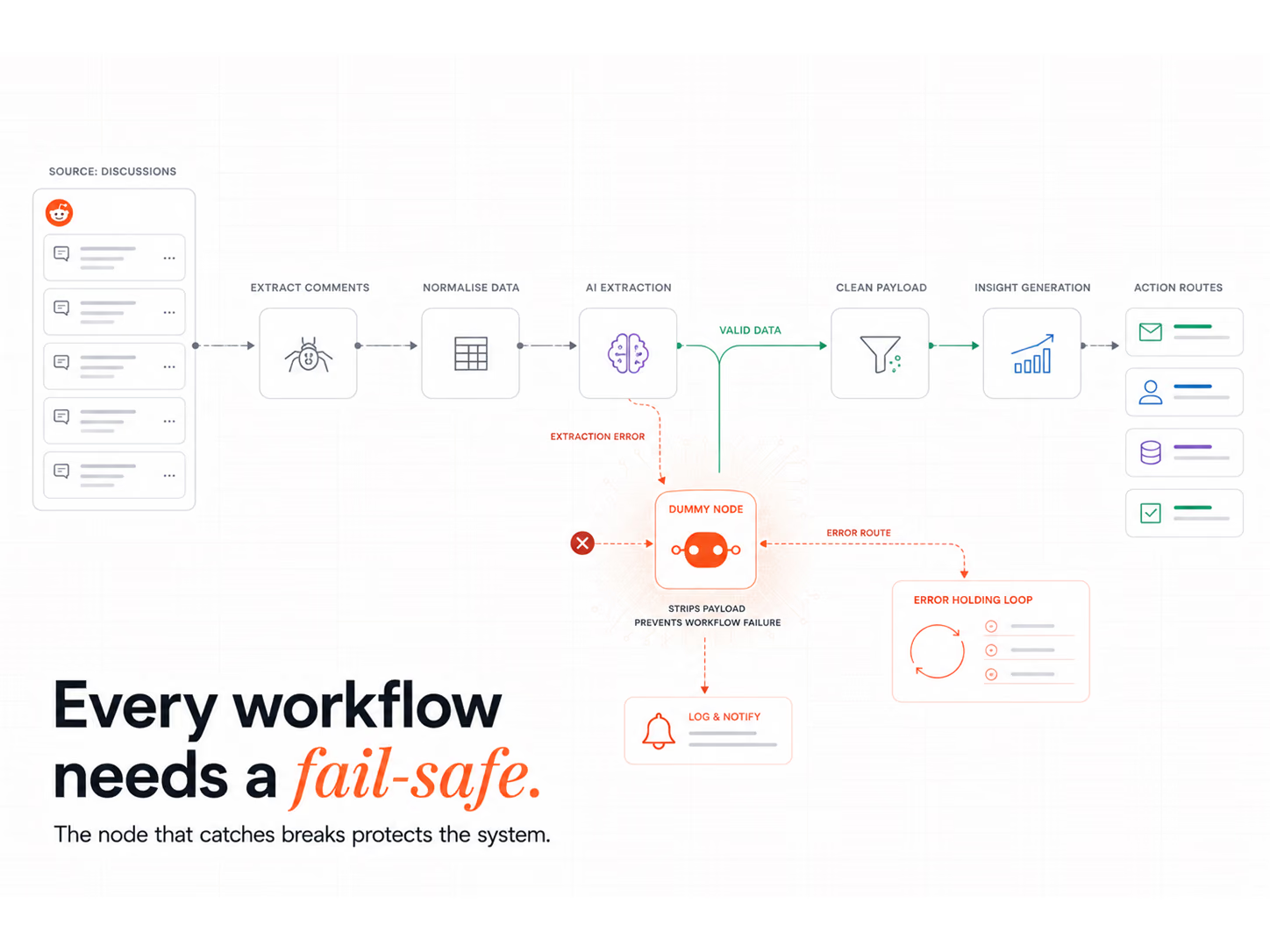
A dummy node is a step that does no real work. It drops the data you no longer need and passes on a tiny, fixed result. In n8n 2 you build it with the Edit Fields (Set) node. Turn on "Keep Only Set Fields" and set 1 field, such as "done: true", so the next node gets only that field.
As of October 2026, the Edit Fields (Set) node docs say "Keep Only Set Fields" will "discard any input data that you don't use in Fields to Set". That option is the core of the pattern.
Some steps from 2025 guides are now out of date:
- The Function node is old. n8n's memory guide calls it "the older Function node". Use Edit Fields instead.
- Skip the Code node for this job. n8n's memory guide says to avoid the Code node where you can. Since version 2, every Code node script also runs on a task runner, a separate helper process.
- The toggle names changed. Older posts say "uncheck all input fields". In the current node it is "Keep Only Set Fields", with an "Include in Output" choice.
A dummy node in the middle of a flow still has 3 good uses. It keeps logs short and shrinks the reply a webhook sends back. It also lets you test one branch with clean, known input. Our post on lead generation with Clay and n8n sets out the 4 layers of that kind of flow, and each layer is a good place to trim.
How do you process big data sets in n8n without crashing?
Split the list into batches and send each batch to a sub-workflow. The sub-workflow does the heavy work and ends with a dummy node. So the parent gets back 1 small item per batch. n8n's docs say a sub-workflow holds only the current batch in memory, and that memory frees up when it ends.
As of October 2026, n8n's guide to sub-workflows says calling one workflow from another "can also help if your workflow grows large enough to encounter memory issues". Here is the build, step by step:
- Add a Loop Over Items node. Set the batch size. In 2026, n8n's own example runs 200 rows per run instead of 10,000.
- Add an Execute Sub-workflow node inside the loop. Point it at a new workflow.
- Start the sub-workflow with the Execute Sub-workflow Trigger. Do the fetch, the AI call and the CRM (customer relationship management) write in here.
- End the sub-workflow with a dummy node. Use Edit Fields with "Keep Only Set Fields" on. Set 1 or 2 fields, such as a count of records written.
- Turn on "Execute Once" in that last node's settings. It then runs once, with data from the first item only. So the parent gets 1 item back, not 1 per record.
Step 4 is the key change from 2025 advice. n8n's docs say each sub-workflow should return only a small amount of data to its parent. If it passes its full input back, the parent holds every batch again, so the dummy node at the end is what keeps the saving.
In our work, Intelligent Resourcing runs a fleet of 100 automation workflows, 32 live in production, across signal detection, data enrichment, competitor intelligence and content operations. Each of those flows needs clear data limits, because one crash stops the signals that flow was built to catch. If you want a flow like this built and tested for you, talk to our team.
How do you raise the memory limit on self-hosted n8n?
On your own server, give the box more memory and raise the heap limit to match. Set the limit with the NODE_OPTIONS setting and the --max-old-space-size flag. The number is in MiB, a unit just over 1 million bytes. This stops "heap out of memory" errors for a while, but it does not fix a heavy design.
The 2026 Node.js command-line docs explain the flag. For a box with 2 GiB (2,048 MiB) of memory, they suggest a limit of 1536 MiB, which leaves room for the rest of the system. In Docker, that looks like this:
- Environment line: NODE_OPTIONS=--max-old-space-size=1536
- Container memory: set it above the heap limit, so the container is not killed first.
- Restart: the new limit only applies after n8n restarts.
Files are less of a risk than they were. The n8n 2 breaking changes page says n8n removed the old mode that kept binary data in memory. Files now go to the filesystem by default, or to the database in queue mode.
One note: as of October 2026, n8n's own page on binary data still says memory is the default. Trust the newer change log. If you still run an old version 1 build, set the binary data mode to filesystem yourself.
What memory does n8n Cloud give you on each plan?
On n8n Cloud you cannot raise the heap limit yourself. Each plan has a fixed cap, and the only way up is a bigger plan. As of October 2026, Starter and Pro-1 get 640MiB, Pro-2 gets 1280MiB and Enterprise gets 4096MiB. That same month, n8n said the app itself uses about 180MiB before any workflow runs.
These caps come from n8n's page on managing your Cloud data, checked in October 2026:
| Plan | Memory | CPU, or processor (burstable) |
|---|---|---|
| Trial | 640MiB | 10 millicore |
| Starter | 640MiB | 10 millicore |
| Pro-1 (10k runs) | 640MiB | 20 millicore |
| Pro-2 (50k runs) | 1280MiB | 80 millicore |
| Enterprise | 4096MiB | 80 millicore |
So a Starter flow has about 460MiB to work with. That is why batches and sub-workflows matter most on these plans. The same page warns that clicking around the editor during a big run can also tip you over the cap. Our post on HubSpot and n8n together covers how to keep big CRM syncs under HubSpot's API limits too.
When should you move to queue mode?
Move to queue mode when many runs fire at once and one machine cannot keep up. Queue mode splits the work: a main instance takes the triggers, and worker machines run the flows. Each worker runs on its own, so heavy runs spread across machines instead of piling onto 1.
As of October 2026, n8n's queue mode docs say the main instance passes each run ID to Redis. Redis is a fast message store that holds the queue. The next free worker picks it up. Here is how the options compare:
| Setting | What it does | When to use it |
|---|---|---|
| EXECUTIONS_MODE=queue | Runs flows on workers, not the main instance | Many runs at once, or one flow that needs its own machine |
| N8N_CONCURRENCY_PRODUCTION_LIMIT | Caps how many live runs go at once on 1 machine | Bursts of webhooks on a single instance |
| Save successful runs: off | Stops n8n storing the data of runs that worked | Stable, high-volume flows past testing |
Queue mode needs Redis, and n8n advises a Postgres database over SQLite, so it adds work to run. For most small GTM teams, batches and sub-workflows come first. Queue mode comes when volume grows. Our GTM engineering page sets out what we build and run.
Clay Workflows
The dummy node is one small part of keeping workflows stable. Intelligent Resourcing builds and runs the systems behind signal-led outbound, and your team owns them.
FAQs
How do I fix the JavaScript heap out of memory error in n8n?
On self-hosted n8n, raise the heap limit with NODE_OPTIONS=--max-old-space-size and give the machine more memory. Then cut what each run holds: batch big lists and move heavy steps into sub-workflows. On n8n Cloud, you need a bigger plan or a leaner workflow.
Does a dummy node reduce memory use in n8n?
It cuts what later nodes get, which keeps logs short and replies small. On its own it does not end the run. It saves the most memory as the last node of a sub-workflow, because the parent then gets back 1 small item instead of the whole batch.
Should I use EXECUTIONS_PROCESS=own to isolate memory?
No. n8n made "main" the default from version 1 and marked "own" mode for removal. Its version 1 guide warns that in main mode, one flow that uses more memory than is free can crash the whole app. Use queue mode to spread runs across workers instead.
How do I automatically delete old run data in n8n?
Pruning is on by default in self-hosted n8n. As of October 2026, it deletes finished runs after 336 hours, or 14 days, and keeps 10,000 at most. Change these with EXECUTIONS_DATA_MAX_AGE and EXECUTIONS_DATA_PRUNE_MAX_COUNT.
When should I not use a dummy node?
Skip it when the next node needs the full data. If you strip a field a later step uses, that step fails or writes blanks. Check each node's input after you add the dummy node.
Why does my n8n workflow crash only when I test it?
Manual test runs use more memory, because n8n copies the data so the editor can show it. A flow that runs fine on its trigger can still crash in a test on big data. Test with a small sample instead.