

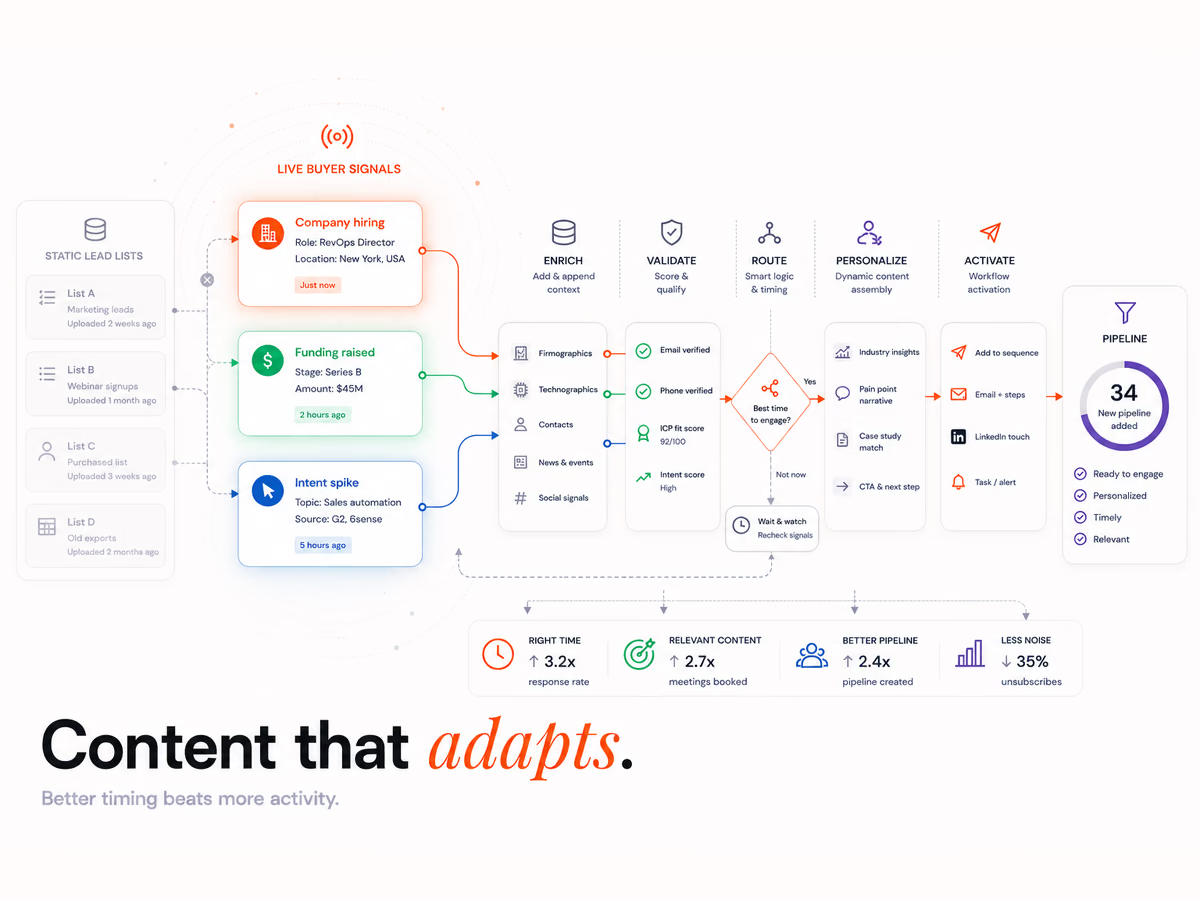
How does dynamic content automation work?
Dynamic content automation swaps parts of a page, email or ad based on who is viewing. It reads data about the viewer, checks it against your rules, and shows the matching version. Viewers who match no rule see a default. A tool then counts which version gets more people to act, so the rules get better over time.
Think of it as 4 parts working in order:
- Data: facts about the viewer, such as their company, their role or the pages they read.
- Rules: "if this, show that". For example, if the industry is health, show the health case study.
- Versions: the blocks that change, such as a headline, an image, a proof point or an offer.
- Goal: the action you want, such as a demo request, so you can tell which version works.
Web tools show versions in 3 ways. An A/B test shows 2 versions at random.
Rules-based personalisation shows a version when a rule matches. Model-driven tools learn which version works best for each kind of visit. In email, the same logic runs inside 1 send, as our guide to email automation triggered by buyer signals shows.
Why bother? Most of the buying journey now happens before a buyer talks to you. 6sense's 2025 Buyer Experience Report, from nearly 4,000 buyers, found first contact with a seller moved from 69% to 61% of the journey. So for most of that time, your site and emails have to do the talking.
What data should drive dynamic content?
Use 3 kinds of data in this order: account, segment, then behaviour. Account data says which company is visiting, and segment data says a known contact's role or stage. Behaviour data says what they just did, such as reading the pricing page twice. Each kind needs a default for when it is missing, because most visits carry little data.
| Data type | Where it comes from | What it can change | Main limit |
|---|---|---|---|
| Account | Reverse IP lookup, or your target account list | Industry headline, logos, case study | Many visits do not match a company |
| Segment | Your CRM (customer relationship management) system or form fields | Role-based proof, plan or offer | Only works for known contacts |
| Behaviour | Pages viewed, visit count, email clicks | Next step, such as pricing or a demo prompt | 1 click is a weak sign of intent |
Reverse IP lookup means matching a visitor's internet address to a company. Webflow's enhanced match page, updated July 2025, says it can return company name, domain, estimated revenue, industry and number of employees. It also says not every visitor matches. People on a public network or a VPN (a private network that hides their location) often do not.
Behaviour signals work best when they stack up. Our guide to B2B buying signals covers which ones point to real intent.
Bad data shows the wrong version to the right buyer. One client's bought data was so unreliable, a record might show 100 staff against $4M revenue, that their reps were confirming prospects by hand on Street View. A page keyed to that record would show the wrong proof.
That is why the default matters. At Intelligent Resourcing, every fact we deliver carries its source. If we cannot verify it, we say so, and we do not fill gaps with guesses. An unknown is shown as unknown, never rounded up to zero.
In dynamic content, the same rule applies. An unknown field should fall back to the default, not to a guess.
What does dynamic content look like on web pages, emails and ads?
The same rules can drive web pages, emails and ads. On a page, the headline, proof and offer change by industry or stage, and in email, 1 send shows different blocks to each segment. In ads, the platform fills in details from the viewer's own profile. Start where you already have the most traffic and the cleanest data.
| Channel | What usually changes | Example |
|---|---|---|
| Web page | Headline, logos, case study, call to action | A logistics firm sees a logistics case study on the pricing page |
| Content blocks, offer, sender, send time | A finance lead gets the finance proof block in the monthly send | |
| Ads | Name, photo, company or job title in the ad | A LinkedIn ad shows the viewer's own photo next to your logo |
In email, the change happens inside 1 send, not by building 5 campaigns. Each contact gets the block that matches their fields, and contacts with no match get the default block.
Ads work a little differently, because the ad platform holds the data. As of October 2026, LinkedIn's help page on Dynamic Ads says these ads are tailored to each member from their own profile data, such as photo, company name or job title. It also says members can opt out of this.
Cold email is a separate job with its own rules. Our guide to signal-based outreach covers how to personalise it.
Which tools run dynamic content, by type?
Pick tools by the channel they change, not by brand. Most teams need 3 types: 1 tool for web pages, 1 for email, and the ad platforms they already use. A customer data platform (CDP) or your CRM feeds all 3, so the same segment means the same thing everywhere. Fix the data layer before buying more tools.
| Tool type | What it does | Examples |
|---|---|---|
| Web personalisation | Swaps page blocks by audience and tests versions | Webflow Optimize, Optimizely, Mutiny |
| Email platform | Shows different blocks to each segment in 1 send | Mailchimp, Klaviyo, Marketo |
| Ad platform | Fills in ad details from the viewer's profile or your lists | LinkedIn Dynamic Ads, Google Ads |
| Account-based marketing (ABM) platform | Finds which companies are researching, then targets them | 6sense, Demandbase |
| CDP or CRM | Holds the segments every other tool reads | Twilio Segment, Salesforce |
Most brands now use artificial intelligence (AI) for this. Twilio's 2025 customer engagement survey of 637 business leaders and 7,640 consumers found 56% of brands use AI to tailor experiences. Still, 88% of consumers said they are more likely to buy when it happens in real time, and only 44% of brands said they work at that level.
The gap is wiring, not tools. Our marketing automation services connect the data layer to the tools that change content.
What do Australian privacy rules say about personalisation?
Australia's Privacy Act does not ban tracking or personalisation. It does set rules once data can identify a person. You must say what you collect, collect only what you need, get consent for sensitive information, and let people opt out of direct marketing. A new rule on automated decisions starts on 10 December 2026.
The Office of the Australian Information Commissioner (OAIC) sets out these duties in its guidance on tracking pixels, published in November 2024. Pixels are small bits of code that report what visitors do. The key points:
- You are responsible. The business that puts a third-party pixel on its site must make sure it follows the Privacy Act.
- Pixel data can be personal. An IP address or a scrambled email can identify a person once matched with other data.
- Collect less. The OAIC asks firms to limit collection to what is needed.
- Sensitive data needs consent. That includes health and similar data.
- Opt-outs apply. Ads that target people must give them a simple way to opt out, under Australian Privacy Principle (APP) 7.
- It is not "set and forget". Checks on tracking tools should be ongoing.
The second change is newer. The OAIC's automated decision guidance, published September 2026, says that from 10 December 2026 some firms must explain automated decisions in their privacy policy.
This applies when a computer program makes or helps make a decision that could significantly affect a person, using their personal information. Swapping a headline is unlikely to count. Rules that set price or eligibility sit closer to the line, so check those with your lawyer.
How do you stop personalisation from backfiring?
Personalisation backfires when it feels creepy, when it pushes too hard, or when search engines see a different page than people do. Use data buyers chose to share, keep each version honest, and change parts of a page, not its whole meaning. Above all, keep a default page that works well for everyone.
A Gartner survey released in June 2025 asked 1,464 B2B buyers and consumers in late 2024 about this. It found nearly half of personalised digital messages miss the mark, because people find them creepy, irrelevant or both. Gartner's fix is to personalise from data that customers share with you.
Follow 4 guardrails:
- Ask, then use. A short quiz or a "what's your role?" choice gives you data the buyer chose to share.
- Do not show what you know. "Hi, we see you're from Acme" feels like being watched. Show the right case study instead.
- Keep search engines in mind. Google's spam policies, updated August 2026, define cloaking as showing different content to users and search engines to mislead users and game rankings. Keep the default page the same for everyone who matches no rule, crawlers included.
- Cap the changes. Swap 2 or 3 blocks per page. A page that changes all over is hard to test and hard to trust.
How do you measure whether dynamic content works?
Measure dynamic content against a holdout group, not against last month. A holdout is a share of visitors who keep seeing the default version. Compare their results with the group that saw the tailored version. Track pipeline and repeat buying as well as clicks, because a version can win the click and still lose the deal.
Clicks alone can fool you. Gartner's June 2025 survey found personalised marketing gave 53% of customers a bad experience. Those customers were 3.2 times more likely to regret a purchase and 44% less likely to buy again.
A simple way to measure:
- Pick 1 goal per page, such as demo requests from the pricing page.
- Hold back about 10% of visitors on the default version for the whole test.
- Run the test for full weeks, so weekdays and weekends both count.
- Compare pipeline, not just clicks. Check which group created more qualified deals.
- Keep the winner and test the next block. Change 1 thing at a time.
If you want help wiring the data, rules and tests together, talk to our team.
Content Creation
Talk to our team about which pages and emails to personalise first, and how to wire your CRM data, rules and tests together.
FAQs
What is dynamic content in emails?
Dynamic content in emails is 1 send that shows different blocks to different people. A finance lead and a retail lead get the same email, but each sees proof from their own industry. The email tool picks the block from fields in your contact list. Contacts with no match see the default block.
What does content personalisation mean?
Content personalisation means changing what someone sees based on what you know about them. In B2B, that is usually their company, their role and what they have read on your site. Done well, it saves the buyer time. Done badly, it feels like being watched.
What are some examples of dynamic content?
A pricing page that shows a case study from the visitor's industry is 1 example. Others include an email block that changes by job role, and an ad that shows the viewer's own photo next to your logo. A "resume where you left off" prompt for a returning visitor is another.
What is the difference between dynamic and static content?
Static content shows the same thing to every visitor. Dynamic content changes parts of the page or email for each visitor, based on data and rules. Most sites mix both: a static page with 2 or 3 blocks that change.
Which channel should you personalise first?
Start with the channel that has the most traffic and the cleanest data. For most B2B teams, that is the pricing page or the main nurture email. Prove it works there with a holdout group before you add more channels.
Does dynamic content hurt SEO?
It does not hurt search engine optimisation (SEO) if the default page is the same for search engines and first-time visitors. Problems start when a site shows search engines content that people never see. Keep changes to a few blocks and keep the default version complete.