

Step 1: What Do You Need in Place Before You Start Building?
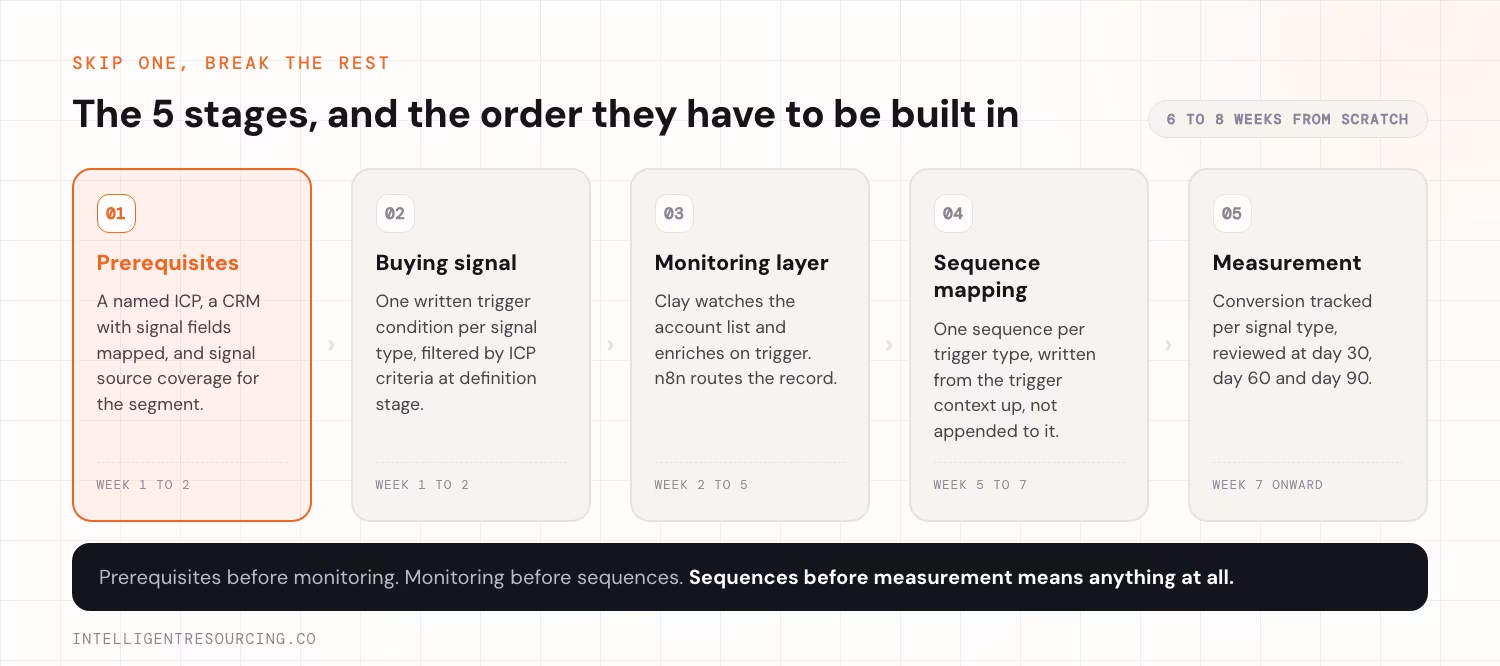
3 prerequisites must exist before any tool is configured. Without all 3, the system monitors the wrong accounts, has nowhere to route data, or fires on segments with no signal coverage. Building the monitoring layer before verifying these prerequisites extends the build timeline and produces a system that fires incorrectly from day one.
The 3 Prerequisites
| Prerequisite | What "ready" looks like | Common failure mode |
|---|---|---|
| Defined ideal customer profile (ICP) | Named criteria: industry, headcount range, revenue band, tech stack, geography | ICP defined only as "companies like our current clients", too vague to build a monitored list from |
| CRM that accepts enriched records | HubSpot (or equivalent) configured with the contact and company fields the enriched records will populate | CRM exists but fields are not mapped, so enrichment data lands with nowhere to go |
| Signal source coverage for the ICP | LinkedIn, Crunchbase, and at least 1 job board covering the ICP segment | ICP is bootstrapped SMBs or government entities, and low signal coverage means few triggers fire |
How to Verify ICP Readiness
Write out the monitored account definition as a filter you could apply in Apollo or ZoomInfo today. If you cannot produce a specific list of 200 to 500 accounts that clearly match, the ICP is not defined enough to build a buying signal from. The buying signal defines triggers for specific account types. A vague ICP produces vague triggers, and vague triggers produce a system that fires on the wrong accounts.
How to Verify CRM Readiness
Confirm HubSpot (or your CRM) has these fields mapped at the contact and company level before connecting Clay:
- Signal type (job change, funding, or tech stack change)
- Signal date (when the trigger event occurred)
- Signal detail (for example, "New VP of Sales joined: [Name]")
- Buying window status (open, closed or deprioritised)
- Enrolment sequence (which sequence was triggered)
These fields do not exist by default. Build them before the monitoring layer goes live.
Step 2: How Do You Define Which Signals Your Team Will Actually Track?
Start with the 3 signal types most reliably tied to a B2B buying window: job changes, funding events, and tech stack changes. Write a specific trigger definition for each. Not "new hire" but "new VP of Sales at a 50 to 500 employee Salesforce shop in Australia." Precision at this stage determines whether the system fires on signal or on noise.
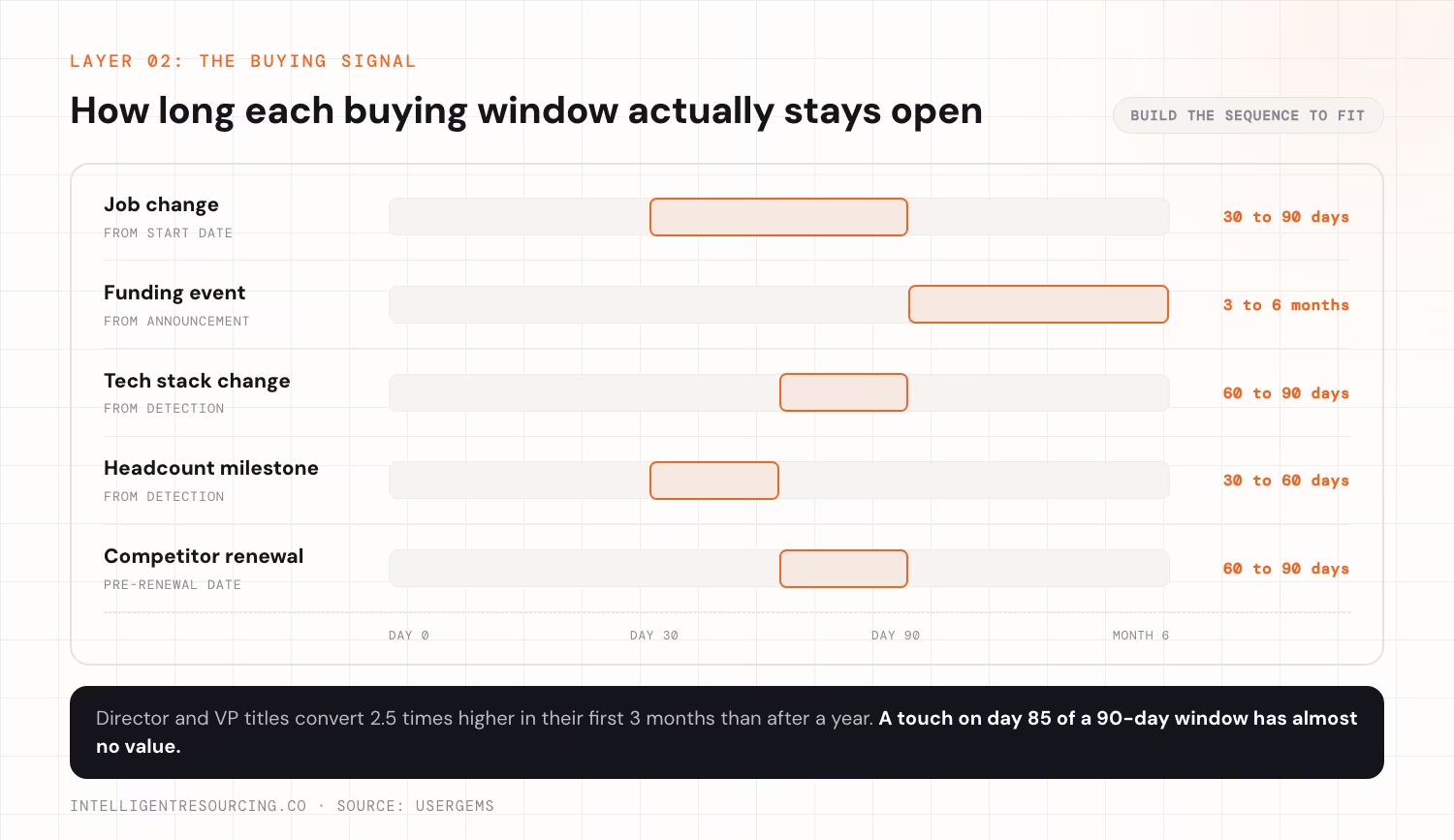
The timing behind the job change signal is well documented. UserGems found that director and VP titles convert 2.5 times higher in their first 3 months than after a year in the role, and that new executives spend 70% of their budget within their first 100 days. That is the window a trigger definition has to land inside.
The Buying Signal Template
| Signal type | Trigger condition | Buying window duration | Sequence assigned |
|---|---|---|---|
| Job change | [Specific role] joins [ICP-fit company] | 30 to 90 days from start date | Job Change [Role Type] |
| Funding event | Series A or Series B announced, [headcount range], [geography] | 3 to 6 months from announcement | Funding Event, Growth Infrastructure |
| Tech stack change | [Specific tool] added or removed, confirmed via [source] | 60 to 90 days from detection | Tech Stack [Tool Category] |
| Headcount milestone | Company reaches [X] employees | 30 to 60 days from detection | Scale Milestone, Ops Infrastructure |
| Competitor renewal window | [Competitor] contract typically renews at [X] months from signing | 60 to 90 days pre-renewal | Renewal Window, Competitive |
Rules for Writing Trigger Definitions
- Specific role, not broad title: "New VP of Sales" is a signal. "New hire" is not.
- ICP criteria apply to the signal: A funding event at a company outside your ICP is not a signal for your team. It is noise. Filter by ICP criteria at the trigger definition stage, not after.
- 1 trigger definition per sequence: Each trigger condition maps to exactly 1 sequence. If 2 different trigger conditions would use the same sequence, either the buying signal is too broad or the sequence is too generic.
How Many Signals to Start With
Start with 2, not 5. Job changes and funding events cover the highest-signal segments for most B2B ICP definitions, and they produce enough trigger volume to generate measurable data within 60 days. Add tech stack changes in month 2 once the first 2 triggers are running cleanly. A system monitoring 5 signal types poorly is worse than one monitoring 2 signal types well.
Once both triggers run cleanly, qualification and escalation can move to an agent, and AI agents for sales prospecting sets out how that hand-off works.
Step 3: How Do You Set Up the Monitoring and Enrichment Layer?
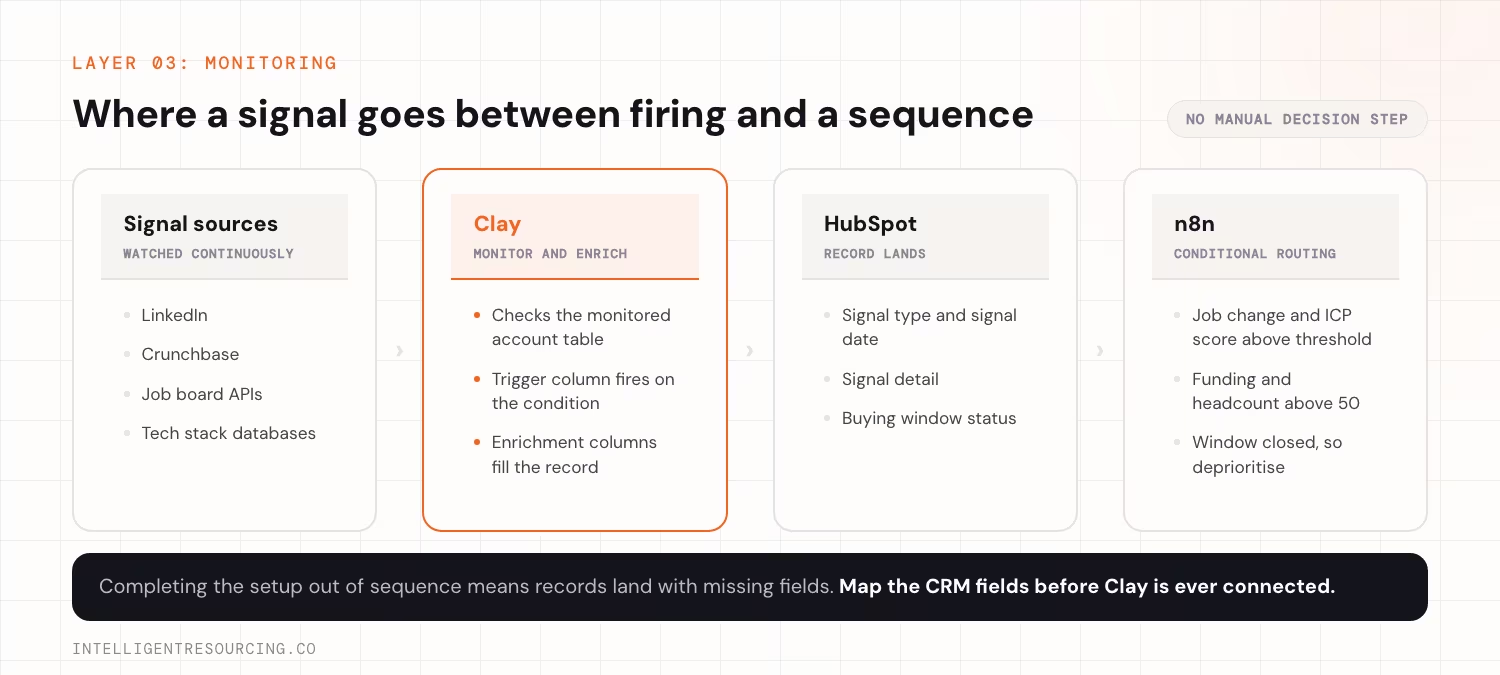
Clay is the monitoring layer. It connects to signal sources, watches the monitored account list for defined trigger events, enriches records when a trigger fires, and pushes the enriched contact into HubSpot. The Clay setup sequence runs in a specific order. Completing it out of sequence means records land with missing fields or incorrect enrichment data.
74% of AI adopters report productivity increases as of 2025, which means automating signal detection and record enrichment returns SDR capacity to the outreach work that drives pipeline. Intelligent Resourcing's Clay workflow automation service installs this exact architecture for B2B teams that need it built without the 8-week configuration timeline.
The Clay Setup Sequence
- Build the monitored account table: Import the ICP account list. This is the universe of companies Clay watches. Update it monthly as new accounts qualify.
- Connect signal sources: Clay integrates with LinkedIn, Crunchbase, job board APIs, and tech stack databases. Connect each source relevant to the buying signal defined in Step 2.
- Define trigger columns: For each signal type, build a Clay column that checks the relevant source for the trigger condition. When the condition is met, the column populates with the signal detail.
- Build enrichment columns: When a trigger fires, Clay populates additional fields: contact name, role, email, LinkedIn URL, company headcount, tech stack snapshot. These fields travel with the record into HubSpot.
- Configure the push to HubSpot: Set up the Clay to HubSpot connection via native integration or webhook. Map Clay columns to HubSpot fields. Confirm the signal type field, signal date field, and buying window status field populate correctly on the receiving end.
n8n Handles the Conditional Routing Logic
Once a record lands in HubSpot from Clay, n8n applies the rules that determine what happens next:
- If signal type is job change and the ICP match score is above threshold, enrol in the Job Change sequence
- If signal type is funding and company headcount is above 50, enrol in the Funding Event sequence
- If buying window status is closed, deprioritise and remove from active monitoring
n8n runs these conditions as a webhook-triggered workflow. No manual decision step exists between signal detection and sequence enrolment.
Step 4: How Do You Connect a Signal Event to the Right Outreach Sequence?
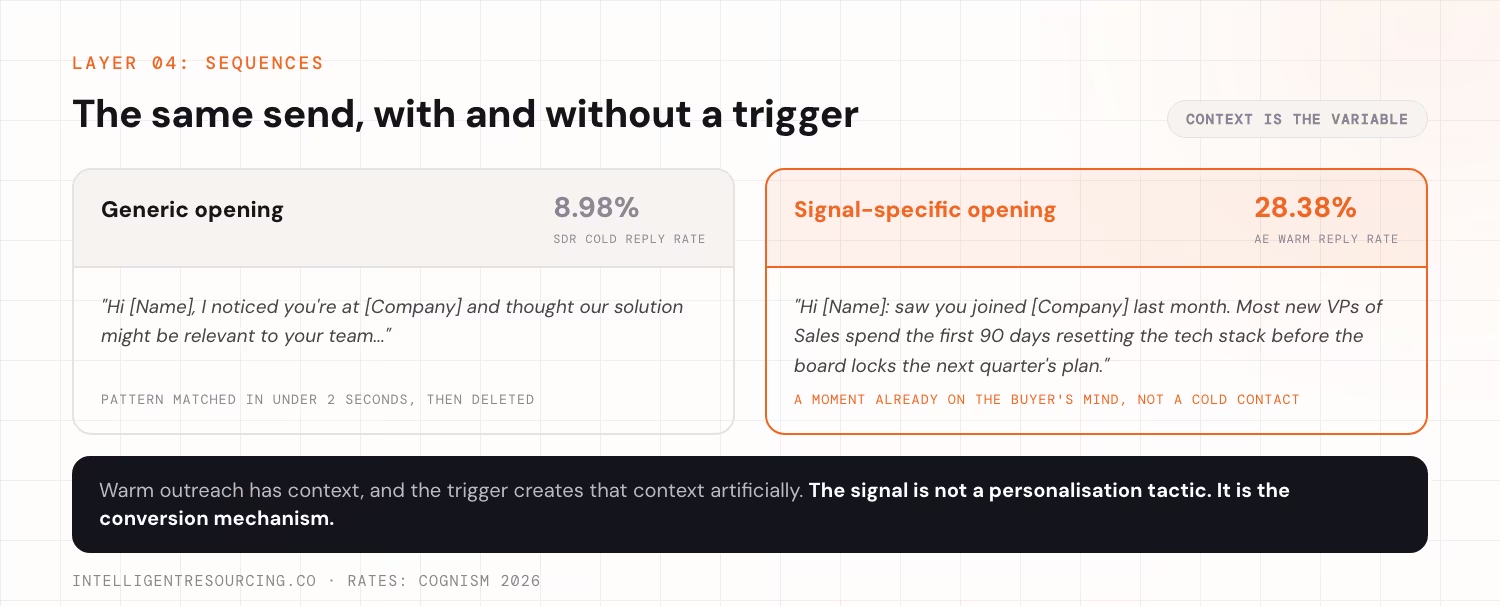
Each signal type needs its own sequence, written from the trigger context up. Not a generic cold email with the trigger detail appended. A sequence built from the signal: the opening line references the specific event, the value proposition connects to the need the event creates, and the call to action fits the urgency of the Verified Buying Window.
Cognism's 2026 outbound study of 149,376 of its own emails found SDRs achieve an 8.98% reply rate on cold sequences, compared to 28.38% for AEs working warm accounts. The gap exists because warm outreach has context. Signal-specific sequences create that same context artificially. The trigger gives the sequence a reason to exist that the buyer already recognises.
Sequence Structure per Signal Type
| Signal type | Opening line anchor | Core message | CTA framing |
|---|---|---|---|
| Job change (VP of Sales) | Reference the new appointment directly | Connect to the GTM infrastructure challenge new sales leaders face in the first 90 days | Short timeline: "before the quarter is set" |
| Funding event | Reference the round announcement | Connect to the vendor evaluation typically triggered by new capital | Window-aware: "before the stack decisions are locked" |
| Tech stack change | Reference the specific tool added or removed | Connect to the integration gap or adjacent need the change creates | Specific: "while the migration is still in progress" |
Generic Versus Signal-Specific: The Difference in Practice
Generic opening (does not work)
"Hi [Name], I noticed you're at [Company] and thought our solution might be relevant to your team..."
The buyer identifies this as cold outreach in under 2 seconds. Pattern matched. Deleted.
Signal-specific opening (works because timing is real)
"Hi [Name]: saw you joined [Company] last month. Most new VPs of Sales spend the first 90 days resetting the tech stack before the board locks the next quarter's plan. Happy to show you how [specific outcome] works for teams in that window."
The trigger makes the timing real. The buyer is not being cold-contacted. They are being reached at a specific moment already on their mind. Intelligent Resourcing's Intelligent Prospecting Playbook documents that outreach triggered by a confirmed buying signal converts at 4x the rate of cold sequence campaigns. The signal is not a personalisation tactic. It is the conversion mechanism.
Sequence Length by Signal Type
| Signal type | Recommended touches | Window to compress into |
|---|---|---|
| Job change | 4 to 5 touches | 3 to 4 weeks |
| Funding event | 5 to 6 touches | 6 to 8 weeks |
| Tech stack change | 3 to 4 touches | 2 to 3 weeks |
Build sequences against the window duration, not a generic 30-day cadence. A touch on day 85 of a 90-day job change window has almost no conversion value.
Step 5: How Do You Measure Whether the System Is Working?
Measure conversion rate per signal type, not aggregate reply rate. A signal-led system produces different conversion rates for different trigger types. Knowing which signals convert best tells you where to focus monitoring resources, which sequences to improve first, and which trigger definitions need tightening. Teams that track only aggregate metrics make decisions based on blended averages that hide which signals are working and which are not.
The 5 Metrics That Matter
| Metric | What it measures | Review cadence |
|---|---|---|
| Triggers fired per signal type | Whether the monitoring layer is detecting events at the expected rate | Weekly |
| Enrolment rate (triggers to sequences) | Whether the routing logic is working and accounts are qualifying | Weekly |
| Reply rate per signal type | Which trigger types produce the most engagement | Monthly |
| Meeting conversion per signal type | Which trigger types produce qualified pipeline | Monthly |
| Buying window close rate | How often the system reaches accounts inside the active window | Monthly |
What "Working" Looks Like at 30, 60 and 90 Days
| Milestone | What to check | Red flags |
|---|---|---|
| Day 30 | Triggers are firing. Records are landing in HubSpot with correct field mapping. Sequences are sending. | No triggers firing means the signal source is not connected. Records landing without signal fields means CRM mapping is broken. |
| Day 60 | Reply rate per signal type is measurable. At least 1 signal type is outperforming the others. | Uniform reply rates across all signal types means sequences are not differentiated enough. |
| Day 90 | Meeting conversion rate per signal type is measurable. The buying signal has been reviewed against 60-day data. At least 1 trigger definition has been tightened based on results. | No meetings from any signal type means sequences need rewriting, or ICP signal coverage is too low. |
What to Do With the Data
- Double down on the signal type producing the highest meeting conversion rate.
- Tighten trigger definitions for signal types producing high reply rates but low meeting conversion. The signal fires on the right accounts, but the timing or the message is off.
- Drop signal types that produce consistently zero engagement after 90 days. They are either not real signals for your ICP, or the segment has low source coverage.
Build the System in the Right Order
A signal-led prospecting system only works when each layer is built in sequence. The monitoring layer needs a defined ICP, the sequences need a clear signal, and the measurement layer needs per-signal tracking to show what is actually converting. Building these stages out of order creates configuration problems that often take weeks to unwind.
The technical setup also requires more than basic tool access. Clay enrichment, n8n webhook logic, and HubSpot field mapping all depend on someone comfortable with APIs, conditional workflows, and data architecture. Without that capability in-house, the configuration phase can extend the build timeline by 4 to 8 weeks.
Intelligent Resourcing's GTM Engineering service covers the full build, from ICP definition and buying signal through Clay and n8n configuration, sequence development, and measurement setup. The system is then transferred to the client with full ownership. The broader signal-led GTM engagement includes the complete prospecting infrastructure from strategy through implementation.
GTM Engineering
Intelligent Resourcing's GTM Engineering builds and installs the full signal-led prospecting infrastructure, including ICP definition, signal, Clay and n8n configuration, sequence architecture, and measurement setup. You get a working system designed around your buying signals, without spending months stitching the stack together internally.
FAQs
How long does it take to build a signal-led prospecting system from scratch?
For a team starting from scratch with no existing ICP documentation, CRM field mapping, or Clay configuration, the full build takes 6 to 8 weeks. The longest phases are ICP definition and signal (1 to 2 weeks), Clay and n8n configuration (2 to 3 weeks), and sequence writing and testing (1 to 2 weeks). Teams that already have a defined ICP and a configured CRM move faster.
Do you need a technical resource to set up Clay and n8n?
Yes. Clay enrichment column configuration, n8n webhook-triggered workflows, and HubSpot field mapping all require someone comfortable with API connections, conditional logic, and data field mapping. This does not require a software engineer, but it does require a technical operations person or a RevOps contractor. Teams without that resource in-house find the tool configuration phase extends the build timeline significantly.
How many signals should you track when starting out?
Start with 2: job changes and funding events. These cover the highest-signal segments for most B2B ICP definitions and produce enough trigger volume to generate measurable data within 60 days. Add tech stack changes in month 2 once the first 2 signal types are running cleanly. A system monitoring 5 signal types without enough volume in any of them produces data too thin to act on.