

What Do Automation Tools Cost in 2026?
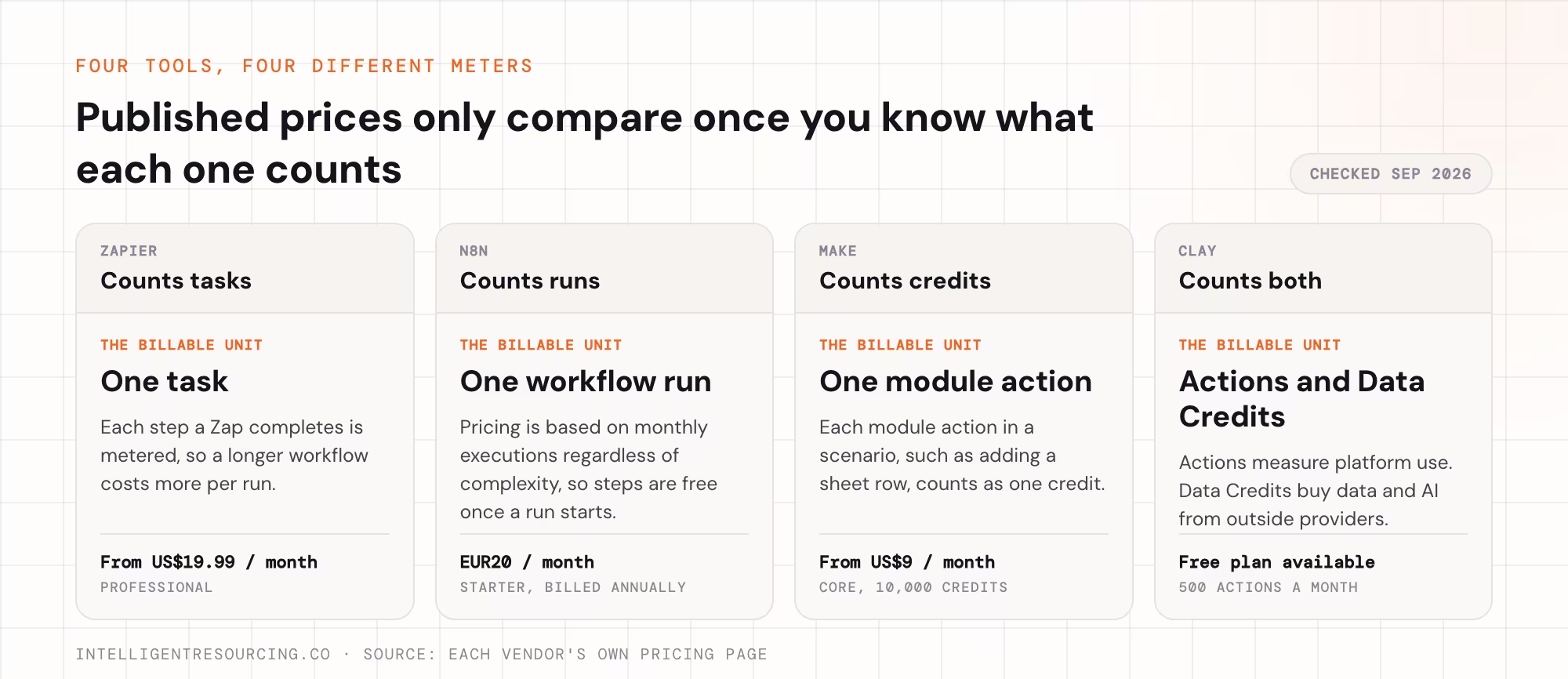
RevOps automation starts with software. But a tool's published price is only the first line of the budget. Here are the starting prices for five common tools, in the currency each vendor publishes.
| Platform | Published starting price | What changes the cost |
|---|---|---|
| Zapier | US$19.99 a month for Professional | Task volume, plan features and team needs |
| n8n | EUR 20 a month for Starter, billed annually | Workflow runs and plan features |
| Make | US$9 a month for Core at 10,000 credits | Credits, since each module action counts as one |
| Clay | Free plan available | Actions, Data Credits and plan |
| HubSpot Data Hub | US$720 a month for Professional, billed annually | Seats, data features and HubSpot Credits |
These figures come from each vendor's official pricing page, such as Zapier's pricing page, checked in September 2026. They are starting prices, not matching plans or full project quotes.
The gap between these prices shows why comparing tools cannot answer the whole cost question. One business might link two apps on a cheap plan. Another needs account research, lead scoring, CRM updates and sales handovers running together. Both use automation, but they pay for very different amounts of work.
Why Does RevOps Automation Cost More Than a Software Subscription?
A subscription pays for the tool. RevOps automation pays for connected workflows that move data and ownership between marketing, sales and customer success. Our explainer on what RevOps automation connects covers those handoffs. This section covers how their cost behaves.
The part most budgets miss is that usage grows with volume. Take a simple lead-routing workflow with 6 steps. It checks the record, matches the company, fills missing fields, scores the lead, assigns an owner and sends an alert.
| Leads per month | Workflow runs | Steps processed |
|---|---|---|
| 500 | 500 | 3,000 |
| 2,000 | 2,000 | 12,000 |
This is an example, not a vendor quote, and on tools that bill by task or credit, each step usually counts. n8n's pricing counts each full run instead, whatever its size. Either way, four times the leads means about four times the usage. That is before any data or AI charges.
Where Does Your RevOps Automation Budget Go?
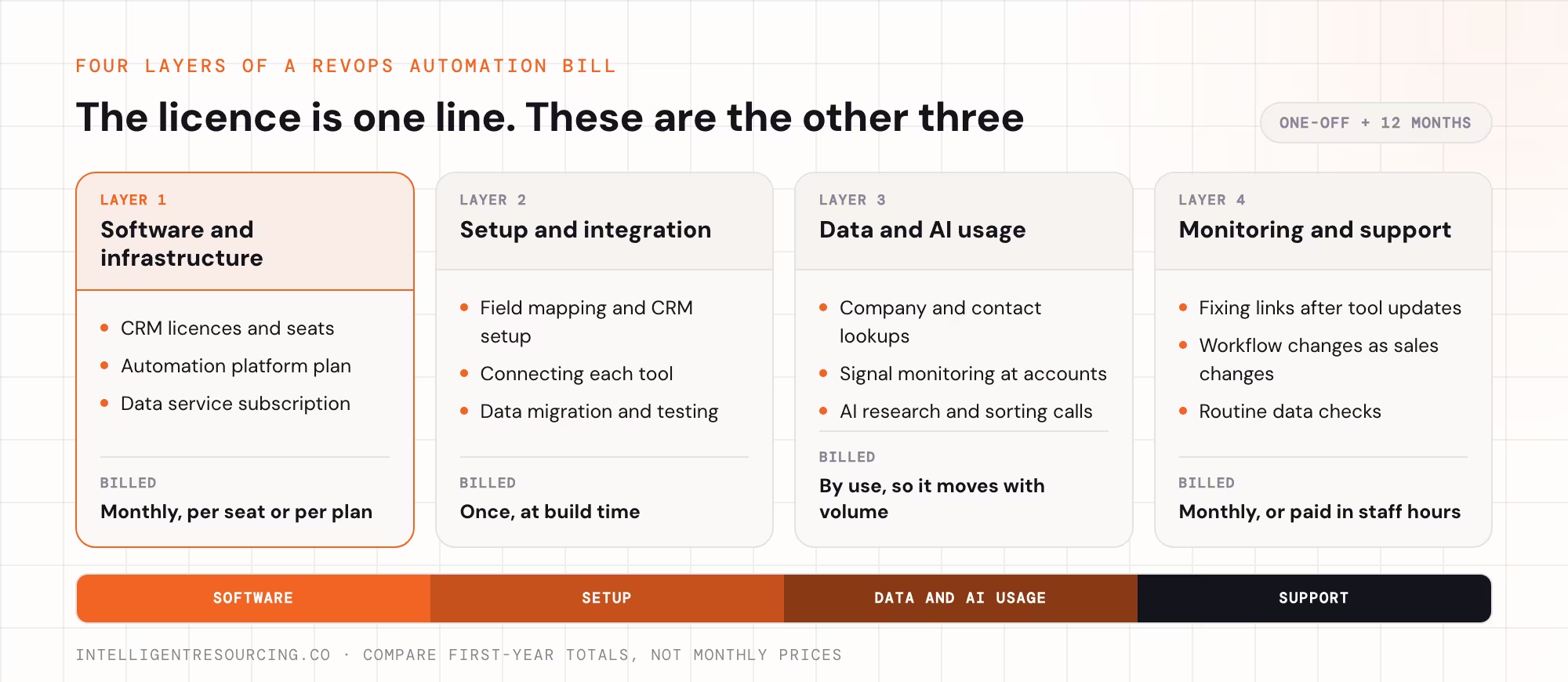
A good budget splits the one-off build from the monthly costs of software, data and support. How much goes into each part depends on your current systems and how many processes you want to automate.
Software and Infrastructure
The software budget covers the tools that store data, link systems and run workflows. That usually means a CRM, an automation platform, a data service and some sales tools.
Check your current licences before you buy more, because some features may already sit in your plans. A company on HubSpot, for example, may be able to automate some routing and data tasks without a second tool. Our guide to a RevOps tech stack in order covers which layers to add first.
Setup and Integration
Setup covers designing, building, testing and launching the system. That includes mapping fields, connecting each tool, setting up the CRM, moving data and testing workflows.
Costs usually rise when data has to move between several systems, or when those systems hold different customer records. The systems involved depend on the industry:
| Industry | Systems that often connect to the CRM | What tends to raise the cost |
|---|---|---|
| Business-to-business (B2B) software as a service (SaaS) | Billing, product usage and customer success tools | Tracking customers from first lead through renewal and expansion |
| Manufacturing | Stock and order, quoting and distributor systems | Quotes that need technical review before they become deals |
| Accounting and legal | Practice management and client file systems | Keeping confidential client files away from sales tools |
| Engineering and freight | Project, tender, transport and customer systems | Links to specialist tools and multi-step approvals |
A project quote should name every link included in the scope.
Data Enrichment and AI Usage
Automation works better with accurate data, but that data usually costs extra. Data services check company details, find the right contacts and spot changes at target accounts. AI tools can help with research and sorting.
These services are usually charged by use. Clay's pricing splits Actions, which measure platform use, from Data Credits, which buy data and AI from outside providers. That split shows the cost of processing data apart from the cost of buying it.
Monitoring and Ongoing Support
Workflows need regular checks because tools, records and sales steps change. A link can break after a tool update, and a new sales process can need new routing rules or reports.
Ongoing support covers these fixes, plus workflow changes and data checks. Without a clear owner, staff drift back to manual work when automation fails, and the value of the original build drops.
How Do Pricing Models Compare Over 12 Months?
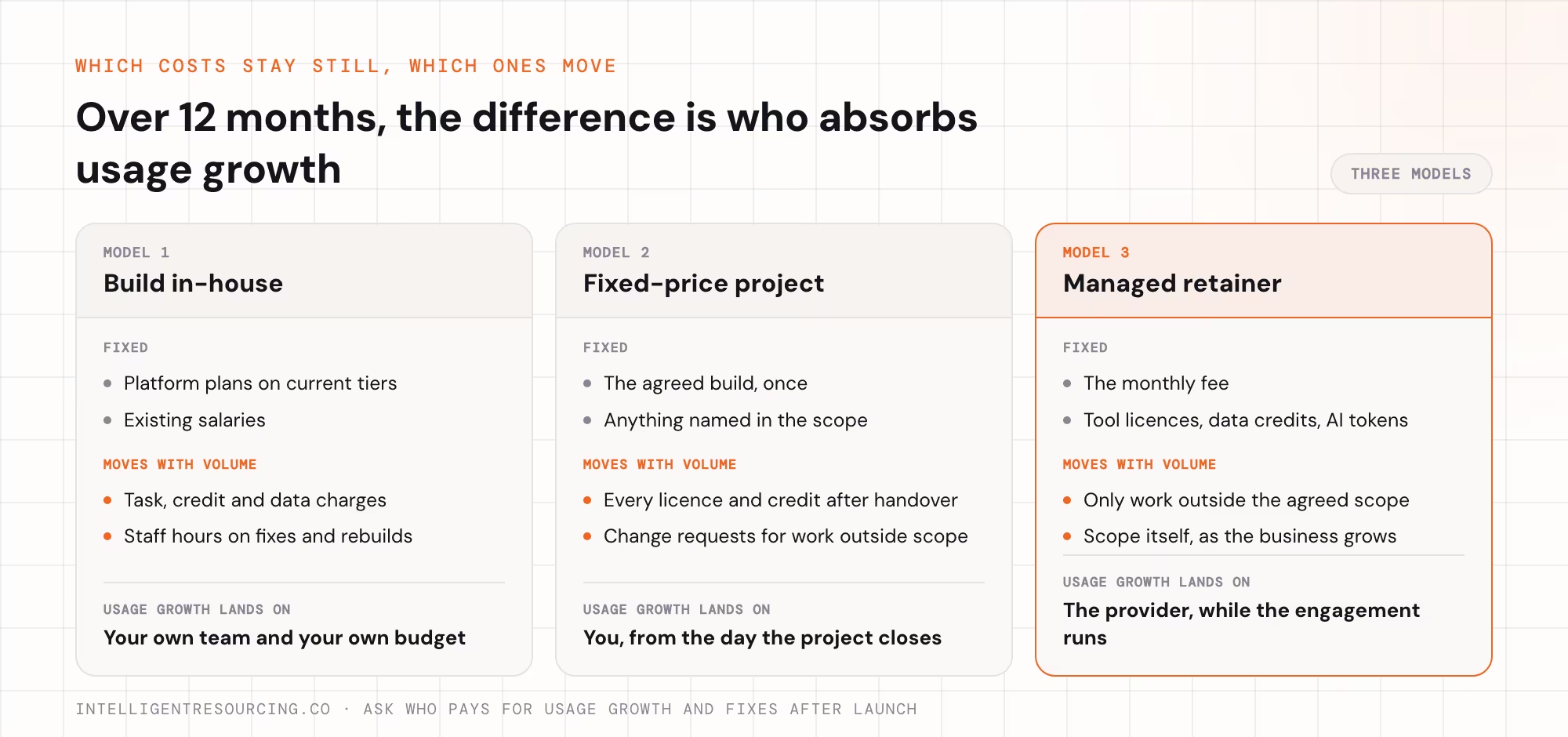
Most firms choose between building in-house, paying for a fixed project, or buying a managed service. Each model puts the upkeep with a different party. Our engineering cost guide compares them with 2026 Australian price bands for smaller businesses.
For RevOps automation, the key question is who pays for usage growth and fixes after launch. It could be your team, a change request, or the monthly fee. An in-house build looks cheaper until you count staff time. MuleSoft's 2026 Connectivity Benchmark Report, a survey of 1,050 information technology (IT) leaders, found IT teams spend 36% of their time designing, building and testing custom links between systems.
Intelligent Resourcing's managed retainers run from AUD $3,500 to AUD $8,400 per month plus goods and services tax (GST). There is also a one-off AUD $1,500 plus GST GTM Strategy Session for companies scoping the work first. Over 12 months, the retainer works out to AUD $42,000 to AUD $100,800. The fee includes tool licences, data and enrichment credits, and AI token costs, so there is no separate software bill on top.
For an in-house build or a fixed project, use this formula:
One-off build + 12 months of running costs
Running costs cover software, workflow usage, data and AI use, staff time and outside help. Here is an example only, not a market benchmark.
| Budget item | Example |
|---|---|
| One-off build | AUD $5,000 |
| Monthly software and data | AUD $500 |
| Monthly upkeep | AUD $400 |
| First-year total | AUD $15,800 |
The example shows why an AUD $500 monthly software budget is not the full annual cost. If your own staff build and run the system, add the hours they spend on it too.
Which Usage Costs Should You Check Before Signing?
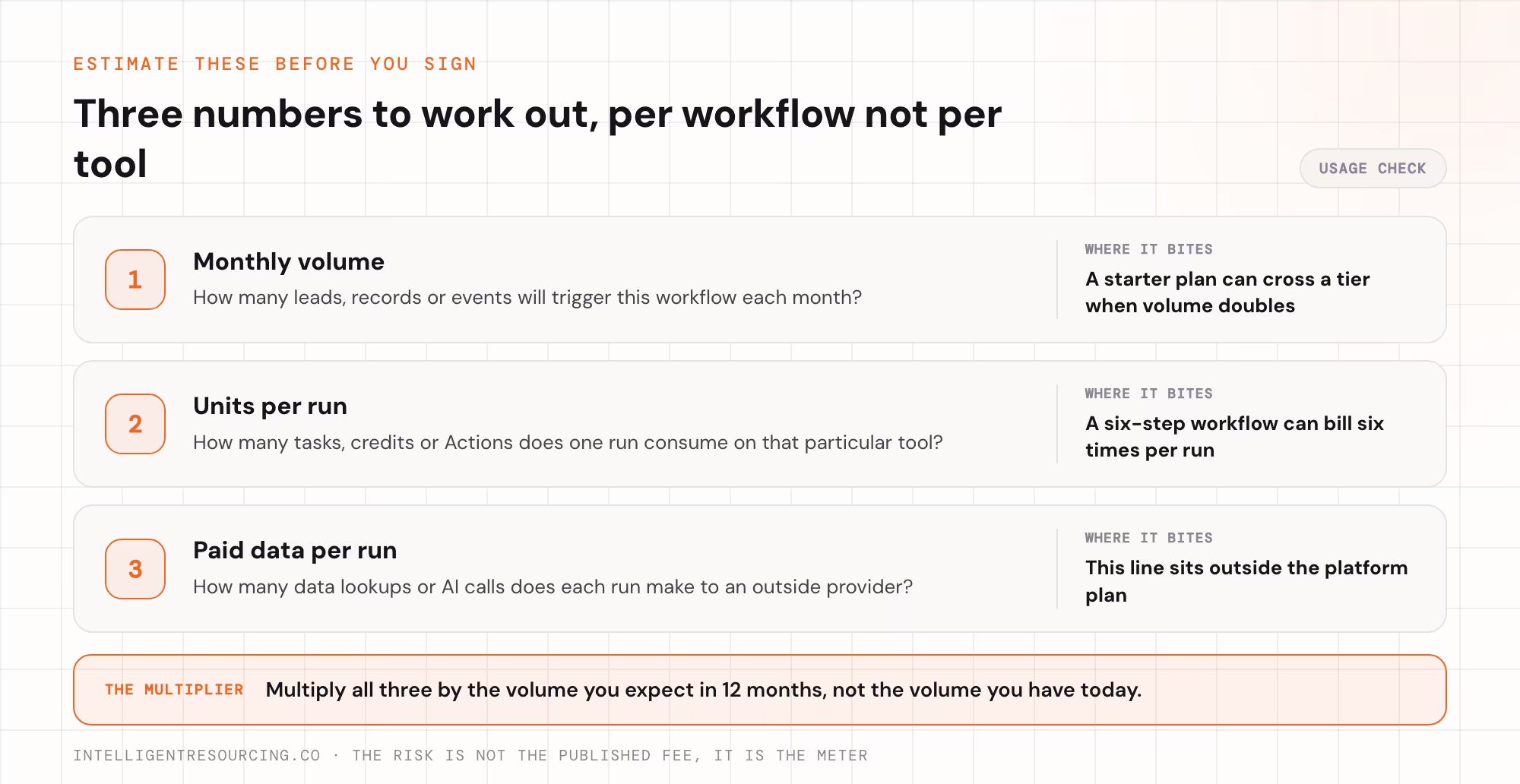
The main pricing risk is not the published fee but how each tool counts usage. Zapier counts tasks, n8n counts workflow runs, Make counts credits, and Clay separates Actions from Data Credits. Because they measure different things, you can only compare them once you estimate how your workflows will run.
Clay's Karan Parekh made the same point in the company's March 2026 pricing memo. Customers "don't come to Clay to buy inputs", he wrote. They come to run outbound, score leads and automate their sales and marketing work.
Before you sign, estimate three numbers for each workflow:
- Monthly volume: how many leads, records or events will trigger it.
- Units per run: how many tasks, credits or Actions each run uses on that tool.
- Paid data per run: how many data lookups or AI calls each run makes.
Multiply those by the volume you expect in 12 months, not today's volume. A workflow that fits a starter plan now can cross a pricing tier once lead volume doubles. Managed retainers such as those on our pricing page fold these usage costs into the monthly fee instead.
How Should You Measure the Return on RevOps Automation?
Measure the return on investment (ROI) against the process the automation was built to fix. Running more workflows does not by itself create more qualified deals or save effort.
Start by writing down what the process costs today and how well it works. Useful measures include time spent qualifying enquiries and the number of duplicate records. Another is the time from an enquiry to the first proper response. After launch, the same measures show whether the workflow has improved.
Time is often the biggest return. Salesforce's State of Sales research, published in December 2022 from 7,775 responses, found reps spend just 28% of their week actually selling. Every hour of admin the system removes can go back to customers.
Intelligent Resourcing's Revenue Engineering Framework uses Buyer-Fit Gates to screen out poor-fit accounts before outreach. An Evergreen CRM keeps records accurate. Its Verified Buying Window approach ties outreach to real changes at a target account, while the Revenue Scoreboard tracks results. For finance and revenue leaders, what matters is the cost of running the system against the quality of deals it produces.
How to Compare Two RevOps Automation Quotes
Two quotes can carry similar monthly fees while covering very different amounts of work. It gets clearer when each supplier answers the same questions.
| What to compare | What the quote should explain |
|---|---|
| Setup | Which workflows, links and data sources are included |
| Software | Which licences are supplied and which stay your responsibility |
| Usage | How data, automation and AI use are charged as volume grows |
| Upkeep | Who watches for failures and keeps the links working |
| Ownership | Who controls the workflows, records and documents |
| Reporting | Which results will be measured |
Check usage meters on the platforms themselves too. HubSpot's Data Hub pricing, for example, adds HubSpot Credits on top of seats. The quote should also explain what happens when you add a new system or ask for extra work. Changes should follow an agreed process, not arrive as a surprise invoice.
Want a clear first-year number for your own systems? We can map your current workflows and scope a build that fits your budget. Book a call to talk it through.
RevOps Tools
We can map your current workflows and scope a build that fits your budget, with the software, usage and support costs priced in from the start.
FAQs
How much does RevOps automation cost per month?
RevOps automation can start with low-cost software, but a full system also needs setup, data and support. Intelligent Resourcing's published managed GTM engineering prices range from AUD $3,500 to AUD $8,400 per month, plus GST, depending on the agreed scope.
What is included in a RevOps automation build?
A build can include CRM setup, data mapping, links between systems, workflow design, testing and documents. The exact scope depends on your current tools and the sales processes being automated.
Can small businesses afford RevOps automation?
Small firms can start with one workflow on their current CRM and a low-cost automation tool. A managed service makes sense once the business needs wider links between systems, ongoing technical support or a fuller revenue system.
Why do RevOps automation costs rise over time?
Most automation and data tools charge by use, such as tasks, runs, credits or data lookups. As lead volume and connected systems grow, the same workflows use more. The bill rises even when nothing new is built.
Does RevOps automation pricing include AI and data enrichment?
Some suppliers include these services, while others charge by use. Intelligent Resourcing's published GTM engineering retainers include tool licences, data and enrichment credits, and AI token costs within the engagement.
Can RevOps automation help manage enquiries from AI search?
Yes. Revenue automation can capture, qualify and route enquiries that arrive through AI search. Generative engine optimisation (GEO) is a separate service that helps a business show up in AI answers. RevOps then connects what happens next to the systems the business already uses.