

What Data Hygiene Items Must Be Checked Before Any Automation Build?
This checklist assumes you already know what B2B marketing automation is and how it works. Start there first if the concept itself is still unclear.
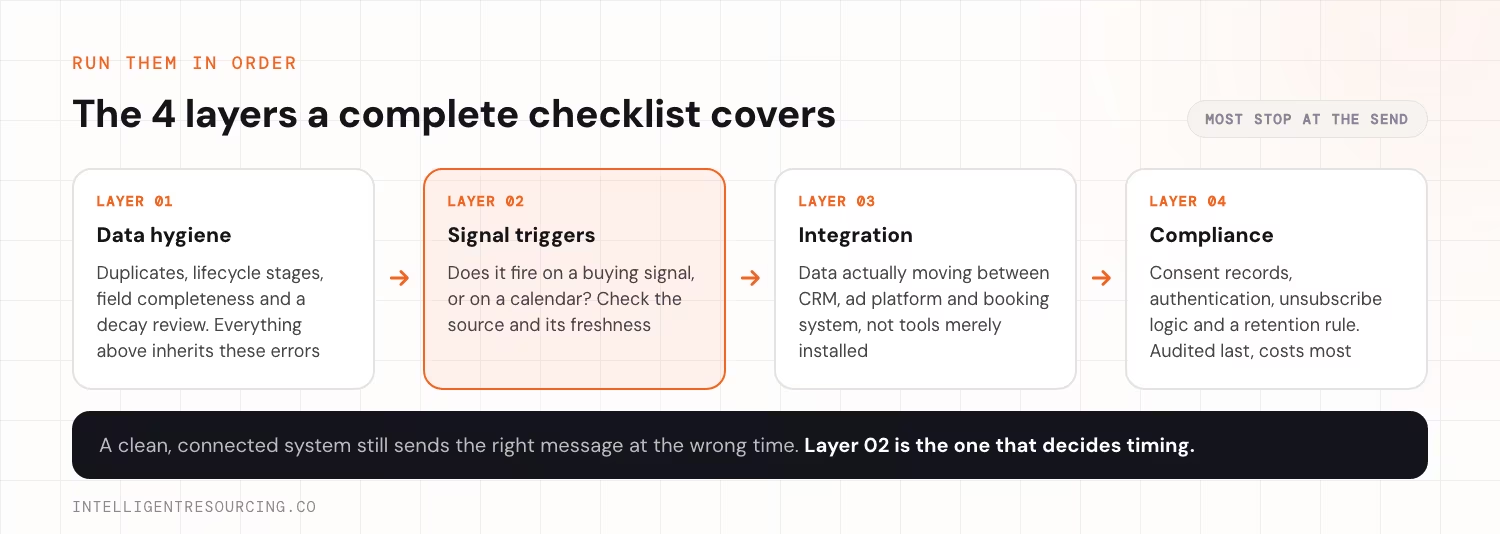
A data hygiene check confirms duplicate records, mismatched stages and incomplete fields before any workflow is built. Automation logic picks up every error already sitting in the CRM. Validity's 2025 State of CRM Data Management report found that 76% of CRM users say less than half their own data is accurate and complete.
Run these 4 checks first:
| Check | Why it matters |
|---|---|
| Duplicate detection | Two records for one contact split engagement history. A lead who visited pricing twice and downloaded a guide once can look like 3 separate low-intent contacts instead of 1 high-intent account. |
| Lifecycle-stage mapping | Every stage (subscriber, lead, marketing-qualified, sales-qualified) needs one written definition. Ambiguous rules route the same contact 2 different ways depending on which record fires first. |
| Field completeness | Job title, company size and lifecycle stage need to be populated on the fields automation actually reads, not just the fields reports display. |
| Data decay rate | Review monthly for high-volume lists, quarterly otherwise. Stale job titles and defunct companies keep triggering workflows built for a contact who has moved on. |
A hygiene pass that stops at deduplication misses the deeper problem. A clean record with the wrong stage still triggers the wrong sequence. The trigger matters more than the platform. See how signal-based marketing works for the full picture.
Which Buying Signals Should a B2B Checklist Actually Track?
A checklist should track buying signals, not calendar dates. Job changes, funding events and tech-stack shifts predict intent that a fixed send schedule cannot. Blending your own engagement data with outside intent signals raises the quality of what reaches sales, because an account that is both researching the category and showing a structural change is a different prospect from a contact who opened an email.
Check for these signal types before building or auditing a trigger:
| Signal type | What to look for |
|---|---|
| Personnel | New decision-maker hires, promotions into a buying role, headcount expansion in a target department. |
| Funding and firmographic | Funding rounds, new office openings, headcount growth: each a proxy for new budget. |
| Tech-stack | A competitor's tool appearing in a target account's stack, or a category tool disappearing. Both indicate an active evaluation. |
| Engagement | Repeat visits to pricing or comparison pages carry more weight than a single content download. |
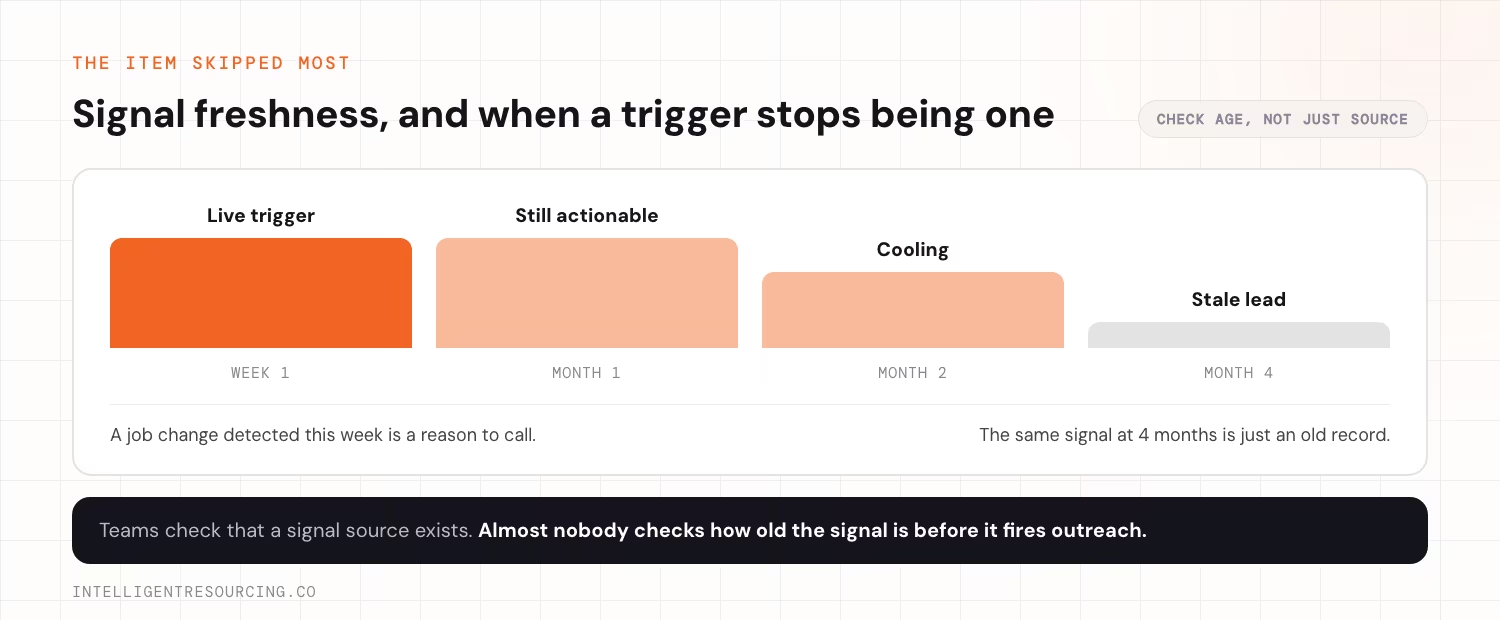
The item skipped most often is signal freshness: teams check that a signal source exists but rarely check how old it is before it triggers outreach. A job-change signal from 4 months ago is a stale lead, not a live trigger. Acting on it wastes the same budget a schedule-based send would. Want the full freshness-weighting logic? Our guide to lead scoring walks through it.
What Integration Checks Confirm the Stack Is Actually Connected?
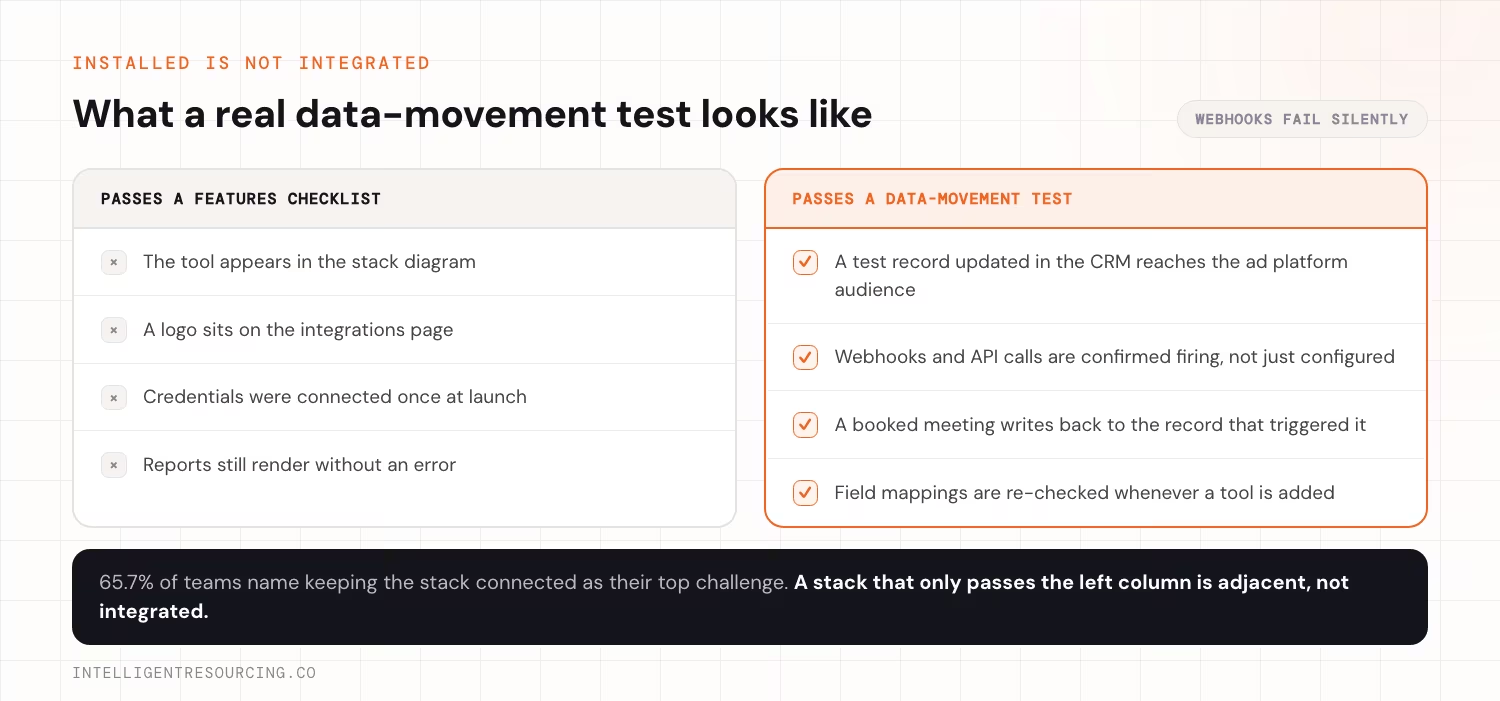
An integration check confirms data actually moves between the CRM, ad platform and booking system. It does not just confirm each tool is installed. Keeping the stack connected is the top challenge for 65.7% of teams, according to MarTech's 2025 State of Your Stack Survey.
Run these 3 checks:
| Check | What it confirms |
|---|---|
| Bidirectional sync test | Update a test record in the CRM and confirm it reflects in the ad platform's audience list within the expected refresh window. A one-way sync stops updating silently the moment a field mapping changes. |
| Webhook and API health check | Confirm the webhooks and application programming interface (API) calls that trigger workflows are still firing, not just configured. A webhook can fail silently for weeks while every downstream report still looks normal. |
| Booking-system handoff | Confirm a booked meeting writes back to the CRM record that triggered the outreach, so sales sees the signal that generated the meeting, not just the meeting itself. |
A stack that passes a features checklist but fails a data-movement test is not integrated, just adjacent. This is the layer covered by must-have CRM automation features, not a single platform's settings page.
What Compliance Items Get Missed on Most Automation Checklists?
A compliance check confirms consent records, sender authentication and retention rules. Most B2B checklists skip these because they never show up on a delivery dashboard. Australia's Spam Act 2003 and the Australian Privacy Principles require clear consent, a clear sender identity and a working unsubscribe link. The Australian Communications and Media Authority enforces this.
Check for these 4 items specifically:
| Item | Why it gets missed |
|---|---|
| Consent record | Store how and when consent was given, not just that a checkbox was ticked. |
| Sender authentication records | Sender Policy Framework (SPF), DomainKeys Identified Mail (DKIM) and Domain-based Message Authentication, Reporting and Conformance (DMARC) records prevent silent deliverability drops when misconfigured. |
| Unsubscribe logic | Confirm an unsubscribe updates every connected tool, not just the platform that sent the email. |
| Data retention rule | Document how long contact data is held after a relationship ends, rather than retaining every record indefinitely by default. |
Most teams treat compliance as a legal sign-off at launch. It is really a recurring item. These records and rules both drift as tools are added.
Teams without dedicated data staff often outsource this step. When evaluating options, compare marketing automation agencies against these same 4 categories, not just price.
How Do You Know the Checklist Is Actually Working?
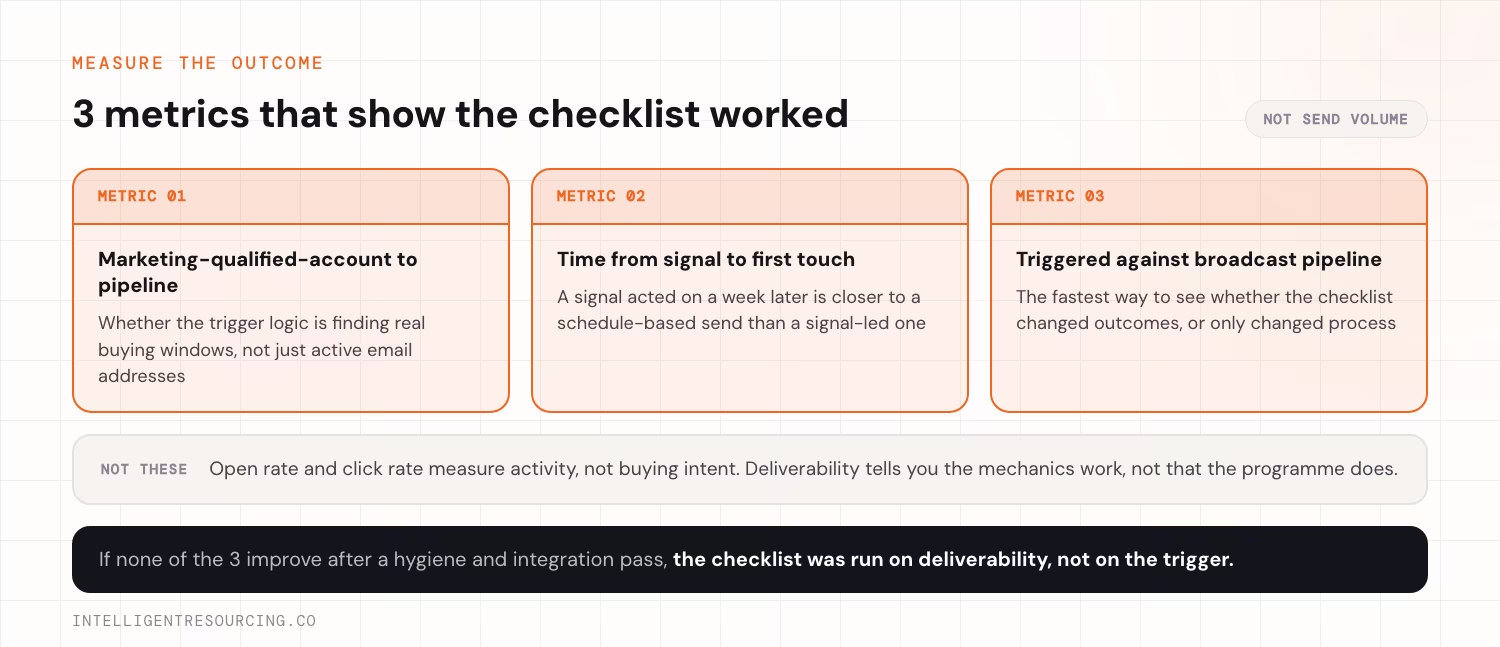
A working checklist is measured by how many marketing-qualified accounts turn into pipeline. Open rate and click rate measure activity, not buying intent. Artificial intelligence (AI) assisted ranking is now standard practice. Salesforce's 2026 State of Sales report found 55% of sales professionals are using AI for prospecting, and 92% of sellers with AI agents say it benefits their prospecting efforts.
Track these 3 outcome metrics instead of send-volume metrics:
| Metric | What it tells you |
|---|---|
| Marketing-qualified-account-to-pipeline conversion rate | Whether the trigger logic is finding real buying windows, not just active email addresses. |
| Time from signal to first touch | A signal acted on a week later is closer to a schedule-based send than a signal-led one. |
| Pipeline from triggered vs broadcast sequences | The fastest way to see whether the checklist items above actually changed outcomes, or just changed process. |
Worked examples of these metrics on a live account are covered in signal-based marketing automation workflows.
If none of these 3 improve after a hygiene and integration pass, something is wrong. The checklist was run on deliverability, not on the trigger.
RevOps Tools
Map the buying signals your automation should be firing on, then wire your CRM, ad platform and booking system to detect them.
FAQs
What is the difference between a marketing automation checklist and a marketing automation audit?
A checklist confirms individual items are in place: data hygiene, triggers, integration and compliance. An audit measures whether those items produce the outcome you built them for. Pipeline created from marketing-qualified accounts is the usual test. Run the checklist first, then the audit against a live send cycle.
How often should a B2B team re-run this checklist?
Re-run data hygiene and compliance checks monthly for high-volume programmes, quarterly otherwise. Re-run the signal and integration checks whenever a new tool is added to the stack. That is when webhook and sync failures most often start.
Can a small team run this checklist without an agency?
Yes, if the team has someone who owns CRM data quality and can read webhook logs. Teams without that capacity usually stall on the integration checks. Those checks fail silently, not with an obvious error.
What is the single most commonly skipped checklist item?
Signal freshness: teams check that a signal source exists but rarely check how old it is before it triggers outreach. That gap quietly turns a signal-led system back into a schedule-based one.
Does this checklist apply to HubSpot, Clay and n8n stacks, or both?
Both, since the 4 categories, data hygiene, signals, integration and compliance, apply on any platform. Only where each check runs changes. On HubSpot, check workflow enrolment logic. On Clay and n8n, check the enrichment waterfall and the webhook chain between tools.