

What Should a RevOps Automation Checklist Test Once It Is Live?
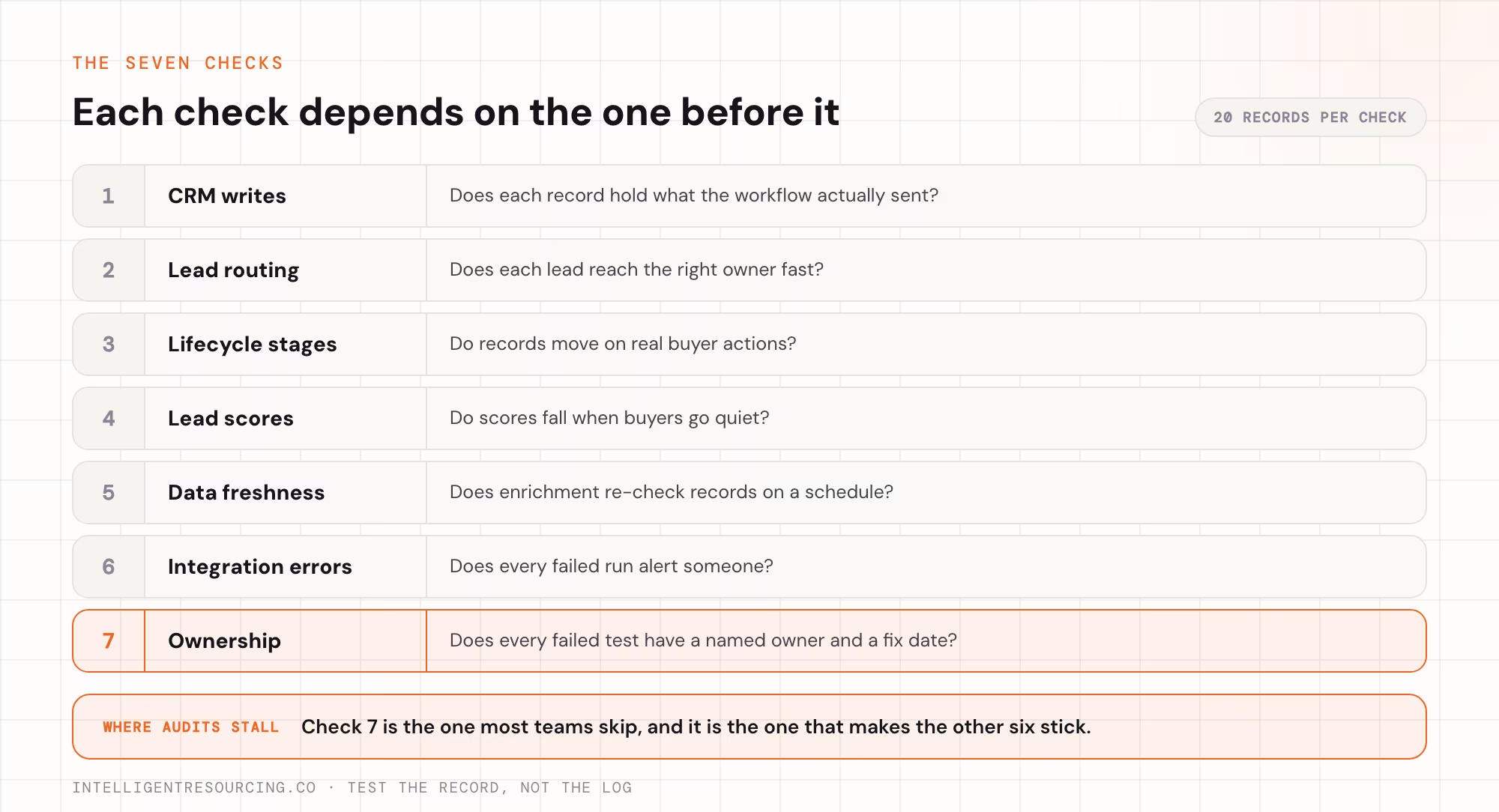
A RevOps automation checklist for a live system should cover the 7 checks listed below. Each check holds a short set of tests that compare what the record shows with what the workflow claims. The aim is to catch failures that never raise an error, because those do the most damage.
If you are still choosing the tools that move leads and data between sales and marketing, work out the order to build your stack first.
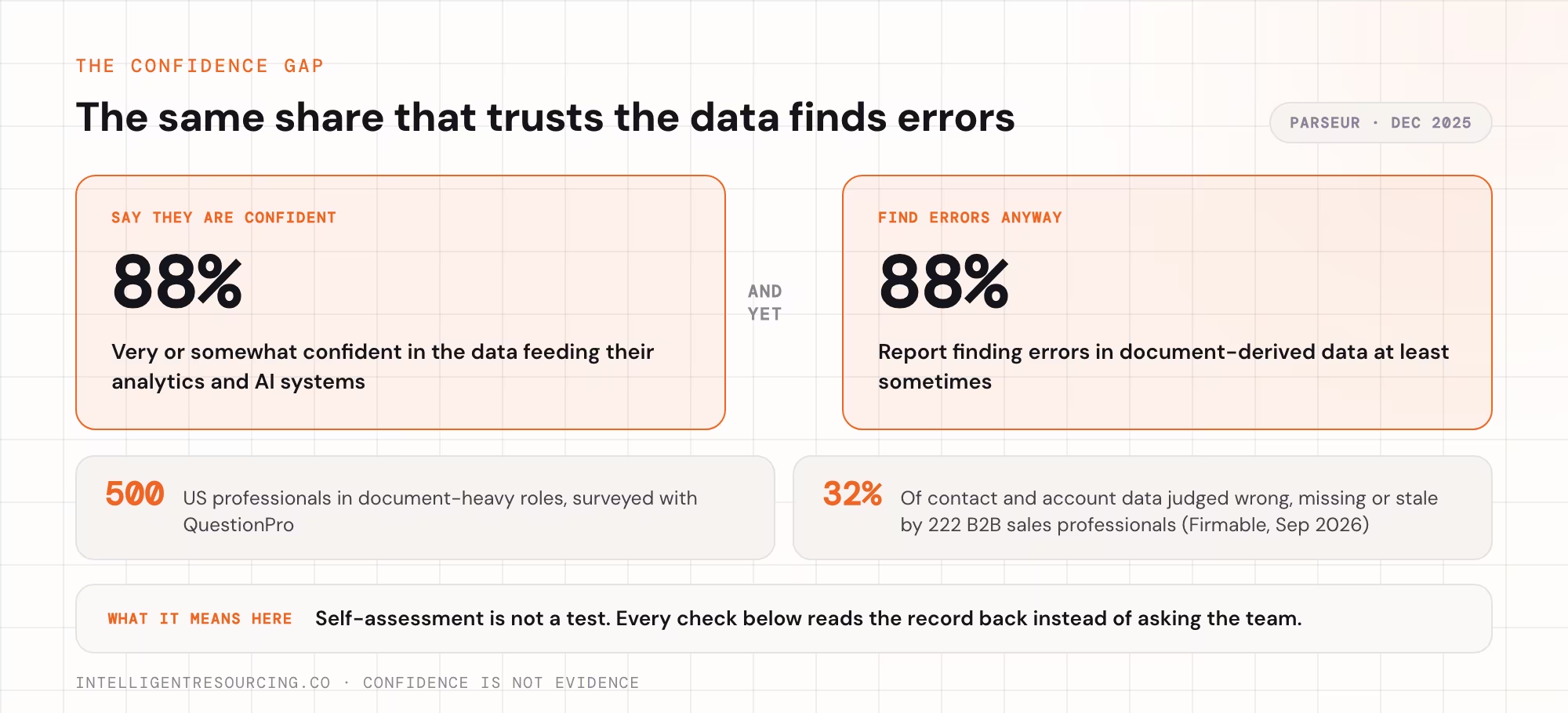
Teams also rate their own data higher than it deserves. When Parseur and QuestionPro surveyed 500 US professionals in document-heavy roles in December 2025, 88% were confident in the data feeding their analytics and artificial intelligence (AI) systems, yet the same 88% found errors in data taken from documents at least sometimes. So every CRM test below checks the record itself, not the log.
The 7 checks, in the order to run them:
- CRM writes: does each record hold what the workflow sent?
- Lead routing: does each lead reach the right owner fast?
- Lifecycle stages: do records move on real buyer actions?
- Lead scores: do scores fall when buyers go quiet?
- Data freshness: does enrichment re-check records on a schedule?
- Integration errors: does every failed run alert someone?
- Ownership: does every failed test have an owner and a fix date?
For each check, pull 20 recently automated records and run the tests in its table.
Does Every CRM Write Land the Way the Log Says?
A CRM write has worked only if you read the record back and it holds the exact value the workflow sent. A success message only means the platform received the request, and it does not prove the right field changed on the right record. Read back a sample of writes every week and compare them field by field.
| Test | Expected result | Failure symptom |
|---|---|---|
| Read back 20 recently updated records | Every field matches what the workflow sent | Field is blank, cut short or unchanged |
| Search for duplicates the workflow created | 0 new duplicates per run | 1 contact appears twice, with 2 owners |
| Send a blank value to a test record | The existing value stays in place | A good job title is replaced with nothing |
| Check records from a run that failed halfway | Every field updated, or none did | A new company with an old title |
Clay's documentation for its HubSpot Update object action says blank values are ignored by default, so blanks coming from Clay are left alone in HubSpot, and that the action requires the record's HubSpot Object ID. Turn that setting off and blank values are sent through, overwriting existing HubSpot values, so a failed enrichment can wipe good data.
Intelligent Resourcing's rule at this layer is to read back and confirm every record it writes, and to fix a failed read-back before any later test.
To keep a rep's manual edits safe, add field protections that block sync overwrites.
Are Leads Reaching the Right Owner Fast Enough?
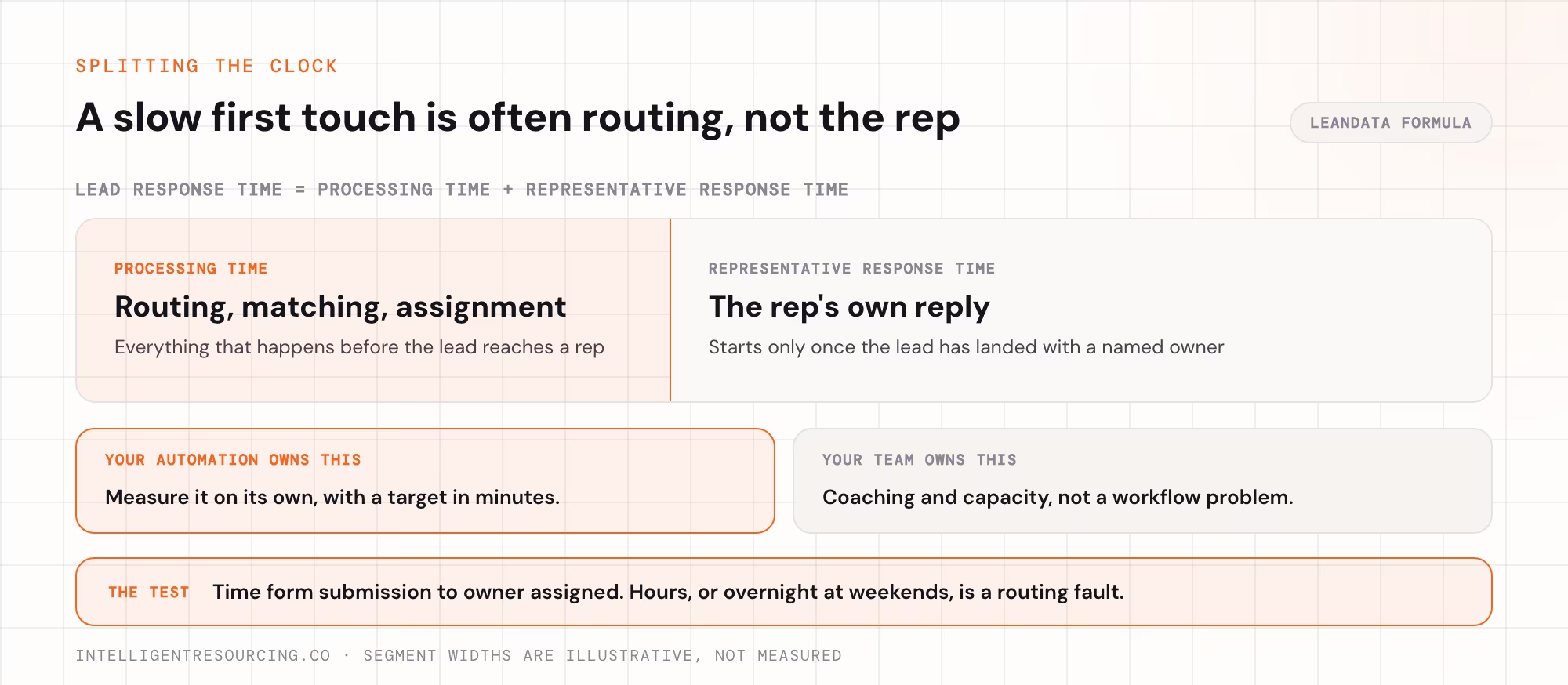
Routing works when each lead reaches the right owner within minutes, follows your territory rules and leaves owned leads alone. Measure routing time separately from the rep's response time. A slow first touch is often a routing delay that looks like a slow rep.
LeanData sets out the formula that lead response time is processing time plus the rep's reply. Processing time is everything that happens before a lead reaches a rep, including routing. Your automation controls this part, so test it here.
| Test | Expected result | Failure symptom |
|---|---|---|
| Submit a test form from each territory | Each lead lands with the named owner | Leads pile up in a default queue |
| Submit a form as a contact a rep already owns | The owner stays the same | Round-robin reassigns the lead |
| Count new leads per rep over 30 days | Counts match the split you set | 1 rep gets far more |
| Time from form submission to owner assigned | Minutes, within your target | Hours, or overnight at weekends |
The second test carries the most risk, which is why Intelligent Resourcing never lets automation overwrite a lead a team already owns.
Do Lifecycle Stages Move When Buyers Actually Act?
Lifecycle stages work when records move forward because a buyer did something, rarely stall and never skip a required step. A stuck stage hides a stalled deal, so your forecast counts revenue that is not moving. Test stage movement against what buyers actually did last quarter.
Stuck stages also cost speed. Ebsta and Pavilion built their 2025 benchmarks on 655,000 opportunities and found top teams close deals 3 times faster.
| Test | Expected result | Failure symptom |
|---|---|---|
| Count records in one stage for over twice the usual time | A short, explained list | Hundreds stuck with no next step |
| Look for records that skipped a stage | Skips only where rules allow | Leads jump to opportunity unqualified |
Stage rules belong in your wider revenue operations design, so fix any unclear stage before you touch scores.
Do Lead Scores Still Match How Buyers Behave?
Lead scores work when they rise as buyers act, fall when buyers go quiet and rank won deals near the top. A scoring model built once and never checked drifts as your market changes. Test it against the deals you actually won last quarter.
Scores also inherit every flaw in the records beneath them. In research Firmable published in September 2026, 222 business-to-business (B2B) sales professionals estimated that 32% of their contact and account data was inaccurate, incomplete or out of date, so a score built on those records ranks the wrong buyers.
| Test | Expected result | Failure symptom |
|---|---|---|
| Check contacts with no activity for 90 days | Their scores have dropped | Silent contacts still rank as hot |
| Score last quarter's won deals | Most scored above your threshold | Won deals scored low, so the model tracks the wrong signals |
Is Enrichment Refreshing Records or Filling Blanks Once?
Enrichment keeps records fresh when it re-checks job titles, companies and emails on a schedule. People change jobs every year, so a record starts to age the day it is written. Check how old each field is, as well as whether it is full.
The Australian Bureau of Statistics found 2.1 million people left or lost a job in the year to February 2026. About 16% of workers had been in their job for less than 1 year.
| Test | Expected result | Failure symptom |
|---|---|---|
| Sort records by last enriched date | Active records refreshed on schedule | Most records last enriched at creation |
| Check 20 job titles against public profiles | 18 or more still match | Several contacts have left |
| Measure how many records each run fills | A stable fill rate | A sudden drop, often a data supplier sending nothing |
Good CRM enrichment runs on a schedule and records when each field was last checked.
Which Integration Failures Stay Hidden Until a Report Looks Wrong?
Integration failures stay hidden when a workflow stops and nobody is told, and the gap shows up weeks later in a report. Common causes are sync errors, runs that stop halfway and limits on the application programming interface (API). Every workflow needs an alert that reaches a named person within 1 working day.
In n8n, an error workflow runs when an execution fails and can send an email or Slack alert, so the audit step is proving it actually fires.
| Test | Expected result | Failure symptom |
|---|---|---|
| Force a failure on a test workflow | The owner is alerted within the hour | No alert, or one sent to a leaver |
| Review 30 days of failed runs | Every failure has an owner and a fix date | Repeat failures nobody checked |
| Compare 1 day's record counts across 2 systems | The counts match | A gap that grows daily |
If nobody on your team can watch these alerts, compare RevOps automation agencies in Australia.
What Should You Fix First When a Test Fails?
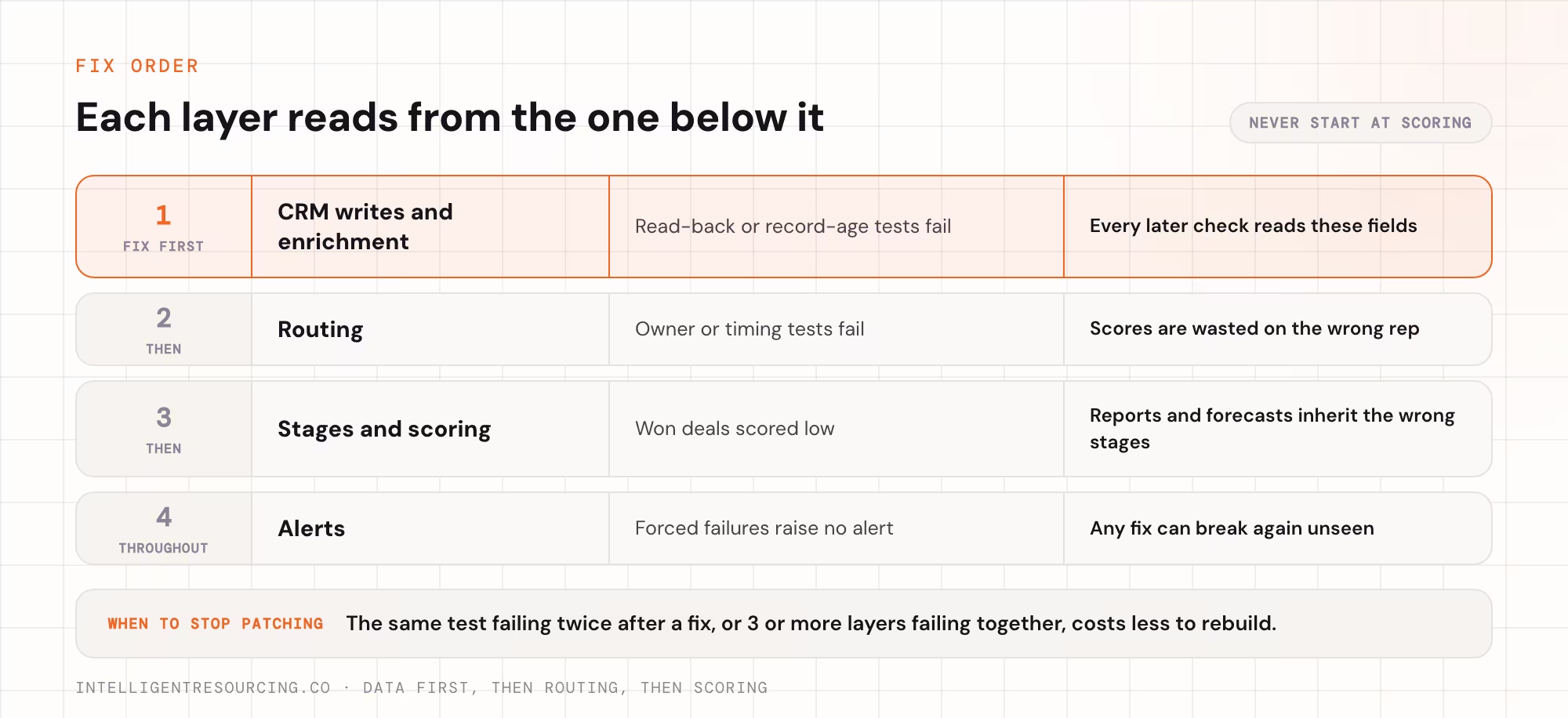
Fix data first, then routing, then scoring, because each layer reads from the one below it. Scores built on old records look sure but are wrong. Give each failed test a named owner and a date, then rerun the full checklist after any change to a workflow, field or rule.
| Layer | Fix it first when | Why it blocks the next layer |
|---|---|---|
| CRM writes and enrichment | Read-back or record-age tests fail | Every later check reads these fields |
| Routing | Owner or timing tests fail | Scores are wasted on the wrong rep |
| Stages and scoring | Won deals scored low | Reports and forecasts inherit the wrong stages |
| Alerts | Forced failures raise no alert | Any fix can break again unseen |
Ownership is where most audits stall. Salesloft and Wakefield Research surveyed 400 US RevOps and executive decision-makers in 2025, and 89% said RevOps lacks clearly defined strategic goals. The ownership check passes when every failed test has a named owner and a fix date.
If the same test fails twice after a fix, a rebuild will cost less than another round of patches. See how Intelligent Resourcing rebuilds revenue operations systems, with every write read back and checked.
RevOps Tools
Run the 7 checks against your own system, then bring in Intelligent Resourcing for the layer you cannot fix in-house. Every write read back and confirmed.
FAQs
How often should you audit RevOps automation?
Read back a sample of 20 automated records every week. Run all 7 checks every quarter. Run the affected tests again after any change to a workflow, field or routing rule.
Who should own a RevOps automation audit?
One named person with permission to change the workflows. They log each fail with a fix date and rerun the test once fixed.
How is this checklist different from a marketing automation checklist?
A marketing automation checklist checks you are ready before a build. This checklist proves the live system does what its logs say.
Can you trust a workflow's success message?
A success message only means the platform received the request. Read the record back afterwards to confirm the right field changed on the right record.
When is a rebuild better than fixing a failed test?
Rebuild when the same test fails twice after a fix, or when 3 or more layers fail together. More patches at that point break workflows that still work.