

Why Does Build Order Matter More Than Tool Count?
A RevOps tech stack is the set of connected systems that runs the revenue journey, from the first buying signal to renewal. It usually centres on a CRM system and, later, AI tools. Our explainer on what RevOps automation connects covers the usual layers. This guide covers the order to build them in.
Those systems only work together when they share the same information. A lead-scoring tool needs an agreed definition of a qualified lead. A routing workflow needs accurate owner and territory data. A renewal alert needs sound customer and usage records.
The 2026 LeanData and LXA report found the average stack had dropped to 37 tools, down from 62 in 2025. Integration complexity was still the top barrier. The report does not publish the two samples side by side, so read the tool-count drop as a trend rather than an exact like-for-like comparison.
A smaller stack is not always a better-connected one. Fewer tools can still leave messy data and missed handoffs if nobody has planned the order they are built in.
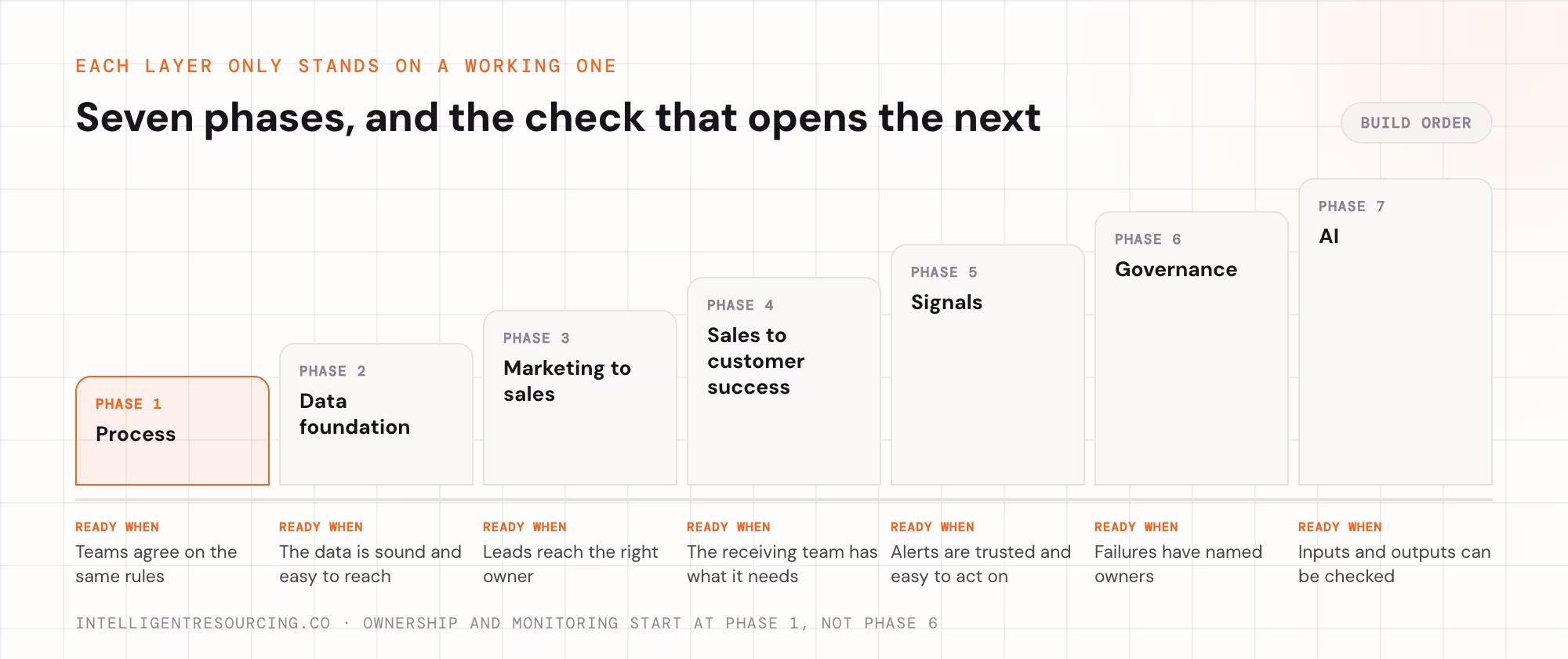
Here is the order the layers depend on each other:
| Phase | What to set up | Ready to move on when |
|---|---|---|
| 1. Process | Lead rules, stage rules and owners | Teams agree on the same rules |
| 2. Data foundation | CRM records, field owners, matching and links between tools | The data you need is sound and easy to reach |
| 3. Marketing to sales | Lead scoring, routing and follow-up | Leads reach the right owner and exceptions are visible |
| 4. Sales to customer success | Deal details and the onboarding handoff | The receiving team has what it needs |
| 5. Signals | Extra buying, usage and renewal triggers | Alerts are relevant, trusted and easy to act on |
| 6. Governance | Regular reviews, change control and owners | Failures and changing rules have named owners |
| 7. AI | AI for one specific job | Its inputs, access and outputs can be checked |
Phase 1: Write the Revenue Process Down Before Buying Software
The first phase produces a document, not a software setup. Marketing, sales and customer success agree on the rules each record follows. They then write those rules into a one-page process spec that every later phase is built on.
A workable spec fits on one page. Here is what each line looks like once it is filled in:
| Spec line | Example entry |
|---|---|
| Qualified lead | A company of 50 to 500 staff in a target industry that has asked for a demo or viewed pricing twice |
| Stage exit rule | A deal moves to Proposal only when the budget and the decision-maker are recorded |
| Owner | The territory rep; unmatched leads go to the sales manager |
| Required fields | Industry, headcount, state and lead source must be filled in before routing runs |
| Response rule | The rep acts within 1 business day; the manager is alerted after 2 |
| Handoff trigger | A closed deal creates the onboarding record and names the customer success owner |
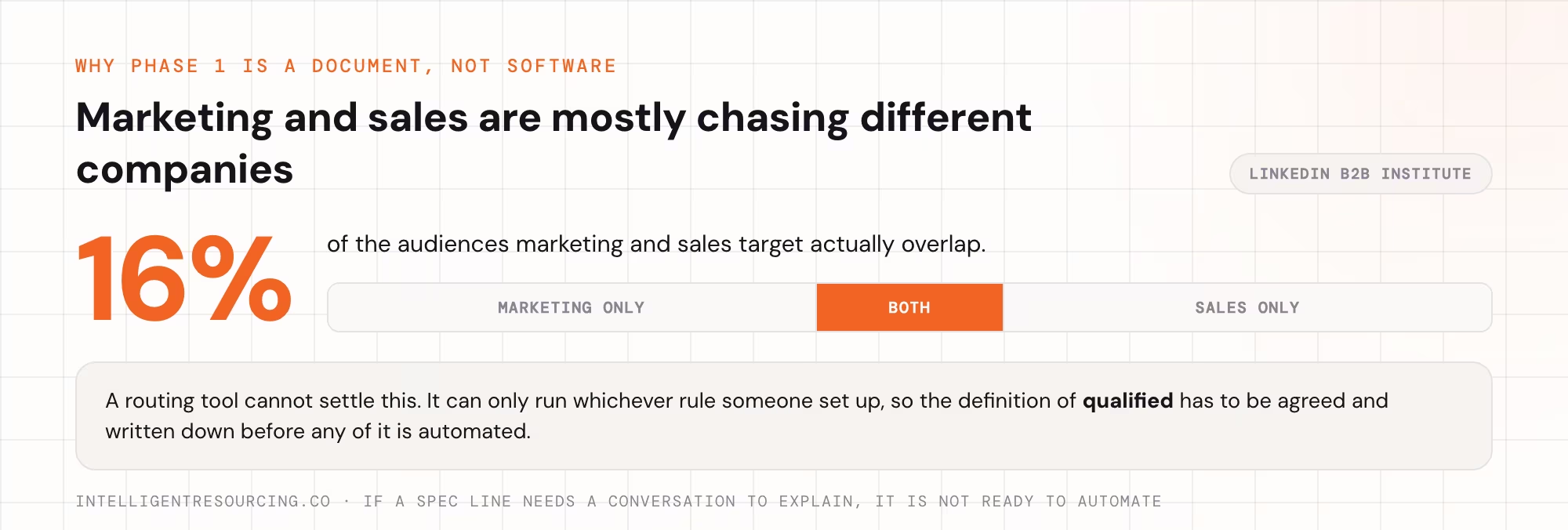
The spec stops software from applying each team's own rules without anyone noticing. If marketing and sales disagree on what makes a lead qualified, a routing tool cannot settle it for them. It can only run whichever rule someone set up.
The gap between teams is usually wider than it looks. Research from LinkedIn's B2B Institute found the audiences marketing and sales target overlap by just 16%. Two teams can mean different companies when they say "qualified".
Write each line so that someone outside the team can apply it. If a line needs a conversation to explain, it is not ready to automate.
Ready to move on: each team can take the same sample lead or deal. They agree on its stage, owner and next step using only the spec.
Phase 2: Build a Data Foundation the Other Tools Can Trust
Once the process is written down, make the records usable. The CRM usually holds the main contact, company and deal records. The key decision is naming one system as the owner of each piece of information. Not every field has to live in one database.
Start with:
- One agreed set of stages, field names and allowed values.
- Duplicate checks and matching leads to the right company.
- Required contact, company and deal fields.
- Clear rules on which system may update each field.
- Checks on the links between tools so records are not overwritten.
- Ongoing checks and enrichment, not a one-off clean-up.
A routing rule cannot assign a lead if the territory field is empty. A dashboard cannot explain pipeline changes if teams use deal stages differently. An AI tool cannot use account history if activities sit on the wrong records.
Most CRMs start further from that standard than teams think. In Validity's 2025 survey of CRM users, 76% said less than half of their CRM data was accurate and complete. It covered 602 CRM users and administrators across the US, UK and Australia.
Left alone, messy data keeps getting worse. This is also the time to check whether a current link between tools creates duplicate contacts, changes owners without warning, or fails without telling anyone. Clear field owners and sync rules stop tools from overwriting data the team has already checked.
Cutting the number of tools does not fix a data model nobody agreed on. Continuous CRM enrichment work treats data quality as regular work, with audits, enrichment and refresh cycles instead of one big clean-up.
Ready to move on: the records the first workflow needs are complete enough to use. Duplicates and owner clashes have an agreed fix. Test records move between tools without losing or overwriting key details.
Phase 3: Connect Marketing to Sales
The marketing-to-sales handoff is where a qualified lead has to become a sales task with an owner. A new enquiry should not depend on someone exporting a list, checking a spreadsheet, or remembering which rep covers an account.
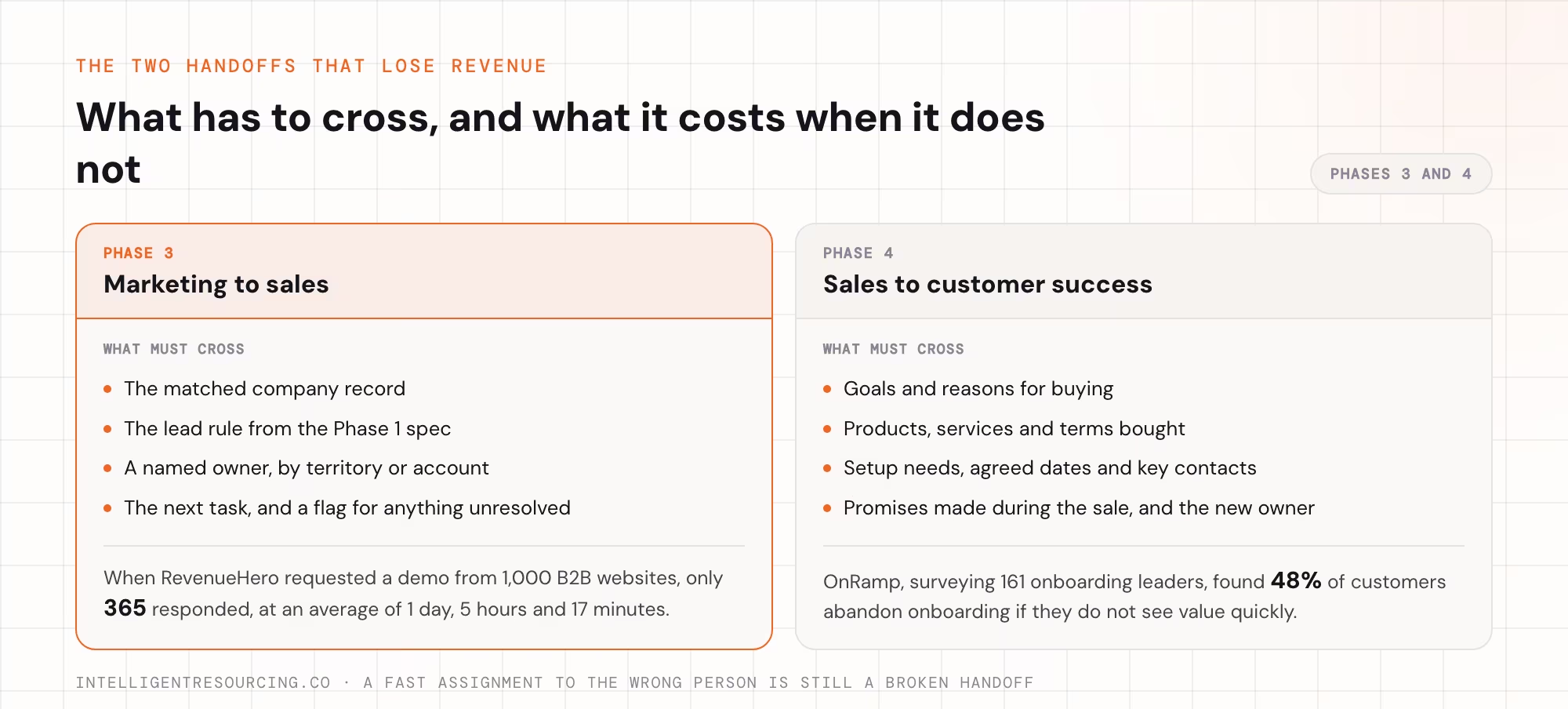
The workflow should check the new record and match it to an existing company where it can. It applies the rules from the Phase 1 spec and assigns the right owner. It then tells that person, creates the next task, and flags anything it cannot sort out on its own.
Automated lead scoring covers how to turn the spec's lead rule into clear scores and assignments. The routing order should cover the current account owner, territory, special skills, and a fallback for leads nobody else picks up.
Many teams never reach follow-up at all. When RevenueHero requested a demo from 1,000 business-to-business (B2B) websites, only 365 responded, at an average of 1 day, 5 hours and 17 minutes.
Do not judge this phase by speed alone. A fast assignment to the wrong person is still a broken handoff.
| Measure | What it shows |
|---|---|
| Time to assignment | How fast a new qualified lead gets an owner |
| Right-owner rate | Whether the routing rules pick the intended rep |
| Unassigned leads | Whether records fall through gaps in the rules |
| Time to first sales action | Whether an assignment turns into follow-up |
| Missed response deadlines | Whether problems are spotted and escalated |
Test the rules when things change, not just in the normal case. When a rep leaves or a territory is redrawn, leads from that territory should reach the new owner. They should not sit in the old owner's queue.
Ready to move on: sample leads reach the right owners, even after a territory change. Missing data and unmatched territories are handled. The team can see when follow-up has not happened.
Phase 4: Connect Sales to Customer Success
The next step comes when a deal closes. The customer success team needs more than a signed contract and a "deal won" alert. It needs the details required to deliver what sales promised.
The handoff should pass on:
- The customer's goals and reasons for buying.
- The products, services and terms they bought.
- Setup needs and agreed dates.
- Key contacts and decision-makers.
- Promises made during the sale.
- The named onboarding or customer success owner.
The automation should create the receiving team's task or onboarding record and send an alert with the details attached. It should also make it clear who owns the account now.
Passing on a record is not the same as finishing a handoff, though. The receiving team must be able to review and accept it, ask for missing details, and flag a promise that needs checking. That step protects the customer. It also lowers the risk of a new customer learning that the delivery team never heard about a promise made during the sale.
The cost of a weak handoff shows up in onboarding. OnRamp's 2025 report, based on a survey of 161 customer success and onboarding leaders, found 48% of customers abandon onboarding if they do not see value quickly.
Ready to move on: customer success can find the promises, contacts and setup details it needs. There is a clear way to accept or send back an incomplete handoff.
Phase 5: Add Buying, Usage and Renewal Signals
Once records and handoffs work, the stack can use more signals to prompt action at the right time. This phase goes beyond the form fills and lead triggers already used in Phase 3.
Signals worth watching, depending on the business:
- A target account showing a new sign it may buy or expand.
- A current customer using the product more or less.
- A pattern of support tickets that needs the account team's attention.
- A key contact changing roles.
- A renewal date getting close with no agreed next step.
Usage is one of the signals customer teams already watch. A Databox survey of more than 40 software as a service (SaaS) companies found 52% name decreased product usage or engagement as a churn warning sign.
A signal is only useful when the system knows which record it belongs to, who should act, and what they should do. Otherwise, signals become one more stream of alerts the team learns to ignore.
For each new trigger, set the data source, the matching rule, the threshold, the owner and the next action. In prospecting, linking account signals to defined outreach actions stops useful events from turning into alerts someone has to decode by hand.
Test for false alarms, and decide which events need a person to review them before anything reaches a customer. When signal tracking, enrichment and outreach work together across your current tools, the receiving team can act with the right account details already attached.
Ready to move on: the team can explain why each alert fired and trusts the account match. It can take the next step without rebuilding the context by hand.
Phase 6: Formalise Governance Across the Stack
Governance does not start in Phase 6. Someone should own each workflow, its data and its exceptions from the day it goes live. This phase adds regular reviews and change control across the whole stack.
Routing rules need updating when territories change. Lead rules may change when a new product launches. A link between tools may break after a field is renamed. Without monitoring, the team may only find these problems after a customer or rep reports one.
Keeping tools connected is a large, ongoing cost on its own. MuleSoft's 2026 Connectivity Benchmark Report found information technology (IT) teams spend an average of 36% of their time designing, building and testing new custom integrations. On average, only 27% of applications are connected.
A regular review should cover:
- Routing accuracy: are records reaching the right owners.
- Data quality: are duplicates, missing fields or mismatched accounts rising.
- Workflow failures: are links or automation rules failing without an alert.
- Response deadlines: are assigned leads and customer tasks being acted on.
- Business changes: do new territories, products, stages or access levels need updated rules.
- Audit trail: can the team see who changed a workflow and what it affected.
How often you review should match how risky and busy the workflow is. A high-volume inbound routing process may need daily checks, while a quieter setup may only need a monthly review. Include a safe way to test changes before they touch live customer records, and apply access rules, monitoring and change control to every layer.
Ready to move on: every important workflow has a named owner and a visible way to show it has failed. It also has an escalation path and a way to test changes.
Phase 7: Add AI When Its Specific Use Case Is Ready
Add AI when the data and controls for its specific job are sound. That does not mean every business must finish every RevOps workflow before it uses any AI tool.
A low-risk writing assistant may be useful earlier, as long as someone reviews its work. AI that assigns leads, suggests deal actions, changes CRM records or sends customer messages carries more risk. Those uses depend far more on clean inputs, the right access, agreed rules and outputs you can trace.
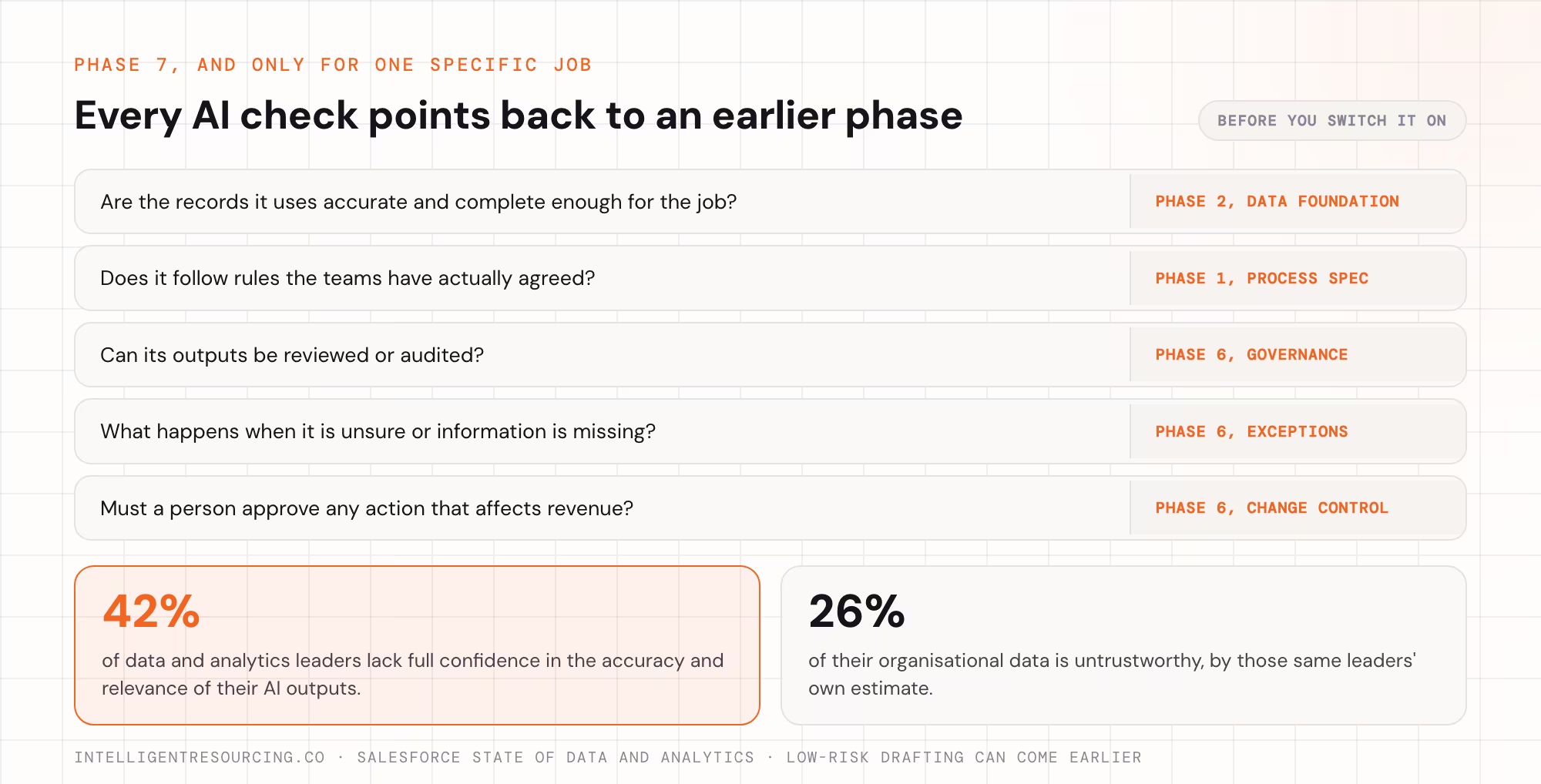
Before you switch on an AI use case, check:
- Whether the records it uses are accurate and complete enough for the job.
- Whether it has the right access.
- Whether its outputs can be reviewed or audited.
- What happens when it is unsure or information is missing.
- Whether a person must approve any action that affects revenue.
Skipping those checks has a known cost. In Salesforce's State of Data and Analytics research, 42% of data and analytics leaders lacked full confidence in the accuracy and relevance of their AI outputs. The same leaders estimated 26% of their organisational data was untrustworthy.
Each of those checks points back to an earlier phase. Accurate records come from Phase 2, agreed rules from Phase 1, and reviewable outputs from Phase 6. That is why AI comes last for any job that acts on revenue.
Ready to move on: the AI produces outputs the team can check. It handles missing or clashing data sensibly, and it does not skip the owner and exception rules already in place.
Where Do RevOps Stack Builds Get Stuck?
Two areas cause the most trouble: the data foundation and ongoing ownership.
Data work can feel slow because its results are less visible than a new dashboard or automation demo. Yet every duplicate, missing field and owner clash is carried into each workflow built on top. In Integrate and Demand Metric's State of Marketing Data benchmark, a survey of more than 200 senior marketing operations and demand generation professionals, 67% reported that poor data quality disrupts lead handoffs between marketing and sales. Set a finish line for the records the next phase needs, instead of trying to make the whole database clean forever.
Ownership causes a different problem. A workflow can pass testing at launch and break later when territories, products, access or tool links change. Build upkeep into the project from the start, including who gets alerts and who is allowed to change the rules.
Teams deciding whether to do the work in-house can see how we approach revenue operations. Scope it to the phases, links and upkeep your team actually needs. A clearly defined gap is easier to judge than a vague request for a whole new stack.
What Changes Once the Stack Is Working?
You should see the result in the customer journey. A qualified enquiry reaches a named rep with its account details attached. A closed deal reaches customer success with its promises and setup details intact. An important renewal or usage signal reaches someone who can act on it.
Those results do not need the most expensive product in every category. They need connected workflows, sound records and people who own the upkeep.
They also change how the revenue team spends its time. Reps can follow up with qualified leads instead of hunting for missing details. Customer success can prepare for onboarding instead of chasing deal notes, and RevOps can fix exceptions instead of exporting and repairing records.
Salesforce's State of Sales research, published in December 2022, found reps spend just 28% of their week actually selling, so time saved on admin goes straight back to customers.
The real test is whether your systems cut manual work and make key revenue actions more reliable.
Not sure whether the problem sits in your process rules, CRM data or a current handoff? A session with us starts by finding that weak layer, before any talk of new tools. Book a strategy session.
RevOps Tools
A session starts by finding whether the problem sits in your process rules, your CRM data or a current handoff, before any talk of new tools.
FAQs
What is the first step in building a RevOps tech stack?
Start by writing the revenue process down as a one-page spec. Set what makes a lead qualified, who owns each stage, what data must be present, and what triggers the next step. Those rules give later automation something clear to run.
What order should a RevOps tech stack be built in?
A practical order is process rules, then the data foundation, then marketing-to-sales automation and sales-to-customer-success handoffs. After that come extra signals, formal governance and AI for jobs whose inputs are ready. Ownership and monitoring should start in the first phase and continue throughout.
Do you need to replace your existing CRM or buy an orchestration platform?
Not always. Check what your current tools can already do and where the links between them fail. A simple, separate workflow may run on the CRM's built-in automation. More complex routing across several tools may justify a dedicated platform.
Why do RevOps tech stacks fail even when the tools are good?
A good tool can still fall short when it gets incomplete records, follows disputed lead rules, or sends work to nobody in particular. Broken links between tools and workflows nobody maintains cause more problems after launch. The build has to cover process, data and ownership as well as software setup.
How long does it take to build a RevOps tech stack?
It depends on your CRM, how many tools are connected, how clean the data is, how complex the workflows are, and the people you have available. A single workflow can be delivered sooner than a full rebuild across teams. Use each phase's check to track progress, rather than a fixed calendar.
Should AI always be the final phase?
No. Add AI when that specific job has sound inputs and suitable controls. Low-risk help, such as drafting, can be useful early. AI that assigns leads, changes CRM records or contacts customers needs cleaner data, the right access, rules for exceptions and human review.