

What Does an AI-Driven Prospecting Stack Actually Consist Of?
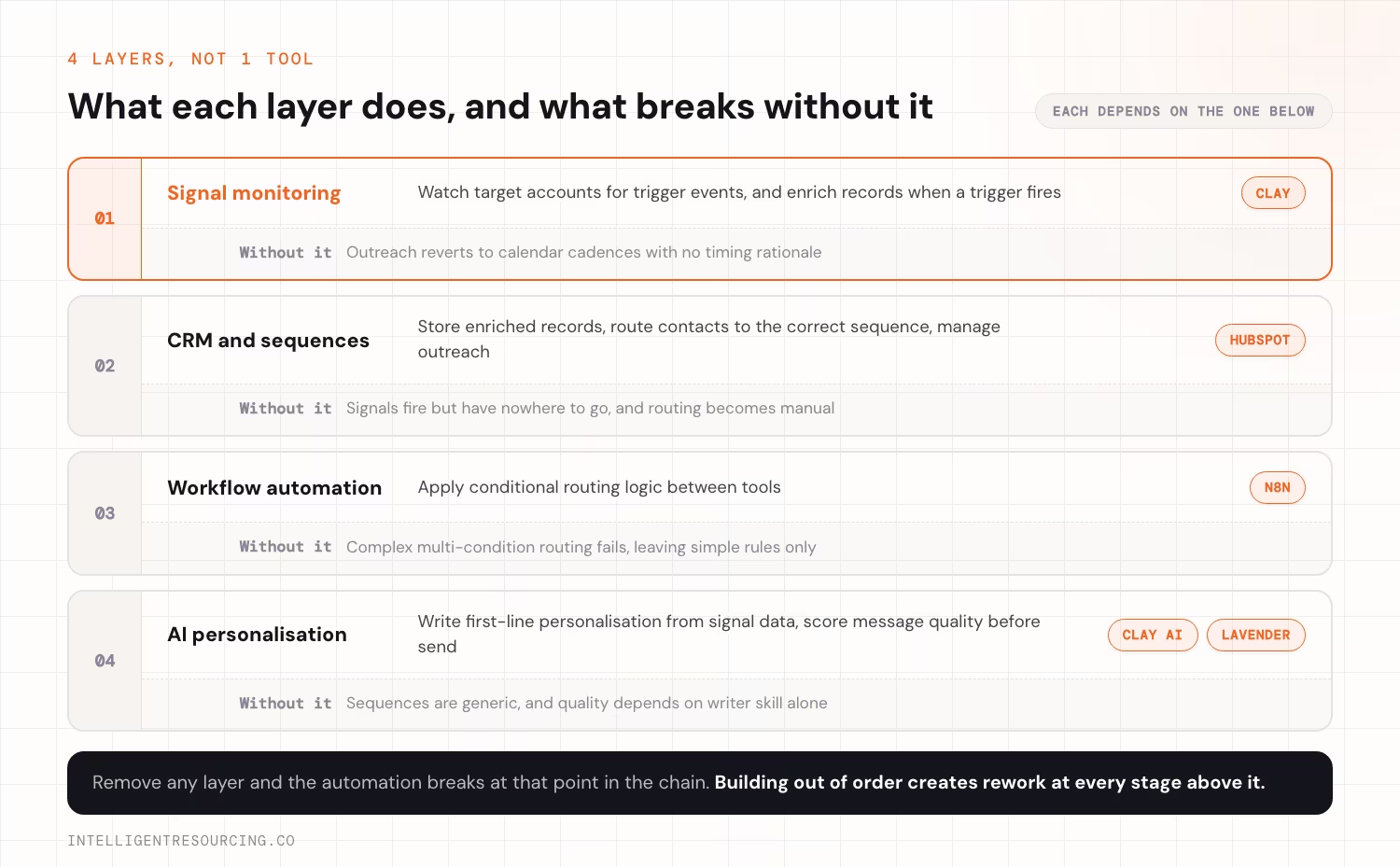
An AI-driven prospecting stack has 4 layers: signal monitoring using Clay, CRM and sequence management using HubSpot, workflow automation using n8n, and AI-assisted personalisation. Each layer depends on the one below it. The tools only work when they sit inside a defined intelligent prospecting framework that connects ideal customer profile (ICP) definition, buying signals, outreach timing, and measurement. Remove any layer and the automation breaks at that point in the chain.
Salesforce's State of Sales 2026 found that 9 in 10 sales teams use AI agents or expect to within 2 years, which makes tool selection the practical blocker, not adoption intent.
The 4 Layers of the Stack
| Layer | Function | Primary tool | What breaks without it |
|---|---|---|---|
| Signal monitoring | Watch target accounts for trigger events, and enrich records when a trigger fires | Clay | Outreach reverts to calendar cadences with no timing rationale |
| CRM and sequences | Store enriched records, route contacts to the correct sequence, manage outreach | HubSpot | Signals fire but have nowhere to go, and routing becomes manual |
| Workflow automation | Apply conditional routing logic between tools | n8n | Complex multi-condition routing fails, leaving simple rules only |
| AI personalisation | Generate first-line personalisation from signal data, score message quality before send | Clay AI columns and Lavender | Sequences are generic, and quality depends on writer skill alone |
The Build Order
- Signal monitoring (Clay) must exist before the CRM has anything to receive
- CRM and sequences (HubSpot) must be configured before n8n has anything to route to
- Workflow automation (n8n) must run before the personalisation layer adds meaningful value
- AI personalisation is worth adding only once the core system is generating pipeline
Building out of this order creates rework at each subsequent stage. This article covers which tool fills each layer. For the stage-by-stage configuration work itself, see building the system from scratch.
Once the four layers run, the autonomous work they support is covered in AI sales agents for prospecting, including the compliance checks an agent needs in Australia.
Which Tools Handle Signal Monitoring and Data Aggregation?
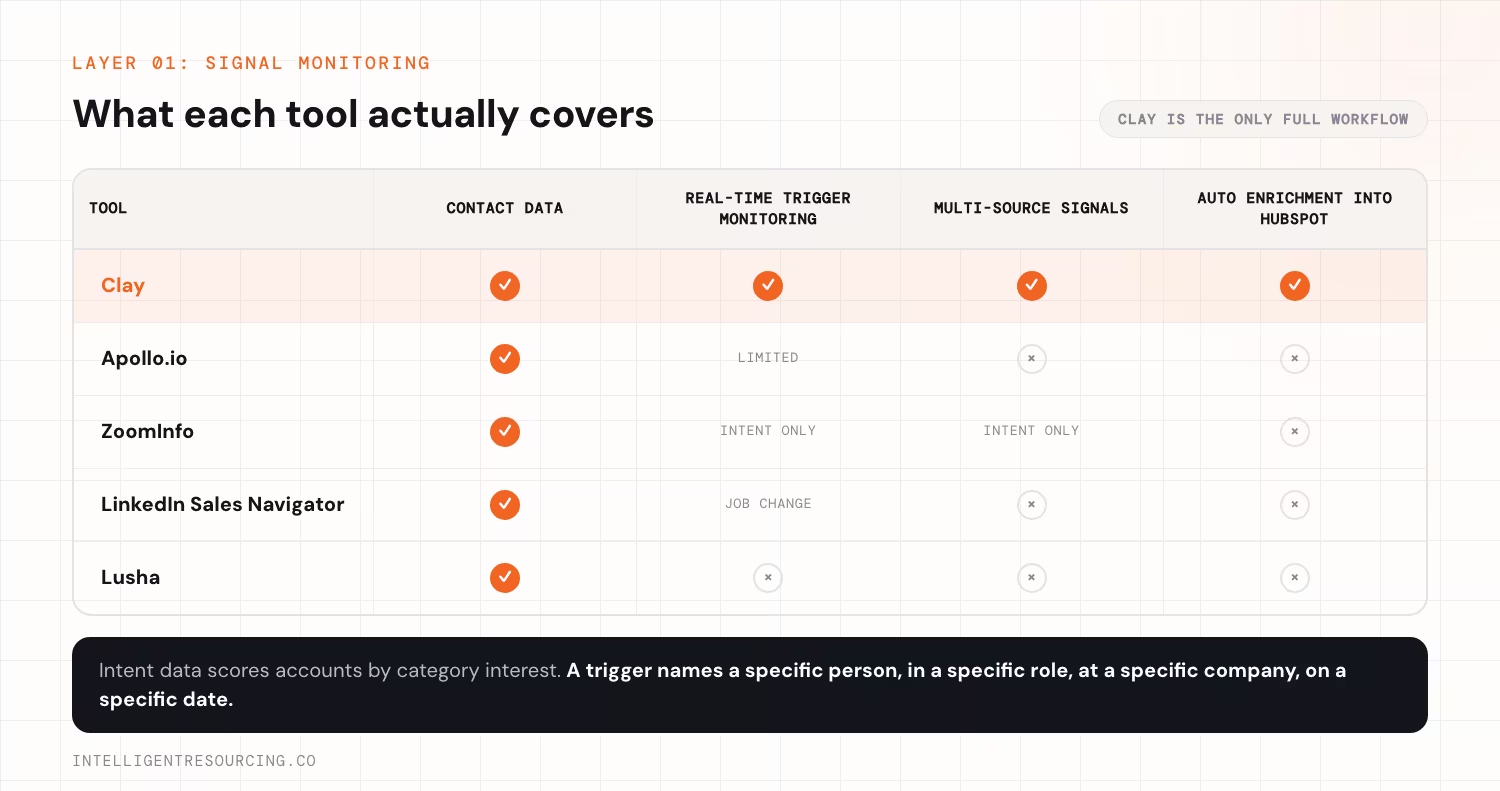
Clay is the signal monitoring and enrichment layer in a signal-led prospecting stack. It connects to LinkedIn, Crunchbase, job board APIs, and tech stack databases. It watches the monitored account list for defined trigger conditions, enriches records when a trigger fires, and pushes the enriched contact into HubSpot. No other single tool covers this complete workflow natively without custom integration.
The Starr Conspiracy's ABM Operations Audit of 47 intent platform deployments found the median time from deploying a signal monitoring platform to first qualified pipeline is 94 days. Getting the monitoring layer running and validated is the first priority, not an add-on after the rest of the stack is built.
What Clay Does at Each Stage
| Stage | What Clay does |
|---|---|
| Account monitoring | Watches a defined list of ICP-fit companies continuously across connected data sources |
| Signal detection | Fires when a trigger condition is met: new hire in a specific role, funding announcement, tech stack change |
| Record enrichment | Populates contact name, email, role, LinkedIn URL, company data, and signal detail automatically |
| CRM push | Sends the enriched record to HubSpot via native integration or webhook, with signal fields mapped |
Intelligent Resourcing's Clay workflow automation service builds and installs this exact monitoring layer for B2B teams.
Alternatives to Clay and Where They Fall Short
| Tool | What it does well | Limitation versus Clay |
|---|---|---|
| Apollo.io | Strong contact database, built-in sequences | Limited real-time signal monitoring, and no native enrichment workflow into HubSpot |
| ZoomInfo | Extensive contact data, intent scoring | High cost, and intent data is not a trigger-based buying signal |
| LinkedIn Sales Navigator | Strong job change signal detection via LinkedIn data | Single source only, with no multi-signal monitoring or automatic CRM push |
| Lusha | Fast contact data lookup | No monitoring layer, so manual record pulls only |
When LinkedIn Sales Navigator Works as a Starting Point
For teams with a tight budget and an ICP where job changes are the only reliable signal, LinkedIn Sales Navigator used manually is a viable first step. A daily search for new hires at target accounts, logged directly into the CRM, works at low volume. The approach does not scale past 20 to 30 monitored accounts without Clay.
Which Tools Manage CRM and Sequence Automation?
HubSpot Sales Hub is the CRM and sequence layer in a signal-led stack. It receives enriched records from Clay. It routes contacts to the correct sequence based on the incoming signal field, and tracks sequence performance per signal type. The CRM must integrate natively with Clay without a manual import step. Manual steps between signal detection and sequence enrolment remove the timing advantage the system depends on.
Belkins' 2025 managed outreach data across 7.5 million emails found that follow-up steps 2 through 6 together account for 58.6% of all replies, while the initial email captures only 41.4%. The sequence architecture inside HubSpot is where most reply volume comes from, not the first touch.
What HubSpot Handles in the Stack
- Receives enriched records from Clay via native integration or webhook
- Stores signal type, signal date, and buying window status on each contact record
- Enrols contacts into the correct signal-specific sequence automatically based on the incoming signal field
- Tracks sequence performance per signal type: reply rate, meeting conversion, sequence completion
- Manages deal creation and pipeline stage updates when a contact converts
HubSpot Versus the Main Alternatives
| CRM or sequence tool | Strength | Limitation in a signal-led stack |
|---|---|---|
| HubSpot Sales Hub | Native Clay integration, strong sequence and workflow tooling | Cost increases at higher contact volumes and seat counts |
| Salesforce | Enterprise-grade CRM, strong reporting and customisation | Requires more configuration for signal workflows, and no native Clay integration at standard tiers |
| Outreach | Strong sequence management and performance analytics | CRM layer is limited, and it is designed to sit alongside Salesforce |
| Salesloft | Strong cadence management | Built for volume cadences, not trigger-based routing |
| Pipedrive | Low cost, fast to set up | Insufficient workflow automation for complex signal routing rules |
The Non-Negotiable Requirement
The CRM must accept automated record creation from Clay without a manual step. Buying windows run 30 to 90 days, and manual steps add days that matter.
What Role Does AI Play in Message Personalisation at Scale?
AI assists with 2 specific tasks here: writing first-line personalisation from enriched signal data, and scoring message quality before sending. It does not replace the signal-specific sequence. It adds a personalisation layer inside the structure the sequence provides, so each message names the trigger event for that recipient.
Lavender's Cold Email Benchmark Report scores emails A to C on quality, relevance and personalisation. A-grade emails achieve a 79% higher reply rate for finance recipients and 58% higher for operations, compared to lower-quality emails sent to the same roles.
Task 1: First-Line Personalisation From Signal Data
Clay includes native AI enrichment columns that write an opening line for each contact from the signal data already in the record. The column takes the signal detail and produces a context-specific first line in a tone defined by the column prompt.
Example outputs by signal type:
| Signal data | AI-generated first line |
|---|---|
| New VP of Sales, 3 weeks in role, company uses Salesforce, 80 employees | "Saw you joined [Company] last month as VP of Sales. Most new sales leaders at this stage are mid-way through their first stack review." |
| New Head of Marketing, no automation stack in current tech profile | "Noticed you stepped into the Head of Marketing role at [Company]. From the job posting, it looks like you're building the function from scratch." |
| Series B announced, 120 employees, Australian SaaS | "Congratulations on the Series B. The first 3 months post-raise are usually when the GTM infrastructure decisions get made." |
This is not AI writing the email. It is AI generating the 1 line that makes the email feel signal-led, using data that already exists in the enriched record.
Task 2: Message Quality Scoring
Lavender analyses outgoing emails against engagement benchmarks and flags issues before the message is sent. It scores subject line length, word count, question count, personalisation level, and reading grade. It does not rewrite messages. It gives the rep a score and specific items to fix before hitting send.
What AI Does Not Do in This Stack
- Write signal-specific sequences from scratch: those are written by humans against the signal context
- Replace judgement on which signals are worth acting on
- Compensate for a weak trigger definition or a misconfigured monitoring layer
How Do You Automate the Connections Between Tools Without an Engineering Team?
n8n handles conditional routing logic between Clay and HubSpot via webhook-triggered workflows. When Clay pushes an enriched record into HubSpot, n8n checks whether the account meets enrolment criteria. It then routes the record to the correct sequence with no manual decision step. A technical operations person, not a software engineer, builds and maintains the workflows.
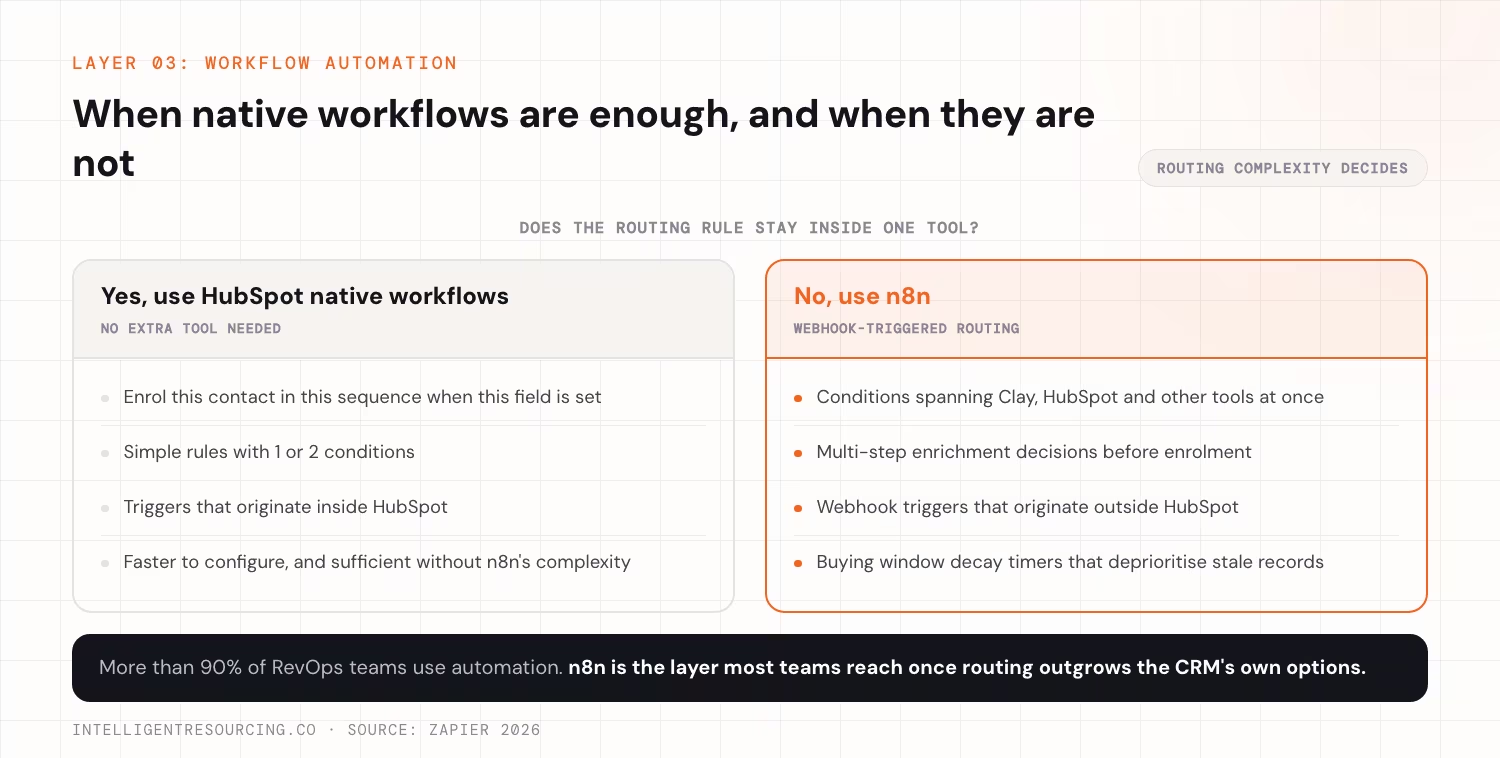
Zapier's 2026 State of Business Automation found that more than 90% of RevOps teams use automation, which makes n8n far from an edge choice. It is the layer most B2B ops teams eventually implement as routing logic grows beyond what native CRM workflows can handle. Intelligent Resourcing's guide to Clay and n8n workflows covers the specific webhook architecture and conditional logic patterns in detail.
What n8n Handles in the Stack
| Workflow trigger | n8n conditional logic | Output |
|---|---|---|
| Clay pushes new record to HubSpot | Signal type is job change and ICP score is above threshold, so enrol in Job Change sequence | Contact enrolled in correct sequence automatically |
| Funding event record arrives | Headcount between 50 and 500 and an Australian company, so enrol in Funding Event sequence | ICP-filtered routing without manual review |
| Buying window decay timer fires | Signal date is more than 90 days old and status is open, so update to deprioritised | Stale window contacts removed from active outreach automatically |
| Contact replies to sequence | Log reply date, update buying window status, notify owner | CRM stays current without manual updates by the rep |
n8n Versus the Main Automation Alternatives
| Tool | Strength | Limitation |
|---|---|---|
| n8n (self-hosted or cloud) | Flexible conditional logic, no per-task pricing, strong webhook support | Steeper learning curve than Zapier, and requires technical ops to configure |
| Zapier | Fast to set up, large integration library | Per-task pricing scales up at volume, with limited conditional logic for complex routing |
| Make (formerly Integromat) | More capable than Zapier, visual workflow builder | Pricing can escalate, and it is less flexible than n8n for complex webhook workflows |
| HubSpot Workflows (native) | No additional tool, stays within HubSpot | Limited to HubSpot's own trigger and condition options, and cannot handle multi-tool logic |
When to Use n8n Versus HubSpot Native Workflows
Use HubSpot's native automation for simple routing: enrol this contact in this sequence when this field is set. Use n8n when routing logic involves conditions across multiple tools, multi-step enrichment decisions, or webhook triggers that originate outside HubSpot.
Which Tools Should You Start With and Which Can Wait?
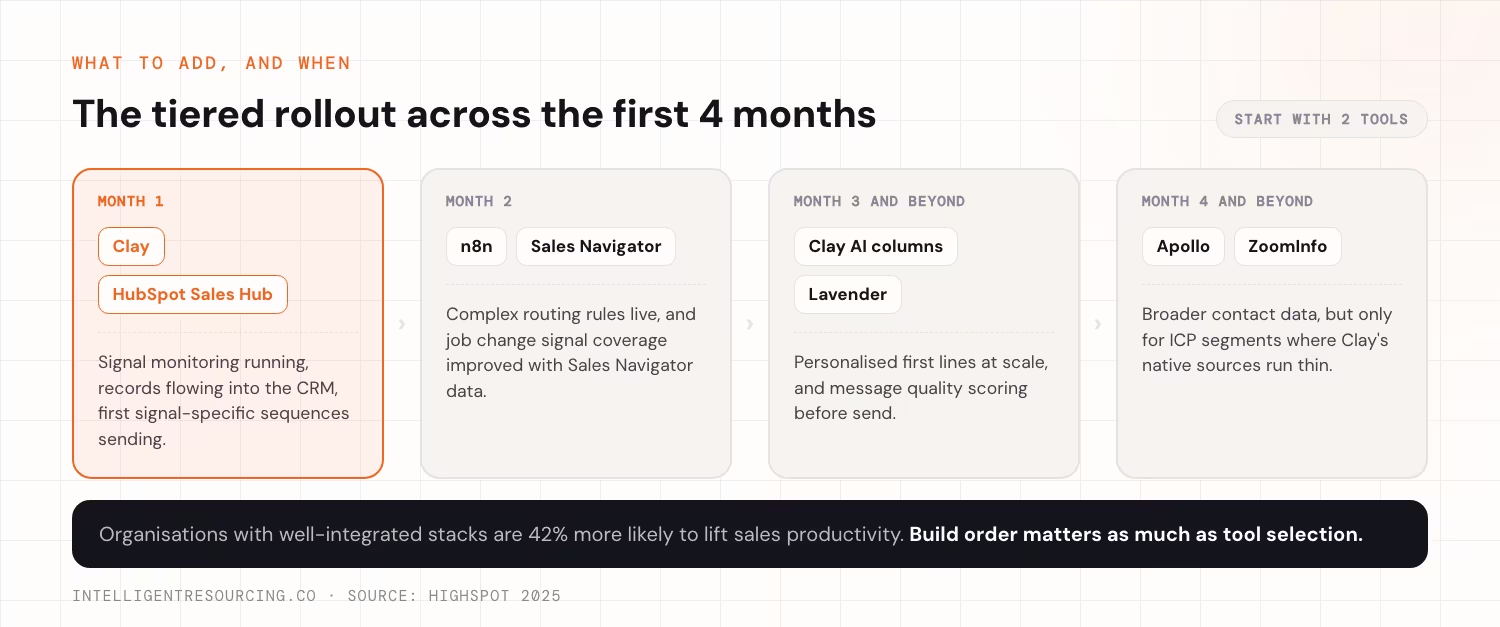
Start with Clay and HubSpot. These 2 tools cover signal monitoring, enrichment, CRM, and basic sequence management. Add n8n when routing logic becomes too complex for HubSpot's native workflows. Add AI personalisation tools in month 3 or later, once the core system is generating pipeline that earns back the extra setup time and cost.
Highspot's 2025 enablement report found that organisations with well-integrated enablement tech stacks are 42% more likely to boost sales productivity. Build order matters as much as tool selection. A stack built in the wrong sequence, where tools are not yet integrated with the layer below them, produces the same overhead as having no stack at all.
Tiered Implementation Roadmap
| Phase | Tools to add | What this phase delivers |
|---|---|---|
| Month 1 | Clay, HubSpot Sales Hub | Signal monitoring running, records flowing into CRM, first signal-specific sequences sending |
| Month 2 | n8n (when routing complexity requires it), LinkedIn Sales Navigator | Complex routing rules live, and job change signal coverage improved with Sales Navigator data |
| Month 3 and beyond | Clay AI columns for first-line personalisation, Lavender | Personalised first lines at scale, and message quality scoring before send |
| Month 4 and beyond | Apollo or ZoomInfo (if Clay coverage is thin for the ICP) | Broader contact data for ICP segments where Clay's native sources produce limited coverage |
Full Stack Reference: Intelligent Resourcing Implementation Versus Common Alternatives
| Layer | Intelligent Resourcing stack | Common alternative | When the alternative wins |
|---|---|---|---|
| Signal monitoring | Clay | LinkedIn Sales Navigator used manually | Teams monitoring a single signal type at fewer than 50 accounts, at lower cost before committing to Clay |
| CRM and sequences | HubSpot Sales Hub | Salesforce and Outreach | Enterprise teams already invested in Salesforce with a dedicated RevOps resource |
| Workflow automation | n8n | Zapier or Make | Simple routing rules with 1 or 2 conditions, faster to configure and sufficient without n8n's complexity |
| AI personalisation | Clay AI columns and Lavender | Manual personalisation by the rep | Small teams with high deal values and time to personalise every message manually |
RevOps Tools
Intelligent Resourcing's GTM Engineering service selects, configures, and installs the full AI-driven prospecting stack for B2B teams. That covers tool selection, Clay and n8n configuration, HubSpot field mapping, workflow logic, and sequence architecture, then hands the system over with full ownership.
FAQs
How long does it take to configure a full AI-driven prospecting stack from scratch?
For a team starting with no existing CRM field mapping, Clay configuration, or signal taxonomy, the full build takes 6 to 8 weeks. Clay enrichment columns and n8n workflow logic are the longest phases, at 2 to 3 weeks each. Teams that already have HubSpot set up with mapped fields and a defined ICP complete the build faster.
Do you need a technical operations resource to set up n8n and Clay?
Yes, but not a software engineer. A RevOps contractor or technical operations hire with prior experience on these specific tools is sufficient. If that resource is not available in-house, the tool configuration phase is where the timeline extends, typically by 4 to 8 weeks.
Can you use Apollo or ZoomInfo instead of Clay as the signal monitoring layer?
Apollo and ZoomInfo provide contact data and, in some cases, intent signals, but neither replaces Clay as the monitoring and enrichment layer. Apollo's intent data is not trigger-based. It scores accounts by category interest, not by a specific event at a specific company on a specific date. ZoomInfo offers similar intent data with the same limitation. Clay monitors for real trigger events, a specific person starting a specific role at a specific company on a specific date, and enriches that record automatically. The distinction is between intent category scoring and event-based trigger monitoring.
What does a full AI-driven prospecting stack cost to run per month in AUD?
Clay starts at approximately $149 a month on the Starter tier. HubSpot Sales Hub starts at $90 a month per seat on Starter, or $500 and above a month on Professional. n8n is near zero if self-hosted, or from approximately $20 a month on cloud. Lavender for message quality scoring runs approximately $29 to $49 per seat per month. For a team of 2 to 3 SDRs, the total tool cost typically runs $600 to $1,200 a month in AUD at month 3, depending on Clay credit usage and HubSpot tier.