

What Should You Check Before Starting B2B Data Enrichment?
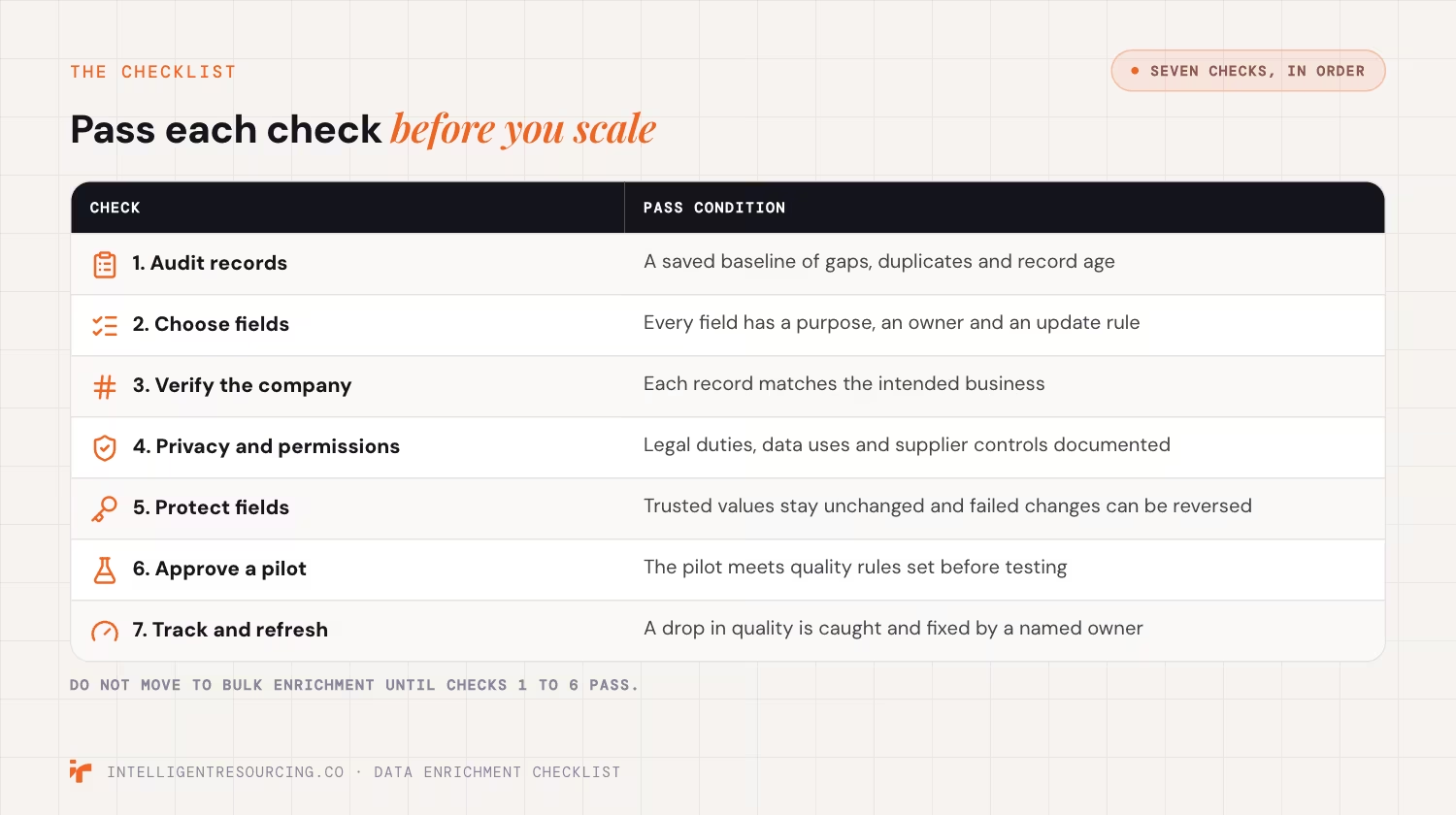
Start by checking record quality and deciding which fields your team needs. These are the first two checks. They show where the gaps sit and whether new data will help sales. Without a baseline, teams cannot tell if enrichment improved records or introduced new errors.
Check 1: Audit Existing CRM Records
Review the accounts and contacts your sales team uses. Count missing fields, possible duplicates and records with old details.
Salesforce's matching rules documentation explains how teams can compare fields to spot duplicate records.
| Audit measure | What to record |
|---|---|
| Field completeness | Share of required fields filled |
| Duplicate records | Possible duplicate accounts and contacts |
| Contact accuracy | Contacts that pass your verification checks |
| Record age | Date each key field was last checked |
| Account coverage | Target accounts with enough usable data |
CRM audit checklist
- Choose the records in scope. Separate active accounts from old or unused records.
- Find possible duplicates. Review matches before merging records.
- Count missing values. Set a baseline for each required field.
- Check existing sources. Find out where current information came from.
- Save a backup. Keep original values and record IDs before making changes.
This audit checks the data before a new update. A separate Revenue Operations (RevOps) automation checklist can then test whether live workflows keep writing the right values.
Check 2: Decide Which Fields Need Enrichment
Only enrich fields that support a clear sales or reporting task. More fields do not always mean better data.
| Field type | Example | Why it matters |
|---|---|---|
| Company identity | Name, ABN, domain | Matches the correct account |
| Firmographic | Industry, size, location | Helps qualify account fit |
| Contact | Name, role, work email | Supports contact research |
| Data quality | Source, check date | Shows when to review information |
Field selection checklist
- List required fields. Include only data needed for a defined task.
- Assign field owners. Decide who can approve changes.
- Mark protected values. Identify fields that tools must not overwrite.
- Set source rules. Define which source can update each field.
Pass condition: The team has a saved baseline and an approved field list. Each field has a purpose, an owner and an update rule.
How Can Australian B2B Teams Verify Company Records?
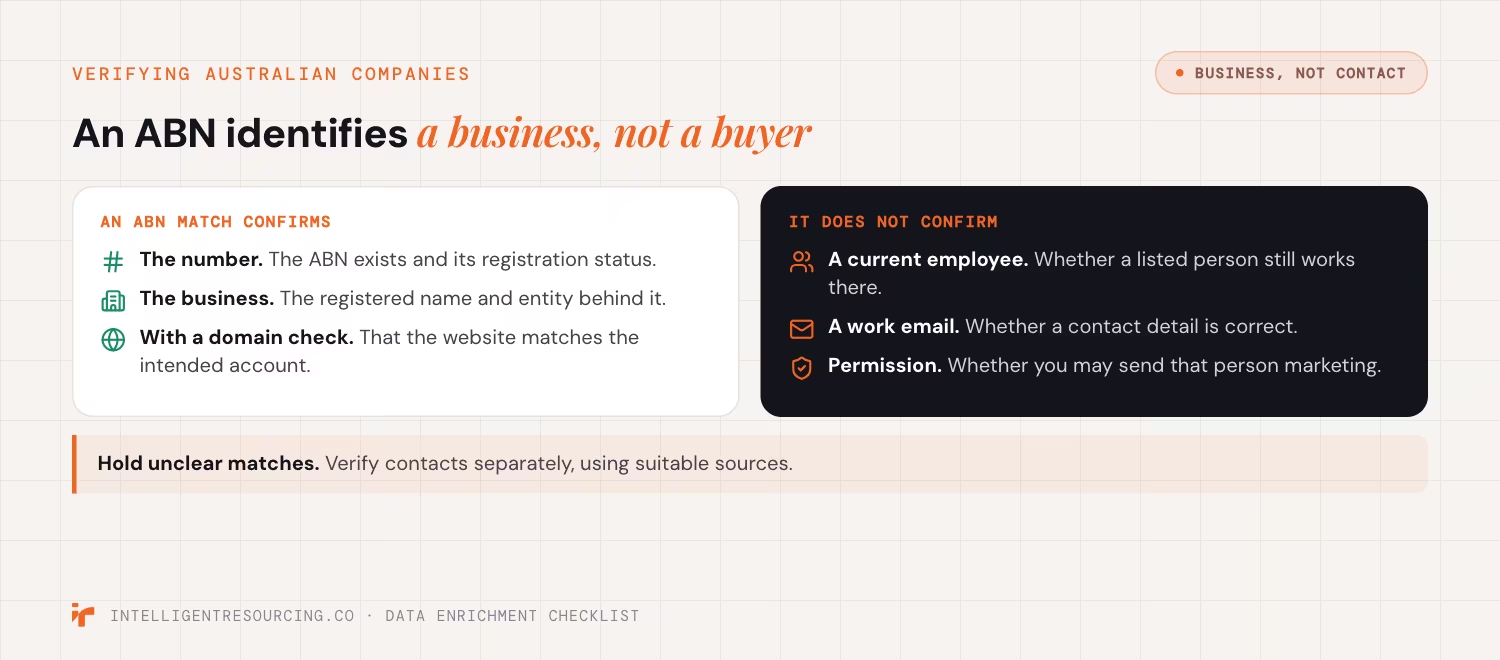
Australian teams can use ABN Lookup to help verify business names, registration status and identity. However, an ABN identifies a business, not a sales contact. Teams must check website domains, company relationships and individual details separately before treating a record as ready for use.
Check 3: Verify the Company Match
The Australian Business Register provides free ABN Lookup web services for checking business data in other applications. Access to those services requires registration and an authentication identifier.
An ABN match helps confirm a business record. It does not prove that a listed person still works there or wants to buy.
Australian company verification checklist
- Check the ABN. Confirm the number and registration status.
- Match the business name. Check for name changes or similar entities.
- Review the company domain. Confirm that the website matches the intended account.
- Flag unclear matches. Hold records with conflicting company details.
- Verify contacts separately. Check roles and work contact details using suitable sources.
Pass condition: Each accepted record matches the intended business. Records with unclear identities stay on hold until reviewed.
Which Australian Privacy Checks Must Teams Complete?
Check privacy duties before adding personal information to CRM records. Australian businesses must consider how they collect, use and share contact data. A public work email does not always permit marketing. Teams also need clear rules for handling third-party data, keeping records secure and honouring contact preferences.
Check 4: Review Personal Data and Marketing Permissions
The Office of the Australian Information Commissioner (OAIC) Australian Privacy Principle (APP) 3 guidance explains when covered organisations may collect personal information. Its May 2026 update stresses collecting only what is reasonably necessary.
The Privacy Act does not apply to every small business in the same way. Teams should confirm which duties apply to their operations.
Electronic marketing has separate rules. The Australian Communications and Media Authority explains the need for consent, sender details and an unsubscribe option.
Data quality controls should also cover supplier terms and data sharing. A previous enrichment governance review shows why teams need to understand how platforms use CRM information.
Privacy and compliance checklist
- Check legal coverage. Confirm which privacy duties apply.
- Document the data purpose. Record why each personal field is needed.
- Review supplier terms. Check how providers collect, use and share data.
- Check marketing permissions. Record consent and suppression status where required.
- Set access rules. Limit who can view and change personal information.
Pass condition: The team has documented its legal assessment, approved data uses and supplier controls. Unresolved issues remain outside the enrichment run.
How Do You Prevent Enrichment From Overwriting Good CRM Data?
Set field rules before you connect an enrichment source. These rules decide which values can change and when a record needs review. A good process protects sales-owned data, blocks blank updates and logs each change. Test the rules because some platform actions can bypass standard settings.
Check 5: Test Field Protection and Conflict Rules
HubSpot's data enrichment settings allow teams to fill empty fields, replace existing values or block enrichment for selected properties.
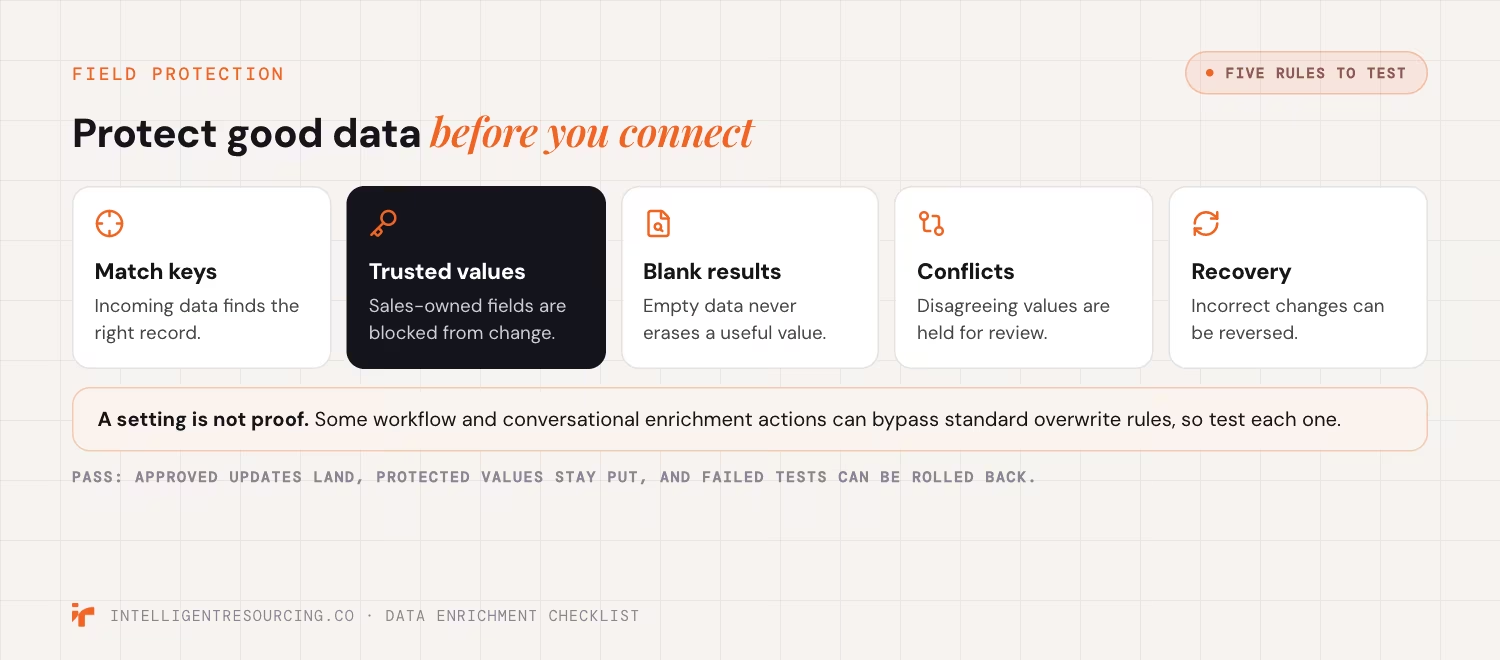
However, HubSpot warns that some enrichment methods can bypass standard overwrite rules. This includes certain workflow and conversational enrichment actions.
That means a setting alone is not proof that a value is safe.
CRM field protection checklist
- Set match keys. Define how incoming data finds the right record.
- Protect trusted values. Block unwanted changes to sales-owned fields.
- Test blank results. Confirm that empty data does not erase useful values.
- Review conflicts. Hold values that disagree with trusted records.
- Test recovery. Confirm that incorrect changes can be reversed.
Teams using Clay with HubSpot or Salesforce can apply these checks alongside their existing CRM field-mapping rules.
Pass condition: Approved updates reach the correct records. Protected values remain unchanged, and staff can restore data after a failed test.
How Should B2B Teams Test Enrichment Before Full Rollout?
Run a pilot using records that reflect your actual database. Include clean accounts, missing fields and hard-to-match companies. Then compare new values with reliable evidence. A pilot should prove that the process adds useful data without creating duplicates, false matches or unexpected changes.
Check 6: Approve the Enrichment Pilot
A pilot does not need a fixed number of records. Its size should match the database, the risks and the range of record types.
HubSpot's workflow testing guide explains how users can test records and preview their path through a workflow. This is useful for checking process logic, but teams should also inspect actual output records.
Post-Pilot Quality Control Matrix
| Test | Pass condition | If it fails |
|---|---|---|
| Company match | Correct business identified | Hold the record |
| Field accuracy | New data matches trusted evidence | Reject the value |
| Duplicates | No unwanted duplicate records | Fix matching rules |
| Field protection | Trusted values remain unchanged | Block rollout |
| Error handling | Failed records are logged | Assign an owner |
| Recovery | Original data can be restored | Fix rollback process |
Pilot approval checklist
- Test mixed record types. Include both easy and difficult matches.
- Review actual values. Compare the CRM output with source evidence.
- Count failed records. Record false matches and unresolved conflicts.
- Test safeguards. Confirm duplicate rules and field protection work.
- Record approval. Name the person who can allow the next stage.
Each team should set its own pass thresholds before testing. Do not rely on a vendor's overall match rate.
A verified dataset can also support signal-led lead generation when teams link account fit with relevant buying activity.
Pass condition: The pilot meets agreed quality rules. High-risk errors are fixed before a wider update.
How Do You Measure and Maintain CRM Data Quality?
Measure enrichment by the records your team can use, not the fields a tool fills. Track verified data, wrong matches, duplicate rates and costs. Review important records when key facts change. Give one person responsibility for each quality check so errors do not remain unresolved.

Check 7: Track Usable Records and Refresh Data
Australian Privacy Principle 10 requires covered entities to take reasonable steps to keep relevant personal information accurate, up to date and complete. The OAIC's data quality guidance also explains why accuracy matters when data is used or shared.
For a practical business measure, track the share of records that meet your approved quality rules.
Verified usable record rate = Verified usable records ÷ Records checked × 100
Example: Measuring the Gain
| Metric | Before | After |
|---|---|---|
| Records checked | 1,000 | 1,000 |
| Verified usable records | 400 | 620 |
| Usable record rate | 40% | 62% |
This example produces 220 more usable records. The rate improves by 22 percentage points.
If the project costs A$1,200, each additional usable record costs about A$5.45 (A$1,200 ÷ 220).
This figure measures data improvement, not revenue return. Revenue return also needs evidence of sales gains or savings.
Ongoing Quality Checklist
- Track usable records. Compare the latest result with the original baseline.
- Monitor failed updates. Review errors and duplicate records.
- Store check dates. Record when key details were last verified.
- Set refresh triggers. Review records after relevant changes or failed contact attempts.
- Assign ownership. Name the person who reviews and fixes errors.
This process should also test the live system. The RevOps automation checklist covers checks for records after CRM workflows have run.
Pass condition: The team can identify a drop in quality and has a clear process to correct affected records.
Key Takeaways
- Clean before enrichment. Fix duplicates and identify missing fields before adding data.
- Verify Australian companies. Use ABN checks for business identity, not contact permission.
- Protect CRM records. Apply and test field-level update rules.
- Approve a pilot. Check actual results against clear pass conditions.
- Keep checking quality. Track usable data and assign owners for ongoing reviews.
Approve Data Quality Before Scaling Enrichment
A B2B data enrichment checklist should help your team decide when records are safe to update. Start with clean data, test each source and protect trusted fields. Then measure the records that sales can use.
Quality work does not end after the first rollout. HubSpot's data quality tools show how CRM teams can track duplicates, field gaps and other issues over time.
The bigger goal is to turn accurate data into useful sales action. A record should help your team identify the right account, check fit and respond when the timing makes sense.
Intelligent Resourcing helps B2B teams build systems around accurate records and verified buying signals. Its Evergreen CRM enrichment service supports cleaner account data and ongoing quality control.
Lead Generation
See how CRM enrichment keeps records verified inside your own CRM, with field rules, pilots and quality checks built in.
FAQs
What is the difference between data cleansing and enrichment?
Cleansing fixes errors in existing records. Enrichment adds or updates information from other sources. Teams should check and clean records before enrichment so new values reach the correct accounts.
Can ABN Lookup verify individual contacts?
No. ABN Lookup helps verify Australian business details. It does not confirm an individual's current job, work email or marketing permission.
Should every B2B contact be enriched?
No. Start with contacts and accounts that support a clear business need. Enriching unused records can add cost and create more data to maintain.
How large should an enrichment pilot be?
Choose a sample that reflects the records and risks in your CRM. Include incomplete entries, complex company matches and records with protected fields. A fixed sample size will not suit every database.
How often should CRM data be refreshed?
Review records when key information changes or before an important sales activity. Set regular checks based on data age, business use and the risk of errors.
What if new data conflicts with a trusted CRM value?
Hold the change until it can be verified. Apply your source-priority rules and keep the existing value when the new information is not reliable enough.