

Step 1: Which signals should feed the workflow?
Feed the workflow with signals you can see and trust. Start with your own data: page visits, form fills, email clicks and product use. Then add public signals, such as a new hire, a funding round or a new office. Each signal needs a source, a date and the account it belongs to, or you cannot act on it.
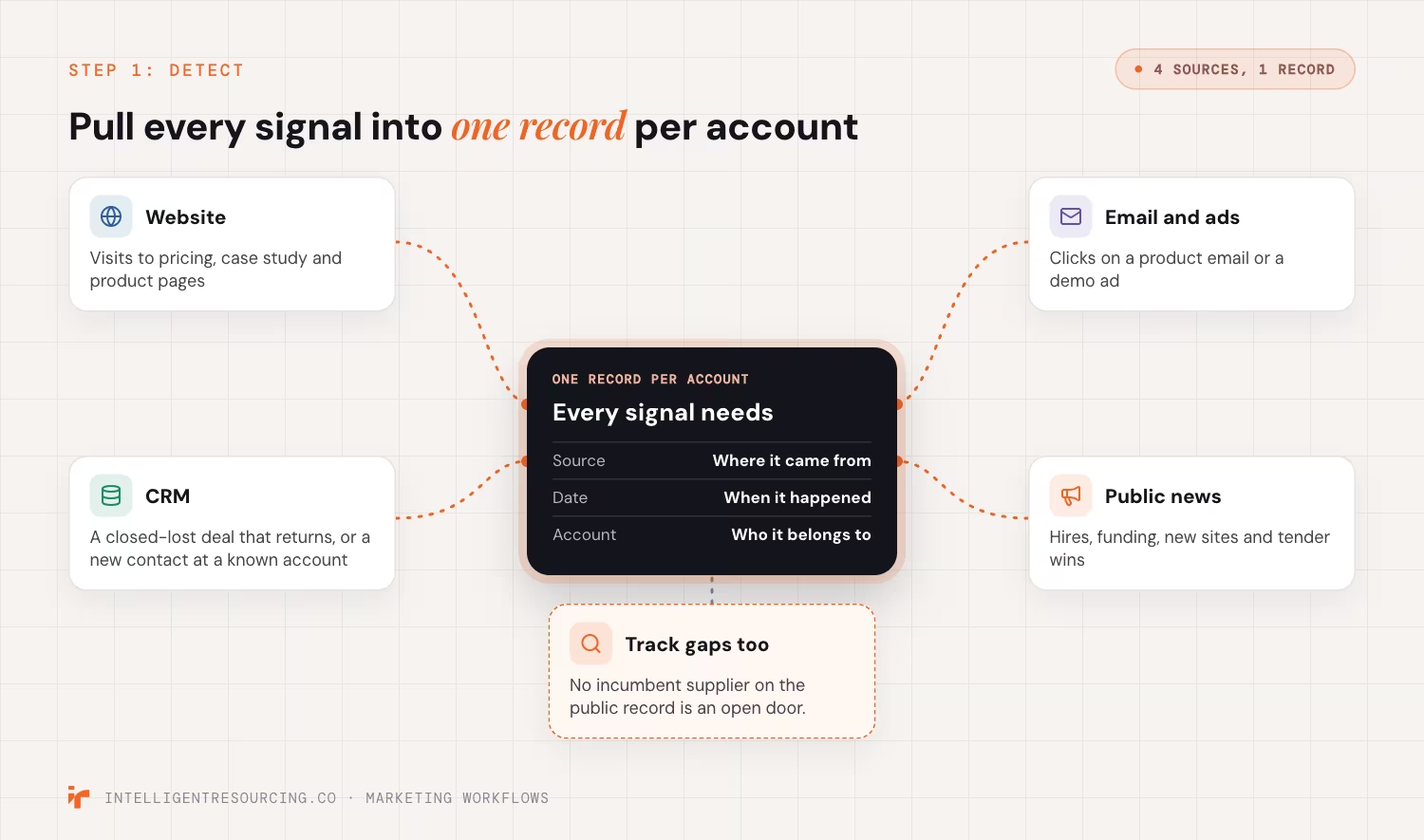
Most teams hold these signals in many places. Your website, your customer relationship management (CRM) system and your ad tools each see a different part of the buyer. So the first job is to pull them into one record per account.
Common signal sources:
- Website: visits to pricing, case study and product pages.
- Email and ads: clicks on a product email or a demo ad.
- CRM: a closed-lost deal that returns, or a new contact at a known account.
- Public news: hires, funding, new sites and tender wins.
For a longer list of business-to-business (B2B) signal types, see our guide to B2B buying signals.
Sometimes the strongest signal is what is missing: no incumbent supplier on the public record is an open door. So track gaps as well as events.
Tracking site visits has rules in Australia. In November 2024, the Office of the Australian Information Commissioner (OAIC) said the business that adds a tracking pixel must make sure it follows the Privacy Act. Its guidance on tracking pixels also warns against a "set and forget" approach. So check your site tracking before you build on it.
Step 2: How do you qualify a signal before acting on it?
Qualify a signal with 3 checks: the account fits your buyer, the signal is recent, and more than one person at the firm shows interest. A signal that passes all 3 moves on to routing. A signal that fails waits or drops out, so one stray click never sets off a sales call.
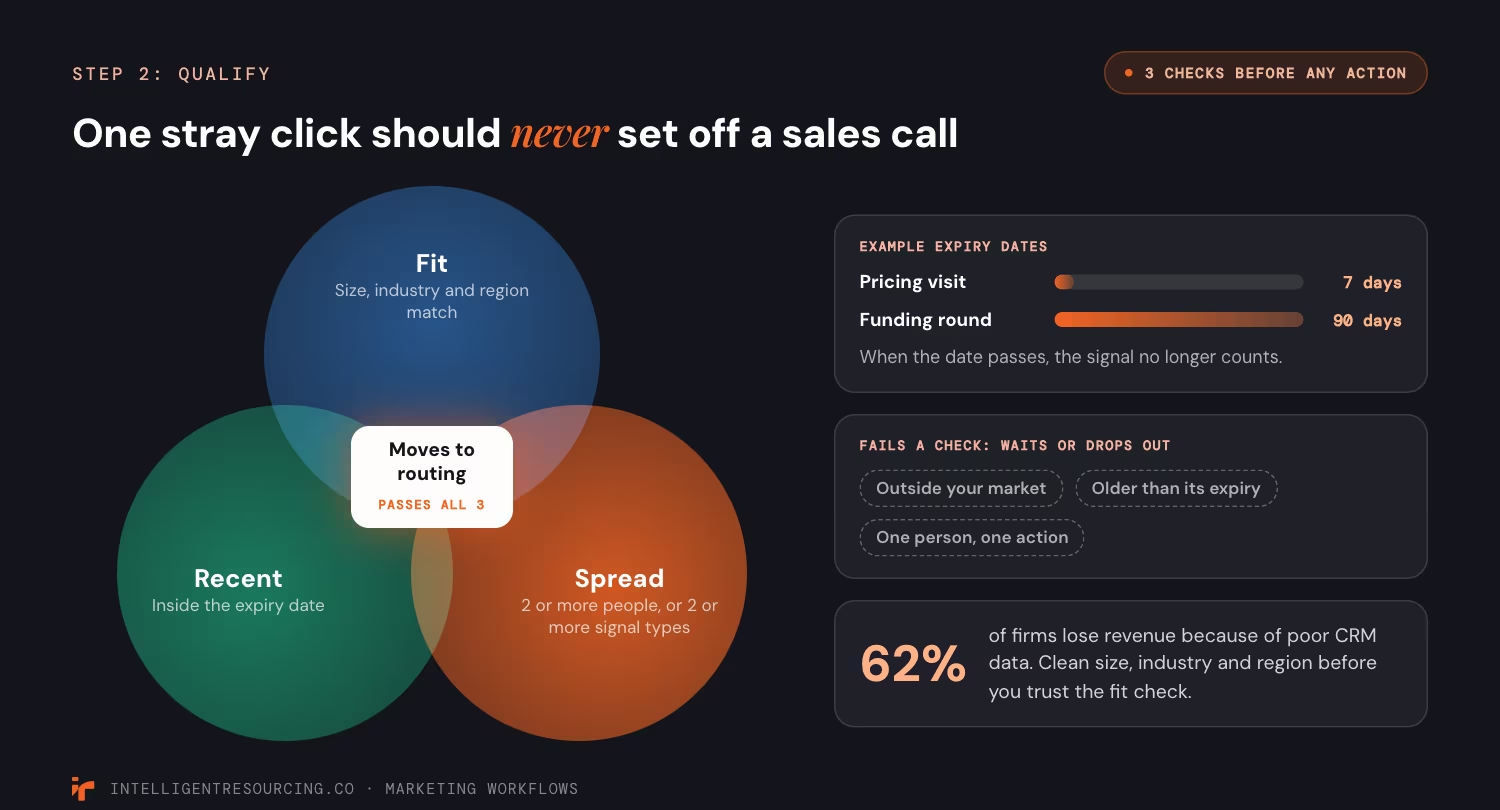
Fit comes first. A pricing page visit from a firm you can't sell to is noise, however strong it looks. So check size, industry and location before you look at intent.
The fit check is only as good as your CRM data. A 2026 Validity survey of 500 marketers, released in August 2026, found 62% of firms lose revenue because of poor CRM data. The survey included Australia. So clean the size, industry and region fields before you trust the check.
Time comes next. A signal loses value each day it sits. Set an expiry date on each signal type, for example 7 days for a pricing visit and 90 days for a funding round. When the date passes, the signal no longer counts.
Then look for more than one person. Groups, not single readers, make buying choices. One person reading a blog post is not a buying group. Three people from one firm on your pricing page in a week is.
| Check | Pass | Fail |
|---|---|---|
| Fit | Firm matches your size, industry and region | Outside your market |
| Time | Inside the expiry date for that signal | Older than the expiry date |
| Spread | 2 or more people, or 2 or more signal types | One person, one action |
To turn these checks into points, see our guide to lead scoring.
Step 3: How do you route a signal to the right owner?
Route each qualified signal to one named owner, with a reply time. Use clear rules: account owner first, then territory, then a fair rotation. Never send a signal to a shared inbox where no one is on the hook. If no owner exists, the workflow should flag it, not drop it in silence.
Write the routing rules down before you build them. A simple order works for most teams:
- Owned account: send it to the person who owns the account in the CRM.
- Open deal: send it to the deal owner, even if a different rep owns the contact.
- No owner: rotate it across a named team, by territory or by turn.
- Still no owner: send an alert to the team lead, so the signal is not lost.
Check what your CRM can do before you plan. As of September 2026, HubSpot's guide to rotating owners says it needs a Sales Hub Professional or Enterprise plan. It also says that if no one is free to rotate to, "no owner will be assigned." That is why rule 4 matters.
Routing is where signal work meets the sales team. Our agentic signal listening service builds this step for teams that want signals sent to the right rep each day.
Step 4: When should a signal trigger a sales alert instead of nurture?
Send a sales alert only when an account fits, the signal is fresh and the buyer is close to a choice. Pricing visits from 3 people, a demo request or a return after a lost deal pass that test. Everything else goes to nurture: useful content, sent when the buyer acts, not on a fixed date.

Most buyers want to research alone first. A 2026 Gartner buyer survey of 645 buyers, released in May 2026, found 67% prefer a rep-free experience. The same survey found 69% want to check what an artificial intelligence (AI) tool told them with a sales rep. So a rep adds value late in the process, when the buyer wants to check facts.
Rep time is also short. Every false alert pulls a rep away from a real buyer. So a few strong alerts beat many weak ones.
| Signal | Route | Why |
|---|---|---|
| One blog visit | Nurture | Early research, one person |
| Product email click, fit account | Nurture, next step in the series | Interest, but no sign of a choice yet |
| Pricing visits from 2 or more people | Sales alert | A group is comparing options |
| Demo or contact request | Sales alert, same day | The buyer asked for a person |
| Lost deal returns to pricing | Sales alert to the old owner | Known account, new timing |
We call the point where these signals line up a Verified Buying Window™. Outside it, nurture does the work.
Step 5: How do you measure whether the workflow works?
Measure the workflow by what it produces, not by how busy it looks. Track how many signals pass qualify, how many alerts turn into meetings and how fast owners reply. Then cut or change any trigger that sends many alerts but books no meetings. Review the numbers each month with sales.

Measuring results is a common problem. HubSpot's 2026 State of Marketing report found the top challenge marketers face in 2026 is measuring marketing return on investment (ROI), cited by 33% of respondents. A signal workflow helps here, because each step leaves a record you can count.
Track these 4 numbers:
- Qualify rate: the share of raw signals that pass Step 2.
- Alert to meeting rate: the share of sales alerts that turn into a booked meeting.
- Reply time: hours from alert to first contact by the owner.
- False alerts: alerts the rep marks as not a real buyer.
Compare the workflow with what you did before. For one B2B client, in one month the engine produced 6 booked appointments against the prior vendor's 4 across every industry. That is the kind of side-by-side test to run before you scale.
When the core workflow works, add more plays. Our list of signal-based automation workflows gives 10 ready recipes to try next.
Who should own a signal-based marketing workflow?
Marketing should own the workflow, and sales should own the reply. Marketing sets the signals, the qualify rules and the nurture steps. Sales sets what counts as a real buyer and agrees a reply time for alerts. One person, often in revenue operations, owns the rules and keeps them up to date.
This split only works if the two teams plan together. A 2024 Gartner survey of 412 marketing and sales leaders found the two teams work together on only 3 of 15 commercial tasks. It also found 90% say their goals conflict. A signal workflow forces the two teams to agree on rules, because each alert crosses from one team to the other.
| Task | Owner |
|---|---|
| Choose signal sources | Marketing |
| Set qualify rules | Marketing, signed off by sales |
| Define a sales-ready account | Sales |
| Reply to alerts on time | Sales |
| Keep rules and data up to date | Revenue operations |
| Monthly review of results | Marketing and sales together |
Hold a short review each month. Look at the false alerts first, since they show which rules need to change. If you want help to set up the workflow and the review, talk to our team.
Buyer Intent
We build the detect, qualify, route and measure steps into your CRM, so every signal reaches one owner. Talk to our go-to-market engineering team.
FAQs
What are intent signals in marketing?
Intent signals are actions that show a buyer is looking into a product like yours. Examples include pricing page visits, demo requests, product email clicks and searches on a topic. Public events such as a new hire or a funding round also count. A signal is strongest when several people from one firm show it at once.
What is a marketing automation workflow?
A marketing automation workflow is a set of steps that run on their own when a rule is met. A form fill, for example, can add a contact to a list, send an email and tell the account owner. A signal-based workflow is one where the rule is a buyer action, not a date.
What does lead routing mean?
Lead routing means sending each new lead or signal to the right person. Rules decide who that is, such as the account owner, the territory or a fair rotation. Good routing gives every lead one owner and a reply time, so none get lost.
How fast should a signal-based workflow act?
Act on a demo or contact request the same working day. Strong signals, such as several people on your pricing page, should reach a rep within a day. Nurture steps can wait for the next send. Set an expiry date on each signal type, so old signals stop counting.
Do you need a full tech stack to start?
No. You need a CRM that can hold signals by account, a way to track your own website and a tool that can run if-then rules. Start with 2 or 3 strong signals and 1 sales alert. Add more sources once those work.
What are examples of automated marketing workflows?
Common examples are a welcome series after a form fill, a nurture series for a content download and a sales alert after a pricing visit. Others include a win-back email after a lost deal and an alert when a known account hires a new leader. Each one needs an owner and a clear stop rule.